9. CONTROL PANEL
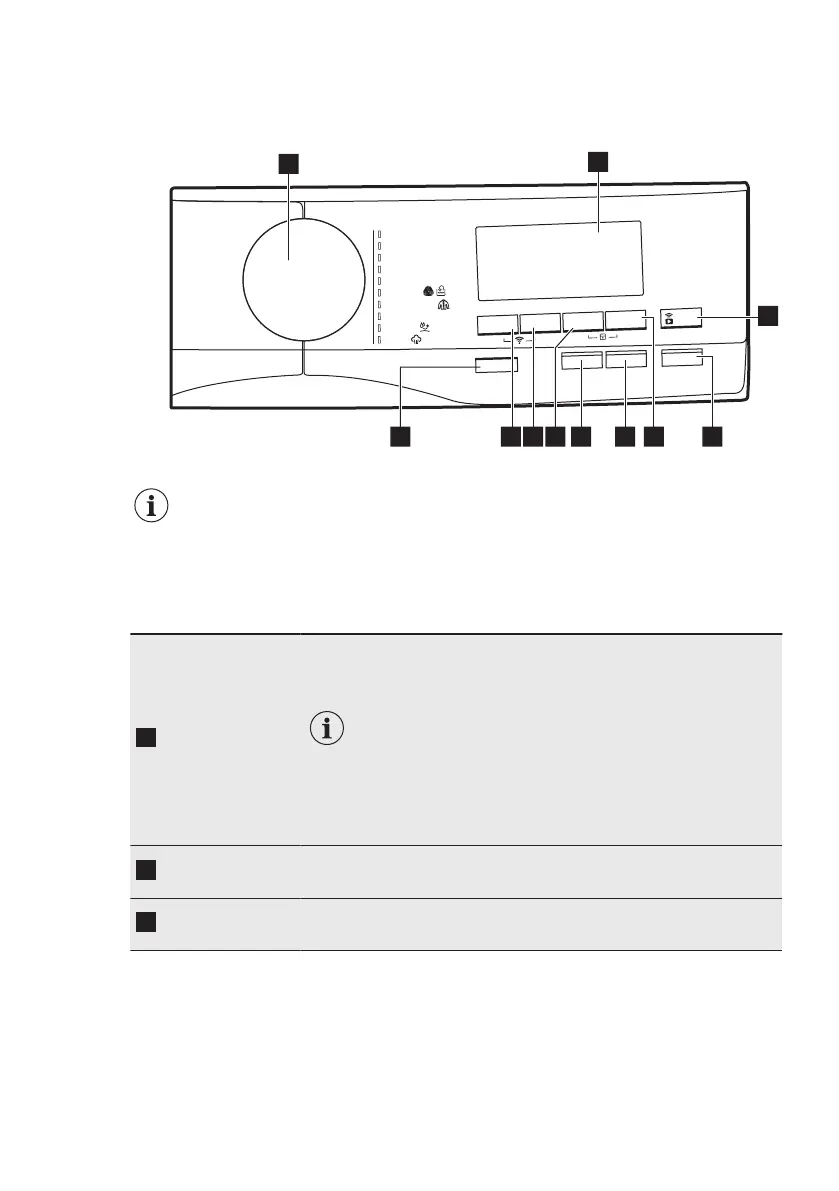
9.1 Control panel description
O
n/Off
Vapor
Pl
us
Extra R
ápido
Temp. °C
Centrif.
Mancha
s/
Pre-Lav.
Inicio/Pausa
Ext
ra
Aclarado
/
Enx
ag
.
I
n
ic
io
D
i
f
e
rido
a
m
a
r
gor
P
.
d
ogl
A
Eco 40-
60
n
i
m
9
4 hsaWyM
soci
t
é
tni
S
s
ãL/ana
L
roo
d
tu
O
gk
3 -
.n
i
m
02
ro
pa
V
/s
a
mulP
s
a
n
eP oc
a
saC
s
odacileD
3
51 10 9 7
2
4
6811
The options are not selectable with all washing programmes. Check the
compatibility between options and washing programmes in the "Available
options in each programmes" paragraph in the "Programmes" chapter. An
option can exclude another one, in this case the appliance doesn't allow
you to set the incompatible options together.
Make sure the screen and touch buttons are always clean and dry.
On/Off push
button
Pressing this button for a few seconds allows to activate or deacti‐
vate the appliance. Two different tunes sound while switching the
appliance on or off.
As the Stand-by function automatically deacti‐
vates the appliance to decrease the energy con‐
sumption in a few cases, you may need to acti‐
vate the appliance again.
Refer to "Stand-by option" paragraph in "Daily
Use" chapter for more details.
Programme
dial
For selecting the desired washing programme. Refer to "Pro‐
grammes" chapter for more details.
Display
It provides information about the setting programme. Refer to
"Display" paragraph for more details.
ENGLISH 19


 To Next Page