AEGIS PRO
Getting Started
11
How to charge the headphones
It is recommended to charge the headphones using only the
supplied USB cable. If your are charging using an external
USB-power adapter, it is recommended to use an adaptor with an
output rating of 500 mA or higher (5V == 1.0A).
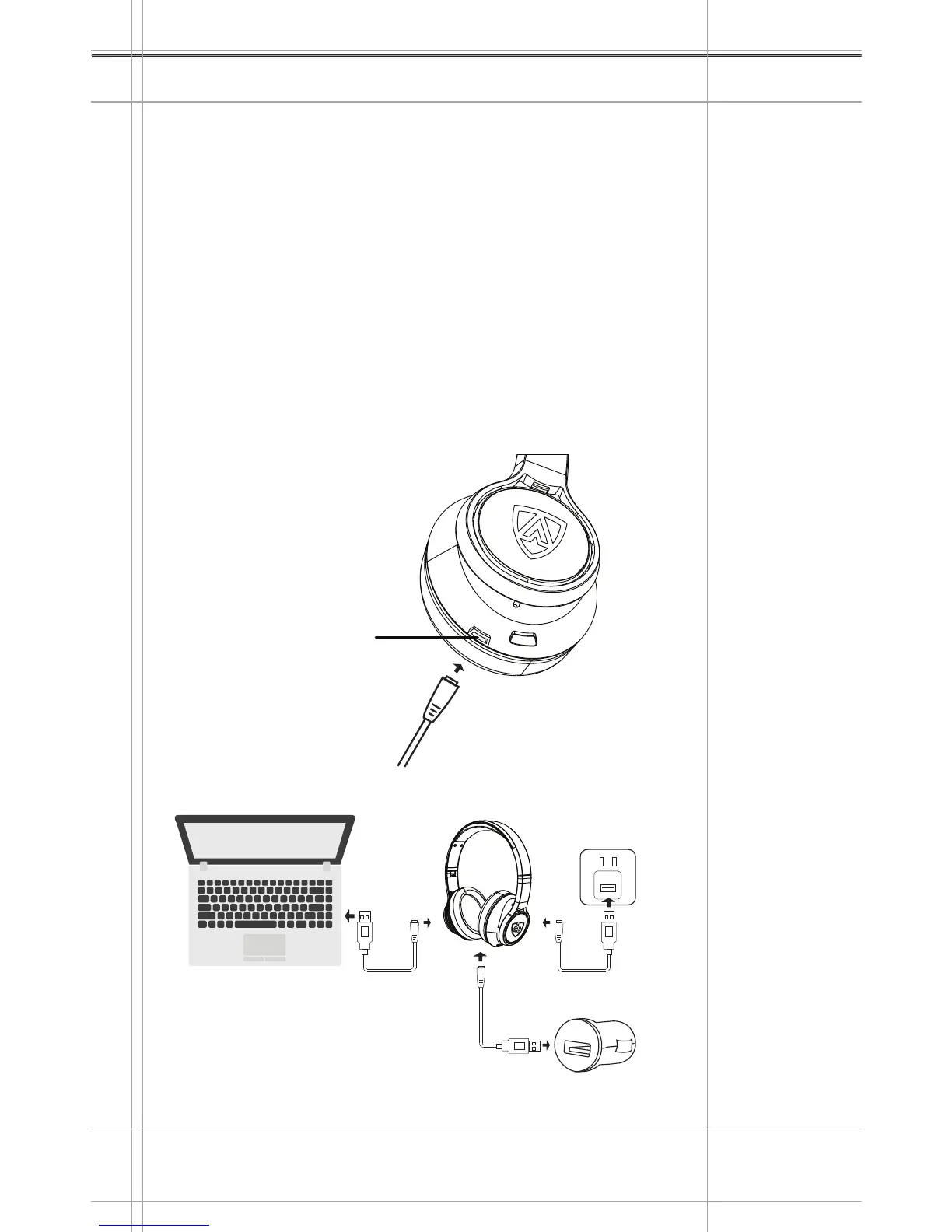
Connect the micro USB plug of the charging cable to the
micro-USB port of your headphones.
Connect the USB plug to the USB port of your computer. If you
are using an external power adapter, connect the USB plug to
the power adapter (not included) or the USB car charger
adapter (not included), and connect to the power source.
Depending on the charging condition of the headphones, the LED
flashes as indicated in the LED/Battery Level table.
1.
2.
Charging via:
ANC
MICRO-USB
CHARGING PORT
Left Earcup
AC Adaptor
Output Rating: 5V == 1.0A
Computer
Car Charger


 To Next Page