AEGIS PRO
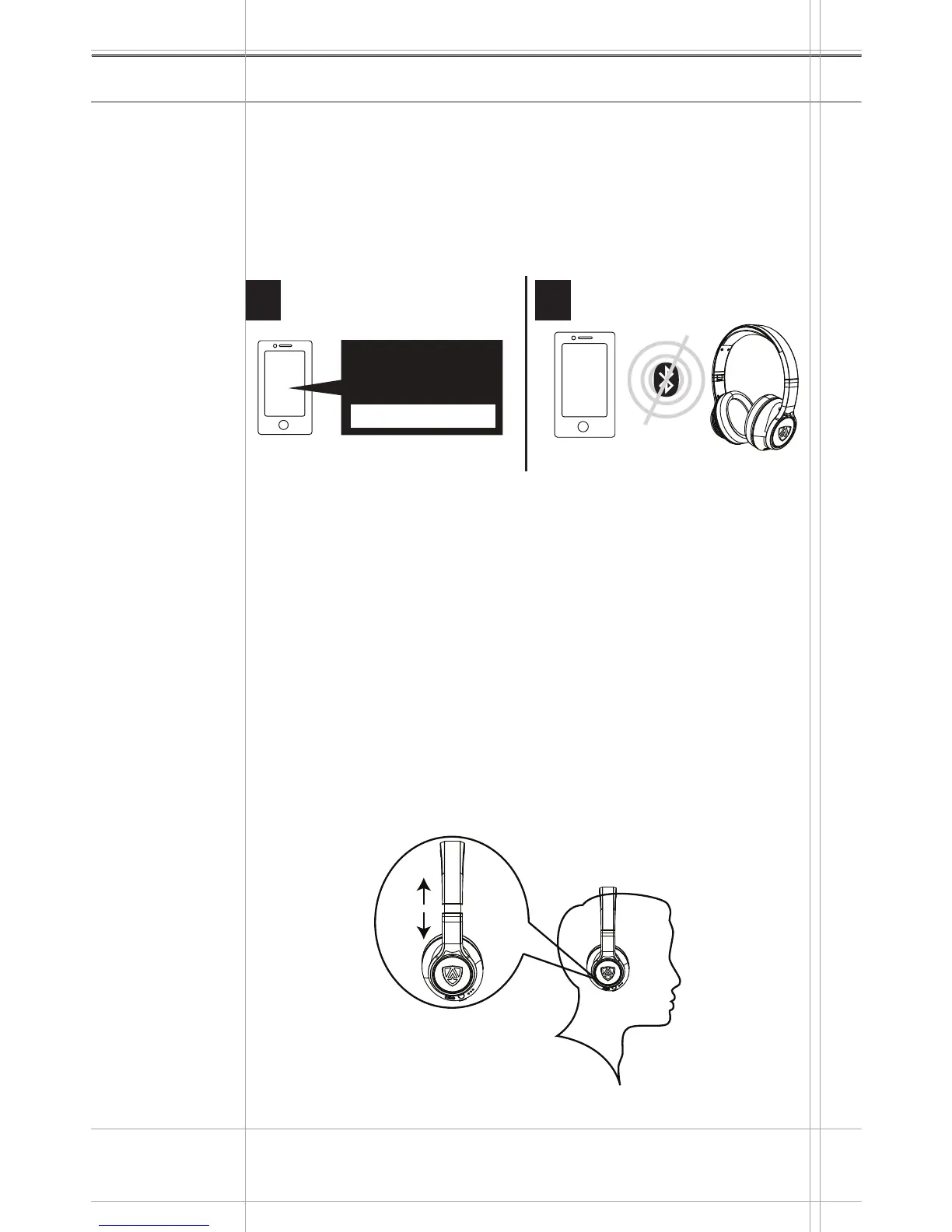
How to disconnect the headphone from a Bluetooth
®
device.
Disable the Bluetooth
®
visibility on your smartphone or Bluetooth
®
device. The headphones will disconnect from the smart or
Bluetooth
®
device, and you will hear a voice prompting “DISCON-
NECT’. The headphones will then search for previously paired
devices. If no device is found, the headphone will power off after
five minutes.
Adjusting the headband
For good sound quality and best possible wearing comfort, you can
adjust the ear pad location on the headband to properly match the
size of your head. The ear cups feature a locking mechanism that
you can easily slide up and down through the headband slider.
Wear the headphones so that the headphones runs over the
top of your head.
Adjust the location of the earpads by moving the ear cups up
and down with the headband slider until:
- your ears are comforabily covered by the earpads,
- your feel even, gentle pressure around your ears,
- a snug fit of the headband on the head is ensured.
Getting Started
14
Menu
Bluetooth on
Bluetooth o
Disconnected!Disable Bluetooth
®
1 2
1.
2.


 To Next Page