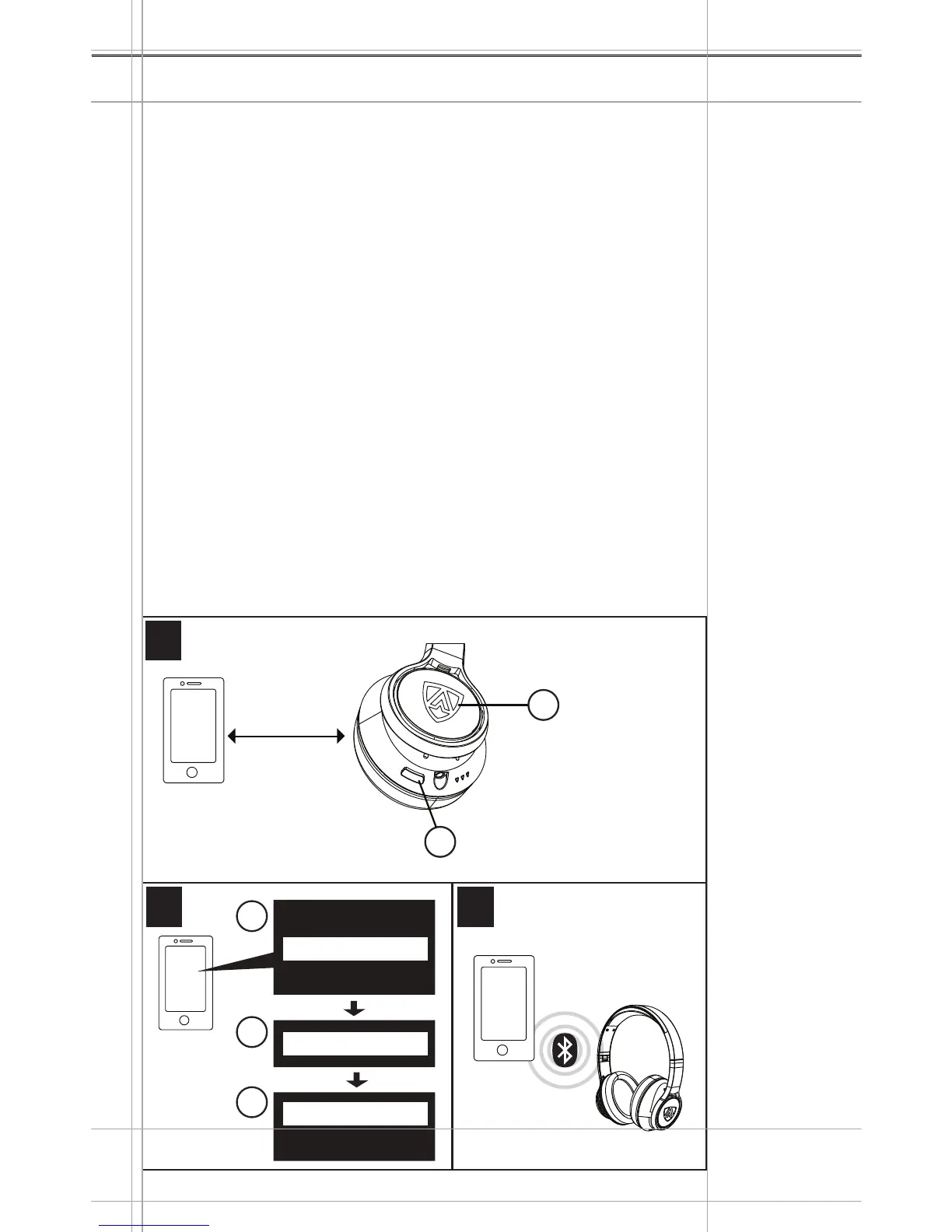
Pairing the headphones with a Bluetooth
®
device
Ensure that your headphones are within a 7.84”/ 20 cm range of
your smartphone or Bluetooth
®
device.
Power off the headphones (refer to page 15). Press the
POWER BUTTON and keep it pressed until you hear the
“power on” sound prompt and wait for the Shield LED to flash
blue and red. The headphones are in pairing mode.
Enable your Bluetooth
®
function on your smartphone or audio
device.
On your smartphone or audio device, start a search for
Bluetooth
®
devices.
From the list of found Bluetooth
®
devices, select “AEGIS PRO”
to establish a Bluetooth
®
connection to the headphones. If
necessary, enter the default PIN code ”0000” / four zeros. A
voice prompt “CONNECTED” can be heard during a successful
pairing.
If no connection is established within 5 minutes, pair mode will be
terminated and the headphones will power off for power saving.
Power on the headphones and repeat the above pairing procedure.
AEGIS PRO
1.
2.
3.
4.
Getting Started
13
Menu
Bluetooth on
Bluetooth o
Keyword: 0000
AEGIS PRO
AEGIS PRO
POWER
INPUT
MIC
Connected!
Flashes blue
and red
7.84”/
20 cm
Right Earcup
1
1
2 3
2
3
1
2
Press and
hold


 To Next Page