POWER
INPUT
MIC
Using the headphones
AEGIS PRO 18
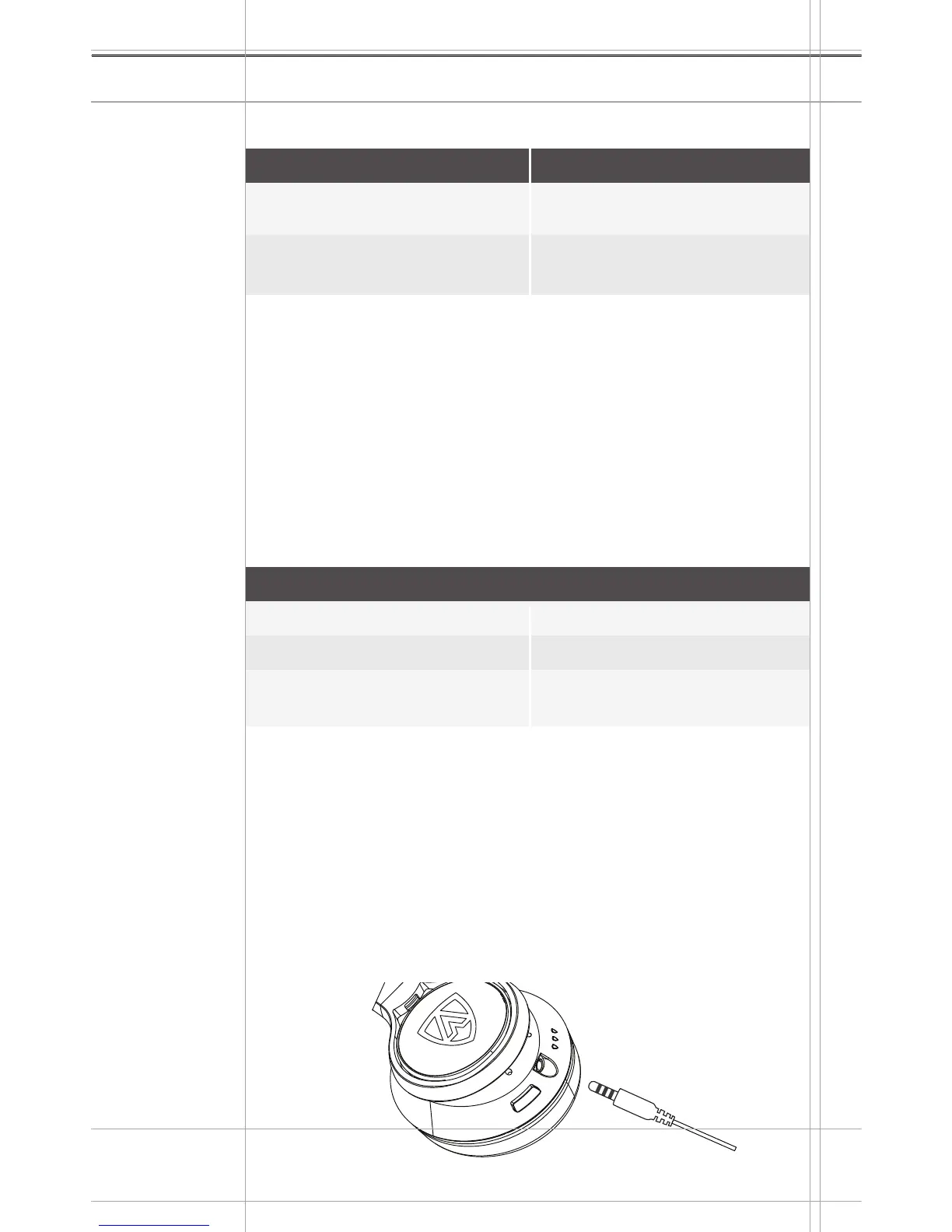
Using the 3.5mm Aux-In cable
To ensure AEGIS PRO is always safe for listening, the volume
limiting technology requires the headphones to power on at all
times.
Bluetooth
®
, call and music control functions are disabled if the
audio cable is used. It is recommended to use the audio cable only
in scenrios where wireless transmission is not allowed. i.e. during
aircraft take-off and landing. For playback functions in wired mode,
please use the controller found on the provided 3.5mm cable.
Connecting the 3.5mm Aux-In cable
Plug the 3.5mm Aux-In cable into the audio input of the
headphones until you hear a click sound. Turn the jack plug
clockwise and ensure that it is surely locked in placed.
The Bluetooth connection will automatically be disabled.
Connect the 3.5mm Aux-In to the audio output of your
smartphone.
Action
Press and release once
Press and release two times
Press and release three
times
Description
Play/pause a song
Plays the next song
Plays the previous song
LED
Action
Press and release once
Press and release two times
Description
Accept the incoming call and
ends the active call
Accept the incoming call and
puts the active call on hold
During a successful connected active call, connected phone
receives another incoming call,
1.
2.
Right Earcup


 To Next Page