RevC 07/15/13 Page 6
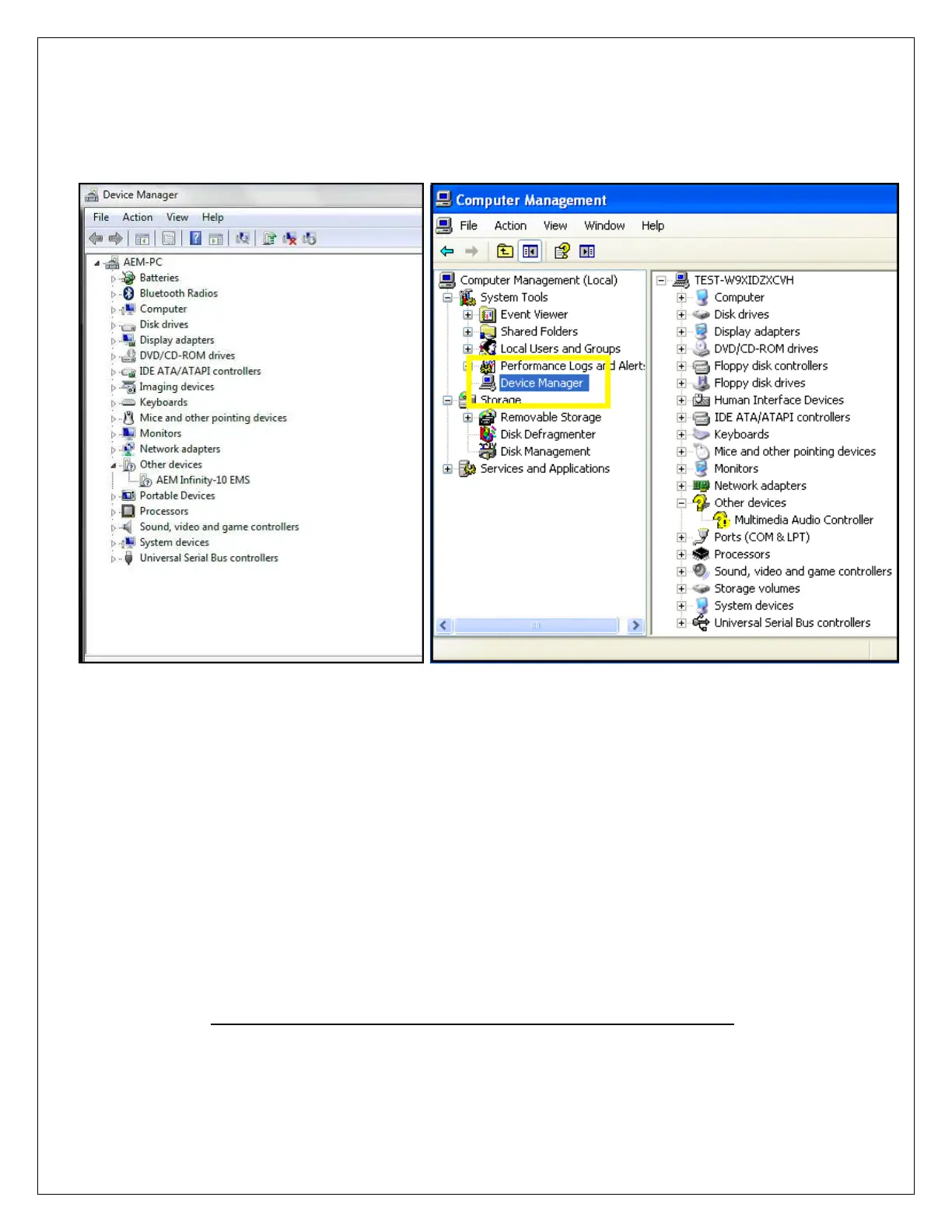
2. Open the device manager. Directions shown below for Windows 7 and Windows XP:
Windows 7 Windows XP
For Windows 7 users, you may simply search for and open the “Device
manager” using the search bar under the start tab. You should see a window that
looks similar to the Device manager shown above on the left hand side.
For Window XP users, right click on “My Computer” under the start tab. Click on
“Manage”. Select “Device Manager”. You should see a window that looks similar
to the Device manager shown above on the right hand side.
Next look for a device labeled “AEM Infinity-10 EMS” (or similar). It may be listed
under “Other devices”. Right click “AEM Infinity-10 EMS” and select Update
Driver Software. When prompted with “How do you want to search for driver
software?” select the second option, “Browse my computer for driver software
Locate and install driver software manually”. USB driver files can be downloaded
from http://www.aemelectronics.com/catalog-software-downloads-72/
Save this file in an easy to find location like the Windows Desktop. You will need
this link below.


 To Next Page
 Loading...