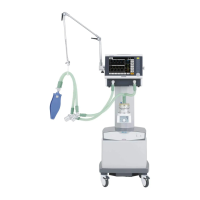
What to do if Aeonmed Shangrila 590P Medical Equipment displays 'System failure 00010!!!'?
- KKenneth SmithSep 22, 2025
Check the airway for gas leakage, and restart the equipment. If the alarm persists, contact aftersales support.
What to do if Aeonmed Shangrila 590P Medical Equipment displays 'System failure 00010!!!'?
Check the airway for gas leakage, and restart the equipment. If the alarm persists, contact aftersales support.
What to do if the minimum pressure alarm sounds continuously on Aeonmed Shangrila 590P?
If the minimum pressure alarm sounds continuously on your Aeonmed Medical Equipment, it could be due to a leak in the patient circuit, alarm settings that are too high, or a change in the patient’s compliance. You should check the pipeline for leaks, reset the alarm settings, and check the patient.
How to troubleshoot if the AC indicator is not bright on Aeonmed Shangrila 590P?
If the AC indicator is not bright on your Aeonmed Medical Equipment, it could be due to several reasons: the power cord might be unplugged, damaged, or the power socket might be faulty, or the fuse might be burned. Ensure the power cord is firmly plugged in. If that doesn't work, try replacing the power cord or using a different socket. If the problem persists, replace the fuse.
What to do if Aeonmed Medical Equipment shows 'Air supply down!'?
If the Aeonmed Medical Equipment displays 'Air supply down!!!', check the air source. If needed, obtain alternative ventilation.
What to do if Aeonmed Shangrila 590P Medical Equipment displays 'System failure 00100!!!'?
Restart the equipment, if the alarm persists, contact aftersales support.
What to do if Aeonmed Shangrila 590P Medical Equipment displays 'System failure 10000!!!'?
Restart the equipment, if the alarm persists, contact aftersales support.
What should I do if the 'Battery Low!!' alarm appears on my Aeonmed Medical Equipment?
If the 'Battery Low!!' alarm appears on the Aeonmed Medical Equipment, charge the battery quickly. If necessary, obtain alternative ventilation.
What should I do if the 'Circuit disconnect!!!' alarm appears on my Aeonmed Shangrila 590P Medical Equipment?
If the 'Circuit disconnect!!!' alarm appears on the Aeonmed Medical Equipment, check the circuit connection and replace the circuit if necessary.
What should I do if the expiratory tidal volume is high on Aeonmed Medical Equipment?
If the expiratory tidal volume is high on your Aeonmed Medical Equipment, check the patient, then set parameters and the V TE monitoring value.
What causes the AC power failure alarm to sound continuously on Aeonmed Medical Equipment?
If the AC power failure alarm sounds continuously on your Aeonmed Medical Equipment, check the power source and ensure the power cord is securely connected.
Details warranty coverage for manufacturing defects and materials.
Outlines Aeonmed's obligations and exclusions under warranty terms.
States conditions under which Aeonmed is not responsible for product security and reliability.
Steps to obtain return authorization and required product information for returns.
Information regarding prepaid user charges for product transportation and insurance.
Provides an overview of the Shangrila590P Ventilator System's purpose and features.
Describes the specific medical applications and patient types for the ventilator.
Lists medical conditions or situations where the ventilator should not be used.
Explains various symbols used on the equipment and in the manual.
Details important safety warnings and precautions for operating the ventilator.
Lists common operational functions accessible on the ventilator.
Provides definitions for technical terms, acronyms, and abbreviations used in the manual.
Lists the components included in the Shangrila590P Ventilator System.
Describes the external appearance and components visible from the front of the ventilator.
Details the controls and indicators on the front panel of the Shangrila590P ventilator.
Explains the layout and different sections of the ventilator's LCD display interface.
Details the physical construction of the ventilator's front cover and base plate.
Describes key ports like emergency respiratory and spout for atomization, plus the expiratory module.
Describes the ports and connectors located on the rear panel of the ventilator, including RS232.
Step-by-step guide for powering on and initiating the ventilator system.
Instructions on how to select and configure different ventilation modes.
Details the Assist/Control (A/C) ventilation mode, including breath delivery types.
Describes the Volume Control Ventilation (VCV) mode and its operation.
Explains the Pressure Control Ventilation (PCV) mode, its parameters, and trigger operations.
Details the Pressure Regulated Volume Control (PRVC) mode, including its breath delivery and adaptive pressure regulation.
Explains the Sigh mode, which delivers high tidal volumes periodically.
Describes Synchronized Intermittent Mandatory Ventilation (SIMV) mode and its breath cycle.
Explains the Spontaneous (SPONT) mode, where inspiration is patient-initiated.
Details the Bilevel Ventilation (BIVENT) mode, involving pressure switching.
Explains Non-Invasive Ventilation with Pressure Control (NIV/PCV) mode.
Describes Non-Invasive Ventilation with Continuous Positive Airway Pressure (NIV/CPAP) mode.
Guides users on how to access and configure alarm parameters and sound settings.
Describes the menu for measuring lung mechanics like compliance and resistance.
Details how to access and view the patient's monitored data.
Guides users on how to configure system settings like language, units, and date/time.
Instructions on setting waveform display style and lists available waveform types.
Information regarding the ventilator's system components like BDU and GUI.
Details LCD areas for patient parameters and shortcut access to functions.
Explains specific functions like Inspiratory Hold, Expiratory Hold, Nebulizer, Suction, Freeze, Reset, Screen Lock.
Guides on adjusting parameters and procedures for safely shutting down the ventilator.
Outlines the schedule and requirements for performing pre-use tests on the ventilator.
Details the steps for checking the system's readiness and connections before use.
Instructions for testing the AC power failure alarm functionality.
Describes how to perform various alarm tests, including pressure and oxygen concentration alarms.
Guides on performing tests for the breathing system, including gas supply and apnea alarm checks.
Lists the necessary tools required for installing the Shangrila590P ventilator.
Instructions for assembling and installing the medical air compressor unit.
Instructions for mounting the elliptical board onto the support column.
Details on installing the carrier for tubing and cables.
Instructions for mounting the carrier for the humidifier unit.
Steps for mounting and connecting the main ventilator unit.
Instructions for connecting the main ventilator unit to the medical air compressor.
Guides on connecting various accessories, including patient tubing and pipelines.
Guides on connecting the air and oxygen supply pipelines to the ventilator.
Instructions for assembling and adjusting the ventilator's support arm.
Steps for installing the humidifier unit onto its carrier.
Detailed instructions for connecting various tubes for the breathing circuit and humidifier.
Procedures for connecting the ventilator to gas supplies and electrical power.
General instructions and precautions for cleaning the ventilator and its components.
Procedures for disinfecting and sterilizing parts of the ventilator system.
Outlines the policy for equipment repair, emphasizing authorized service and testing.
Provides a recommended schedule for routine user maintenance tasks.
Estimates the useful lifespan of key ventilator components like the mask, cord, main unit, and battery.
Guides on accessing and performing calibration procedures for sensors and valves.
Detailed steps for calibrating the flow sensor on the ventilator.
Instructions for calibrating the pressure sensor, referring to flow sensor calibration.
Steps for calibrating the oxygen sensor, including 21% and 100% settings.
Procedures for calibrating the inspiratory valve, including password entry.
Procedures for calibrating the expiratory valve, including password entry.
Instructions for performing height compensation calibration.
Step-by-step guide for safely replacing fuses in the ventilator.
Guidelines for proper use, maintenance, and transportation of the ventilator.
Details on battery specifications, charging, maintenance, replacement, and disposal.
Explains the general principles of alarms, their display, and priority levels.
A comprehensive list of alarm messages, their priorities, definitions, and operator actions.
Provides a guide to common malfunctions, their possible causes, and recommended troubleshooting actions.
Lists the physical dimensions, weight, and power specifications of the ventilator.
Details the operational, transport, and storage environmental requirements for the ventilator.
Provides technical specifications for gas supply, power, connectors, compliance, and electrical safety.
Explains the schematic diagram of the Shangrila590P System's operation principle.
Details the performance characteristics and settings of the ventilator's various modes and functions.
Provides guidance on electromagnetic compatibility and warnings related to RF interference.
| Brand | Aeonmed |
|---|---|
| Model | Shangrila 590P |
| Category | Medical Equipment |
| Language | English |