FUSE
CONN1
FUSE
CONN1
+
-
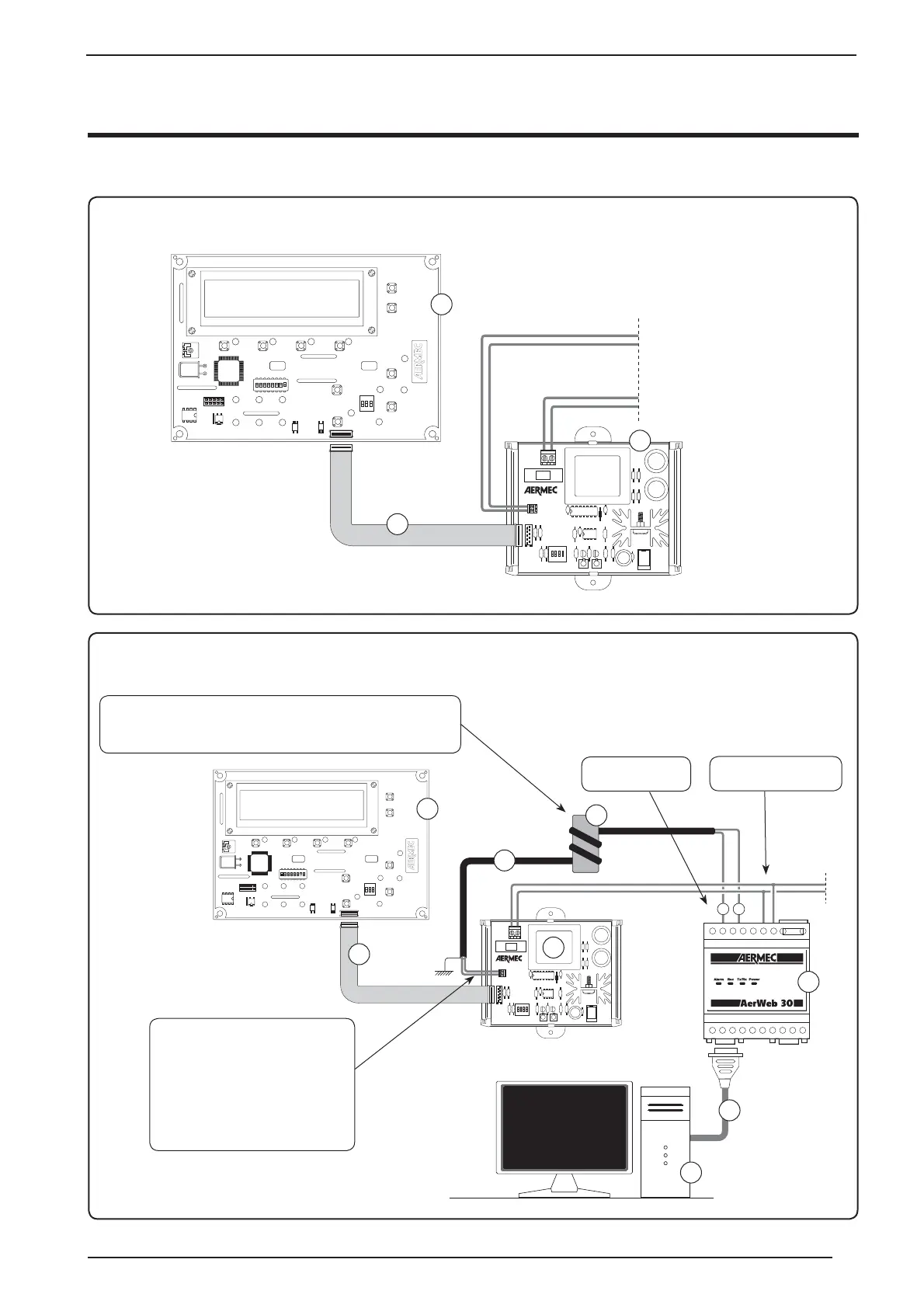
Connection between AER485, GR cards and AERWEB
2
1
3
230V
~
50Hz
230V
~
50Hz
1
2
3
4
5
6
7
AER485 connection with GR03
AER485 connection with GR03 and AerWeb30
Key
1 - GR03 card
2 - 10-way flexible flat cable
3 AER485 card
4 - AerWeb 30
5 - RS485 serial cable
6 - Serial connection
7 - Ferrite
8 - Pc
Key
1 - GR03 card
2 - 10-way flexible flat cable
3 AER485 card
8
The serial connection between AER485
and AerWeb 30, must be carried out
using shielded two-pole cable (connecting
the shielding to earth); the name of the
control board for the serial connection is
CONN1; The poles indicated on the card
represent:
Pole A = POSITIVE POLE;
Pole B = NEGATIVE POLE;
The supplied ferrite must be introduced onto the serial connection cable,
positioning it close to the AER485 card. The installation of the ferrite must
be carried out by twisting the cable around the ferrite two times.
Serial connection,
terminals 7 and 8
Power supply connection,
terminals 10 and 12
Serial connection (MODBUS protocol)
15



 To Next Page