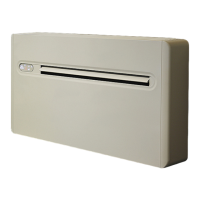
This document describes the AERMEC CMP231, an air conditioning unit featuring inverter technology. It's designed for user-friendly operation and efficient climate control.
Function Description
The CMP231 is an air conditioning unit capable of cooling, heating, dehumidification, and ventilation. It utilizes inverter technology for precise temperature control and energy efficiency. The unit can be managed via a remote control or a touch-screen display on the appliance itself.
Operating Modes:
- Well-being button (economic automatic mode): This mode automatically sets the temperature and ventilation speed to achieve the best comfort level in the room, considering the setpoint and room temperature.
- Cooling only mode: The appliance cools and dehumidifies the room. The compressor will stop if the room temperature is lower than the setpoint by 3°C and restart when it rises by 3°C.
- Dehumidification only mode: This mode dehumidifies the room, maintaining a comfortable temperature and ventilation speed. It's useful during mid-seasons or in humid climates. The appliance works intermittently in this mode.
- Ventilation only mode: The compressor is deactivated, and the appliance only ventilates the room at a user-selected fan speed.
- Heating only mode: The appliance heats the room. The compressor will stop if the room temperature is higher than the setpoint by 3°C and restart when it drops by 3°C.
- Nocturnal well-being button: This mode is designed for quiet operation, reduced energy consumption, and improved well-being during sleep. In cooling, the set temperature increases by 1°C after one hour and another degree after two. In heating, the set temperature decreases by 1°C after one hour and another degree after two. This function is not available for dehumidification only, ventilation only, and economic automatic modes.
Control Features:
- Setpoint adjustment: The setpoint can be adjusted between 16 and 31°C.
- Fan speed control: The fan speed can be set to minimum, medium, maximum, and automatic. The 12 HP Inverter model offers 5 positions: minimum, medium, maximum, dual power, and automatic.
- Timer mode: Allows programming the appliance to switch on or off at a specific time, up to 24 hours in advance.
- Control of air flow direction: Adjusts the direction of the air outlet flap.
- Brightness sensor: Automatically adjusts the display brightness.
- Digital thermometer: Displays the temperature.
- Touch-screen display key lock: Prevents accidental changes to settings.
Important Technical Specifications
- Model: CMP231
- Power Supply: 230-1-50 V-F-Hz
- Cooling Power (1): 2.35 kW
- Heating Power (2): 2.36 kW
- Power Absorbed (Cooling 1): 730 W
- Power Absorbed (Heating 2): 720 W
- Dehumidification Capacity: 1.1 l/h
- EER (Energy Efficiency Ratio): 3.22 W/W (A+ energy efficiency class for cooling)
- COP (Coefficient of Performance): 3.28 W/W (A energy efficiency class for heating)
- Internal-External Ventilation Speed: 4 No.
- Dimensions (WxHxD): 1030x555x170 mm
- Weight: 48.5 kg
- Noise Level (min-max): 27/41 dB(A) (measured 1m away and 1.5m high)
- Wall Holes Diameter: 162 mm
- Refrigerant Gas: R-410A
- R410A Refrigerant Charge: 520 g
- Maximum Absorbed Power (with Dual Power function activated during heating): 1060 W
- Maximum Absorbed Current (with Dual Power function activated during heating): 4.8 A
- Maximum Working Pressure PS: 3.8 MPa
- Casing Protection Level: IPX0
Operating Limits:
- Cooling Mode:
- Internal Ambient Temp: DB 35°C - WB 24°C (Max), DB 18°C (Min)
- Outside Ambient Temp: DB 43°C - WB 32°C (Max), DB -5°C (Min)
- Heating Mode:
- Internal Ambient Temp: DB 27°C (Max), DB 5°C (Min)
- Outside Ambient Temp: DB 24°C - WB 18°C (Max), DB -10°C (Min)
Usage Features
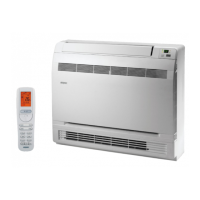
- Remote Control: The primary interface for managing the appliance. It features buttons for various modes, setpoint adjustment, fan speed, timer, and other functions.
- Touch-Screen Display: An alternative control interface located on the unit itself, mirroring the remote control's functions.
- Start-up: The appliance is activated by turning on the main switch on the electrical power supply line or connecting the power supply plug.
- Command Confirmation: A beep and display confirmation indicate successful reception of commands from the remote control.
- Remote Control Range: Approximately 8 meters, requiring the top part of the remote to point towards the internal unit's display.
- Battery Insertion: Uses CR2012 3V dry lithium batteries. Polarity must be observed during insertion. Used batteries should be disposed of in designated collection areas.
- Safety Precautions:
- Avoid obstructing the air flow (inwards and outwards).
- Do not place objects or structural obstacles (furniture, curtains, plants, etc.) near the air flow.
- Do not move the horizontal air outlet flap manually.
- In case of water leaks, turn off the appliance and disconnect the power supply.
- During heating, the conditioner periodically removes ice from the external battery.
- The appliance must not be installed in rooms where explosive gases develop or where there are humidity and temperature conditions that exceed the maximum levels reported in the installation manual.
- Clean the air filter regularly.
- Handle the remote control cautiously; avoid exposure to rain, liquids, impacts, or direct sunlight.
- Interferences may occur if other remote-controlled appliances or electronic/fluorescent lamps are present.
- Remove batteries if the remote is not used for a long time.
- Energy Saving Advice:
- Keep filters clean.
- Keep doors and windows closed.
- Avoid direct sunlight in the room (use curtains, blinds, or shutters).
- Do not obstruct air flow.
Maintenance Features
- Periodic Maintenance: The air conditioner requires minimal maintenance, primarily cleaning operations.
- External Cleaning:
- Disconnect the unit from the mains before cleaning.
- Wait until parts have cooled down.
- Do not use abrasive sponges or corrosive detergents.
- Clean external surfaces with a soft, damp cloth.
- Cleaning Filtering Seats:
- The air conditioner has filtering seats that require cleaning.
- To extract filters: open the grid, lift filters to remove them.
- Clean filters with a vacuum cleaner or by washing in lukewarm water without detergents or solvents. Allow to dry.
- Reinsert filters and close the cover.
- Ensure the panel is mounted correctly after cleaning.
- Using the appliance without filters is prohibited.
- Filter Cleaning Frequency: Clean the air filter after a period of continuous use (around 200 hours) or when the "CLEAN FILTER" icon appears on the display. This icon also appears when starting the appliance after a period of inactivity. The filter is located in the top part of the appliance.
Troubleshooting and Problem Diagnosis:
- The manual provides a table for common anomalies and their possible solutions (e.g., no power supply, clogged air filter, inadequate heating/cooling).
- Operating Aspects Not Interpreted as Problems:
- The compressor has a delay (approx. 3 minutes) between stops and reactivations to protect it from frequent activations.
- During heating, warm air is dispensed a few minutes after the compressor activates to avoid discomfort from cold air if the fan started immediately.
- For alarms displayed on the unit (e.g., E1, E2, E3, E4, E5, E6, E7, OP, OF), the manual provides a cause and a description of the functioning. For persistent issues or alarms, contact authorized technical assistance.
- Unauthorized repair attempts invalidate the warranty.

 Need help?
 General

 To Next Page