57
Auto functioning (from the remote control)
In this functioning mode the user does not set the temperature; the fan of the indoor unit functions
in Automatic mode.
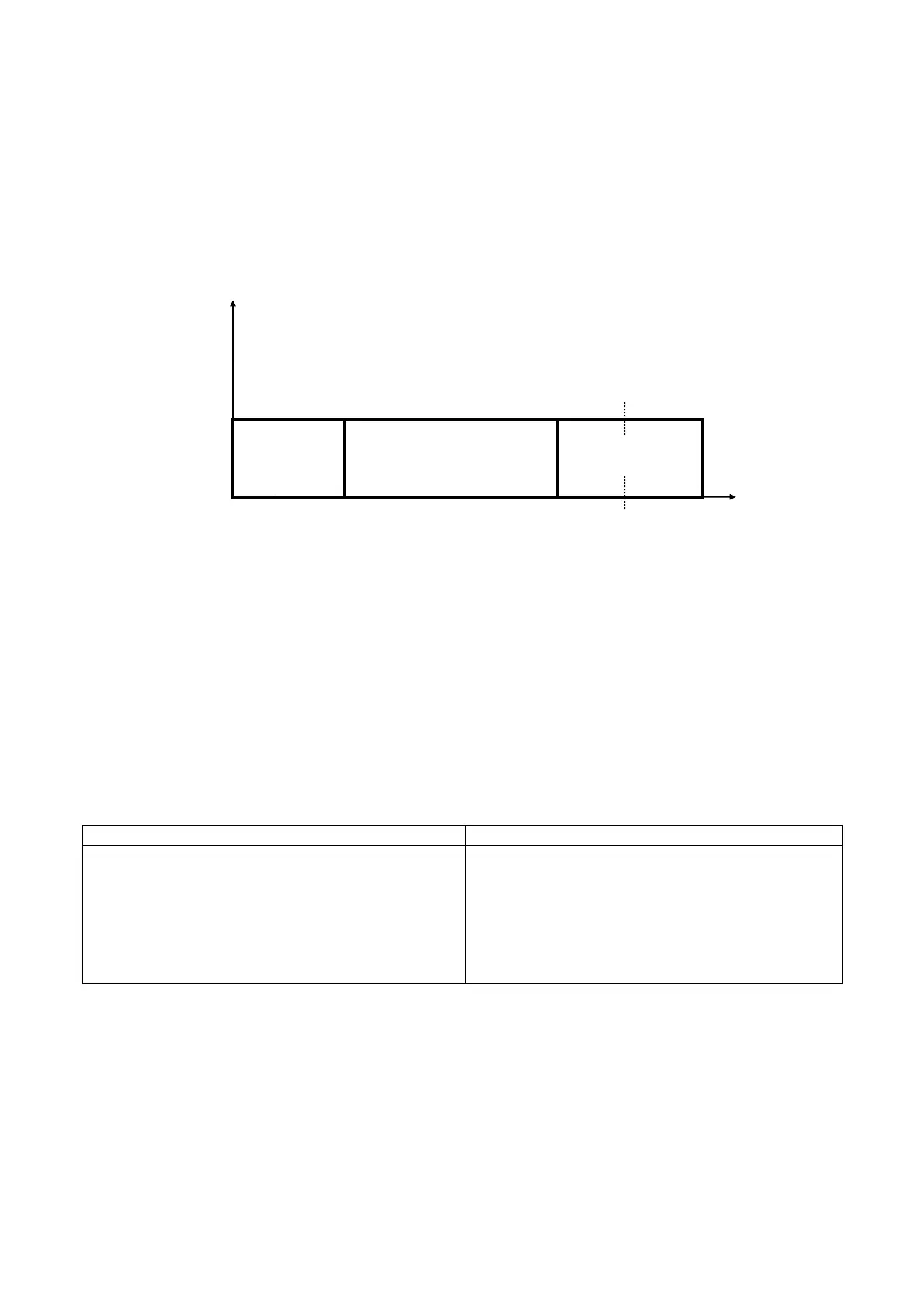
By activating the "AUTO" mode on the remote control, the temperature SET disappears and the
fan works in automatic mode. The machine reads the ambient probe SA (always in continuation,
even in heating mode, despite the activation of thermostat-controlled operation) and it decides
whether to function in "HEATING, or "COOLING" mode (according to the enclosed diagram) on the
basis of the ambient temperature and sets a T
L
operating setting as shown in the chart.
It is possible to correct the fixed machine operation setting by ±5°C from the remote control.
In automatic mode the machine reselects the function after each start from standby mode.
Managing the timer (from the remote control)
Functioning with the programmer timer makes it possible to set the delay on the start up and stop
of the machine from a minimum of 0.5 to a maximum of 12 hours.
The absence of mains voltage causes this function to be interrupted. Any timer settings will be
reset.
Full power (from the remote control)
The full power command (only present on the Sharp A698JBEZ range of remote controls)
produces the following behaviour:
Heating mode Cooling mode
+ Fan speed forced to maximum
+ Setting forced to 32°C
(the algorithm relating to thermostat-controlled
ventilation is respected if envisaged by the dip-
switches)
+ Fan speed forced to maximum
+ Setting forced to 18°C
Autostart function
If there is a restart after a loss of voltage and in start ups after the first powering, the machine will
be returned to the state it was in thanks to a permanent memory.
SET 23°C 24.5°C 26°C
heating
cooling
SA
21°C 25°C 28°C


 To Next Page