60
Alarm log display
It is also possible to display the last anomalies that arose and were automatically reset.
For all the receivers, the procedure is as follows:
place the machine in standby and press the AUX key for at least 5 seconds (a triple beep indicates
that this function is being used). From this moment on the display will be a coding of the anomalies
identical to the one used with the alarms. To end this visualisation it is necessary to turn on the
machine with an ON command.
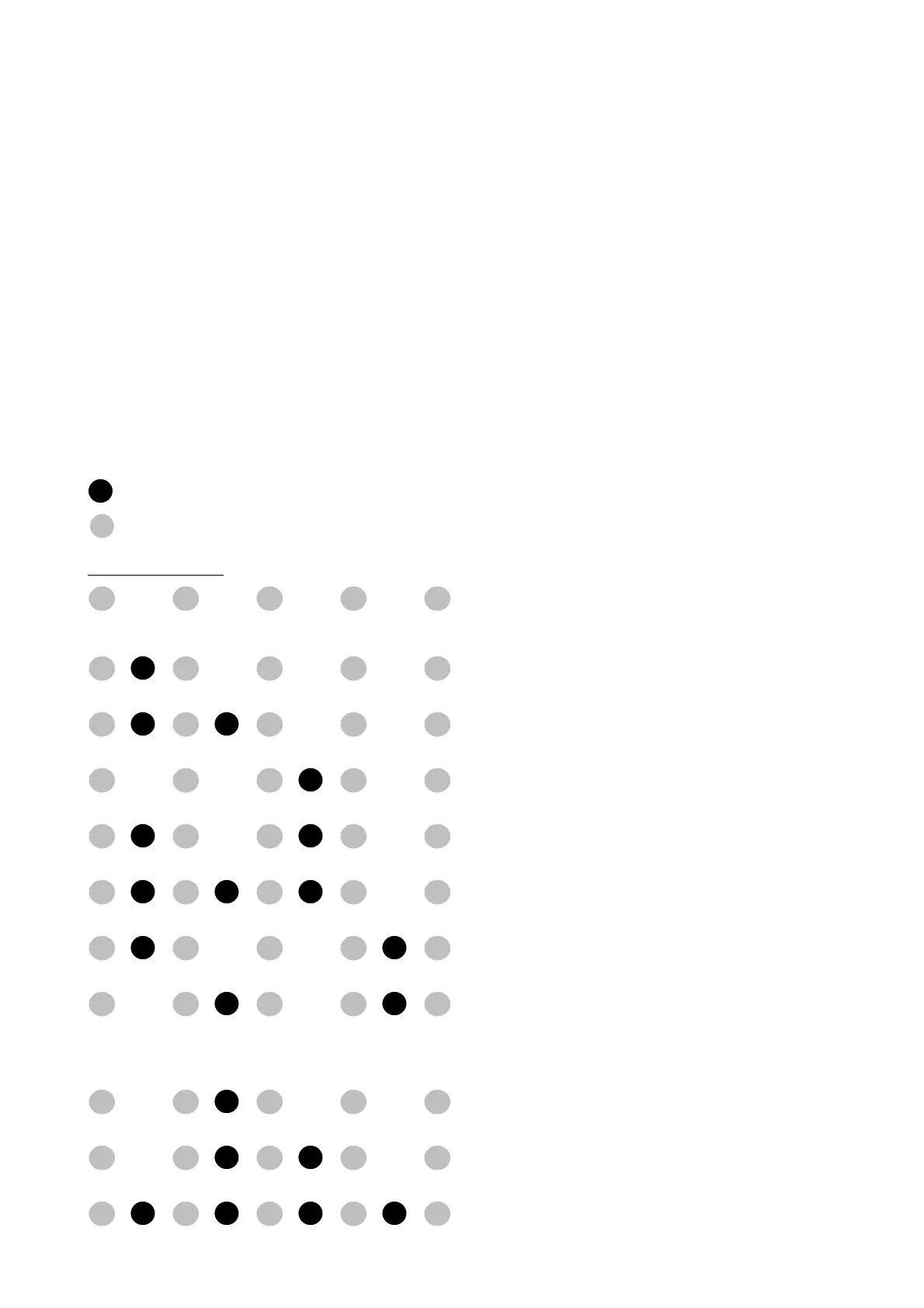
The alarm coding is the following:
yellow LED: cyclically it flashes 5 times and then stays off for five seconds
red LED: comes on at the same time as the yellow LED (4-LED receiver)
thereby providing a specific code
FCL alarm coding
= Red LED
<Tab/>= Yellow LED
ALARM DISPLAY
Other alarms
Coil overheating
Electric heater probe
Water probe
Ambient probe
No alarm
External contact/Condensate discharge
AL1 Contact
Electric heater overheating
Defrost probe (ECL)
Anti-freeze (only for heating (ECL))
Serial alarm (only with wired panel (ECL)


 To Next Page