61
Probe display (with infrared receiver)
It is possible to display the values of the temperature probes captured by the electronic board. To
do this it is necessary to follow the following procedure:
set OFF from the remote control (or by pressing the AUX key).
press the AUX key for 5s. (At this point, the board makes a triple beep to indicate that the
Alarm display mode is being used).
press the AUX key again for 5s. In this way, the board activates the Probe displaymode.
The board initially makes a beep and displays the value of the SA ambient probe. To
display the other probes, press the AUX key in the normal way; the number of beeps
indicates which probe is being shown:
Beeps Probe displayed
1 Ambient probe SA
2 Coil probe SD
3 Water probe SW
4 Electric heater probe SR
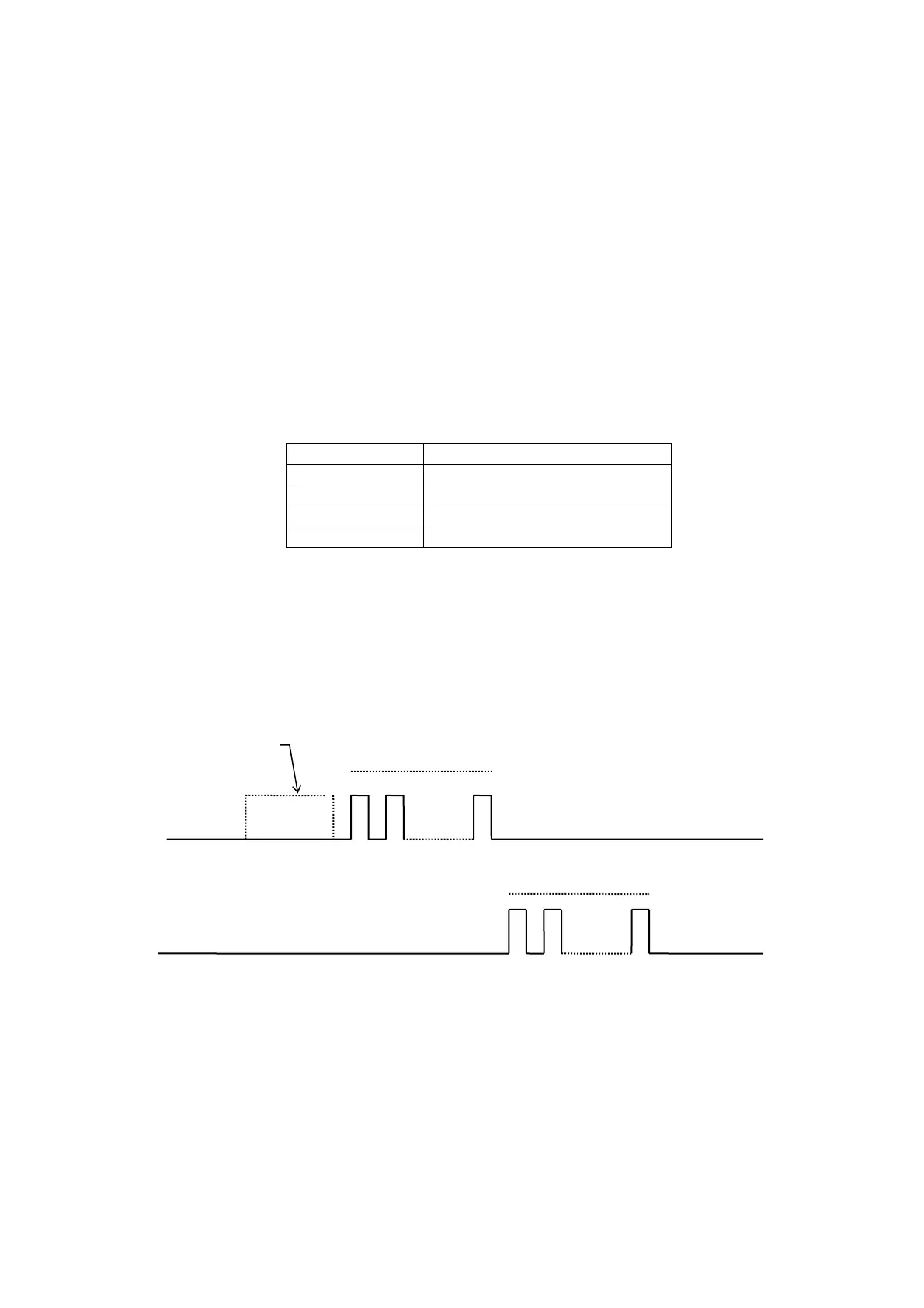
The value of the probe displayed is expressed by means of a cyclical sequence of brief LED
flashes. The red LED indicates tens and the yellow LED indicates units. For negative values, the
sequence is preceded by a long flash (around 3 seconds) of the red LED.
In the case of an absent probe, a long flash (around 3 seconds) of the yellow LED is displayed.
The value of the electric heater probe is not expressed in degrees but as a value between 0-255.
Red LED
Yellow LED
Any minus sign
tens
units


 To Next Page