18
ACCENSIONE/SPEGNIMENTO DEL SISTEMA:
Premere
ON
OFF
Heat Mode
Cool Mode
Dry Mode
Temperature
Touch
Networking
Timer
Auto Fan
Fan mode
Key Lock
Sleep
On/
O
Mode Up Fan
Speed
Swing Down
Day
Clock
per accendere o spegnere l’unità
MODE:
- Premere
ON
OFF
Heat Mode
Cool Mode
Dry Mode
Temperature
Touch
Networking
Timer
Auto Fan
Fan mode
Key Lock
Sleep
On/
O
Mode Up Fan
Speed
Swing Down
Day
Clock
per cambiare modalità di funzionamento come segue:
- Auto - Cool - Dry - Heat-Fan
VELOCITÀ DELLA VENTOLA:
- Premere
ON
OFF
Heat Mode
Cool Mode
Dry Mode
Temperature
Touch
Networking
Timer
Auto Fan
Fan mode
Key Lock
Sleep
On/
O
Mode Up Fan
Speed
Swing Down
Day
Clock
per selezionare: Auto-Basso-Medio-Alto-Auto (indicato
come A-1-2-3-A)
IMPOSTAZIONE DELLA TEMPERATURA:
- Premere
ON
OFF
Heat Mode
Cool Mode
Dry Mode
Temperature
Touch
Networking
Timer
Auto Fan
Fan mode
Key Lock
Sleep
On/
O
Mode Up Fan
Speed
Swing Down
Day
Clock
o
ON
OFF
Heat Mode
Cool Mode
Dry Mode
Temperature
Touch
Networking
Timer
Auto Fan
Fan mode
Key Lock
Sleep
On/
O
Mode Up Fan
Speed
Swing Down
Day
Clock
per regolare la temperatura impostata (risolu-
zione: 1°C)
- L’intervallo di temperatura impostato va da 15 ° C a 30 °
SWING:
- Premere
ON
OFF
Heat Mode
Cool Mode
Dry Mode
Temperature
Touch
Networking
Timer
Auto Fan
Fan mode
Key Lock
Sleep
On/
O
Mode Up Fan
Speed
Swing Down
Day
Clock
per attivare/disattivare lo swing
SLEEP:
- Tenere premuto
ON
OFF
Heat Mode
Cool Mode
Dry Mode
Temperature
Touch
Networking
Timer
Auto Fan
Fan mode
Key Lock
Sleep
On/
O
Mode Up Fan
Speed
Swing Down
Day
Clock
e
ON
OFF
Heat Mode
Cool Mode
Dry Mode
Temperature
Touch
Networking
Timer
Auto Fan
Fan mode
Key Lock
Sleep
On/
O
Mode Up Fan
Speed
Swing Down
Day
Clock
per attivare/disattivare la modalità di
notturna.
RTC (orologio in tempo reale):
Tenere premuti
ON
OFF
Heat Mode
Cool Mode
Dry Mode
Temperature
Touch
Networking
Timer
Auto Fan
Fan mode
Key Lock
Sleep
On/
O
Mode Up Fan
Speed
Swing Down
Day
Clock
e
ON
OFF
Heat Mode
Cool Mode
Dry Mode
Temperature
Touch
Networking
Timer
Auto Fan
Fan mode
Key Lock
Sleep
On/
O
Mode Up Fan
Speed
Swing Down
Day
Clock
per 3 secondi e premere
ON
OFF
Heat Mode
Cool Mode
Dry Mode
Temperature
Touch
Networking
Timer
Auto Fan
Fan mode
Key Lock
Sleep
On/
O
Mode Up Fan
Speed
Swing Down
Day
Clock
una volta
entrati nell'impostazione del timer per accedere all’impostazione RTC.
- Premere
ON
OFF
Heat Mode
Cool Mode
Dry Mode
Temperature
Touch
Networking
Timer
Auto Fan
Fan mode
Key Lock
Sleep
On/
O
Mode Up Fan
Speed
Swing Down
Day
Clock
o
ON
OFF
Heat Mode
Cool Mode
Dry Mode
Temperature
Touch
Networking
Timer
Auto Fan
Fan mode
Key Lock
Sleep
On/
O
Mode Up Fan
Speed
Swing Down
Day
Clock
per regolare l’ora o i minuti
- Premere
ON
OFF
Heat Mode
Cool Mode
Dry Mode
Temperature
Touch
Networking
Timer
Auto Fan
Fan mode
Key Lock
Sleep
On/
O
Mode Up Fan
Speed
Swing Down
Day
Clock
per selezionare l’ora o i minuti
- Premere
ON
OFF
Heat Mode
Cool Mode
Dry Mode
Temperature
Touch
Networking
Timer
Auto Fan
Fan mode
Key Lock
Sleep
On/
O
Mode Up Fan
Speed
Swing Down
Day
Clock
per selezionare il giorno
- Premi
ON
OFF
Heat Mode
Cool Mode
Dry Mode
Temperature
Touch
Networking
Timer
Auto Fan
Fan mode
Key Lock
Sleep
On/
O
Mode Up Fan
Speed
Swing Down
Day
Clock
per salvare ed uscire
TIMER ACCESO O SPENTO:
Tenere premuti
ON
OFF
Heat Mode
Cool Mode
Dry Mode
Temperature
Touch
Networking
Timer
Auto Fan
Fan mode
Key Lock
Sleep
On/
O
Mode Up Fan
Speed
Swing Down
Day
Clock
e
ON
OFF
Heat Mode
Cool Mode
Dry Mode
Temperature
Touch
Networking
Timer
Auto Fan
Fan mode
Key Lock
Sleep
On/
O
Mode Up Fan
Speed
Swing Down
Day
Clock
per 3 secondi per accedere all’impostazio-
ne del timer
- Premere
ON
OFF
Heat Mode
Cool Mode
Dry Mode
Temperature
Touch
Networking
Timer
Auto Fan
Fan mode
Key Lock
Sleep
On/
O
Mode Up Fan
Speed
Swing Down
Day
Clock
per selezionare il giorno
- Premere
ON
OFF
Heat Mode
Cool Mode
Dry Mode
Temperature
Touch
Networking
Timer
Auto Fan
Fan mode
Key Lock
Sleep
On/
O
Mode Up Fan
Speed
Swing Down
Day
Clock
per alternare tra:
Timer ON ora, timer ON minuti, timer OFF ora, timer OFF minuti
Timer ON o OFF e “-: -” indicano che il timer ON o OFF non impostato
- Premere
ON
OFF
Heat Mode
Cool Mode
Dry Mode
Temperature
Touch
Networking
Timer
Auto Fan
Fan mode
Key Lock
Sleep
On/
O
Mode Up Fan
Speed
Swing Down
Day
Clock
o
ON
OFF
Heat Mode
Cool Mode
Dry Mode
Temperature
Touch
Networking
Timer
Auto Fan
Fan mode
Key Lock
Sleep
On/
O
Mode Up Fan
Speed
Swing Down
Day
Clock
per regolare l’ora per l’attivazione o la disattiva-
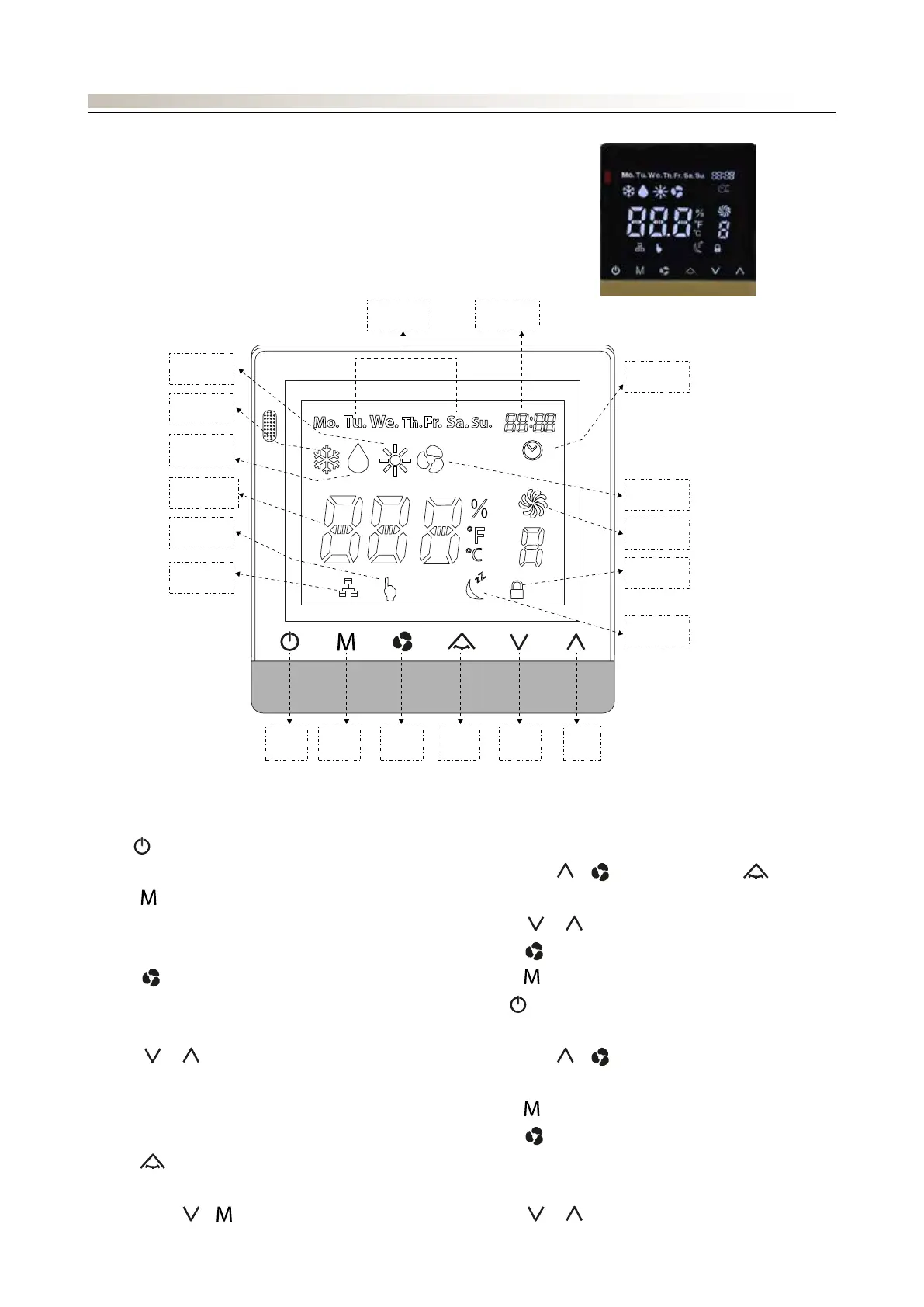
PFW4 è un sistema di controllo di climatizzazione che può essere utilizzato con il ventilconvettore di tipo FCWI.
PFW4 è costituito da
• Pannello (unità Display)
• Cavo di lunghezza 4m (estendibile fino a 25m utilizzando cavo 24AWG)
• Supporto per installazione a parete
CONTROLLO: PANNELLO A FILO PFW4
ON
OFF
Heat Mode
Cool Mode
Dry Mode
Temperature
Touch
Networking
Timer
Auto Fan
Fan mode
Key Lock
Sleep
On/
O
Mode Up Fan
Speed
Swing Down
Day
Clock





 To Next Page