EasyManua.ls Logo

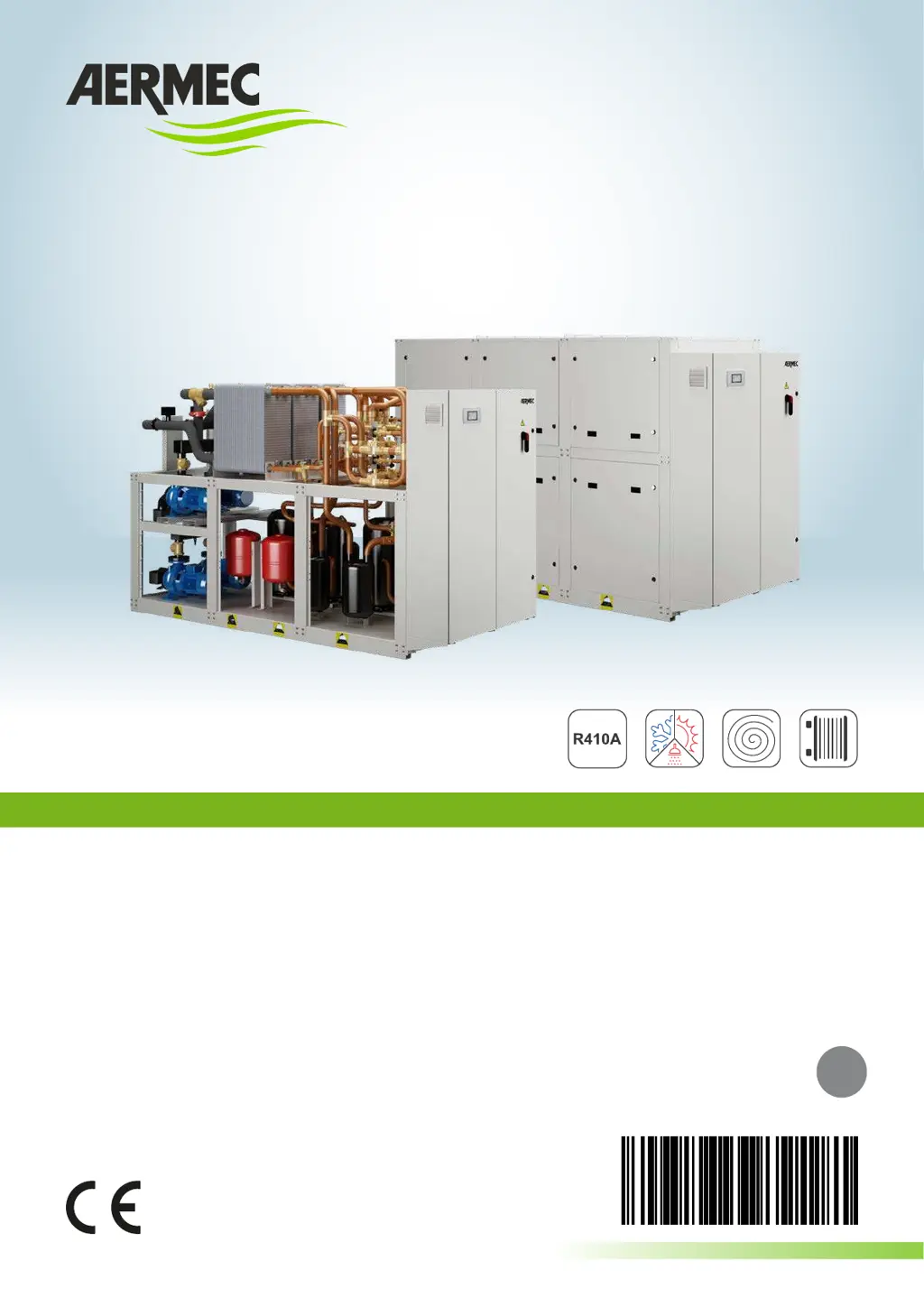
AERMEC NXP 0500 - User Manual

AERMEC NXP 0500
40 pages
Print Icon
To Next Page IconTo Next Page
Loading...
BARCODE
EN

TRANSLATION FROM ORIGINAL
18.10 6068951_01
NXP
0500÷1650
MULTIPURPOSE UNIT WATER / WATER
INDOOR UNIT
2PIPE SYSTEM
4PIPE SYSTEM

Other manuals for AERMEC NXP 0500

Questions and Answers

  • S
    Shelly SimsAug 15, 2025
    How to fix AERMEC Chiller that does not start?
    • F
      Felicia HarrisonAug 15, 2025
      If your AERMEC Chiller isn't starting, here's what to check: * **Voltage:** Ensure there's electric voltage present and check safety systems. * **Switches:** Make sure the master, remote (if applicable), control panel, and main switches are all in the ON position. * **Circuit Breaker:** Verify the compressor magnet circuit breaker is ON. * **Power Supply:** Check for adequate power supply voltage. If the above steps don't resolve the issue, the remote control switch coil, circuit board, peak condenser, or compressor itself might be broken and need replacement.
  • M
    Mark EricksonAug 18, 2025
    What to do if AERMEC NXP 0500 compressor has high discharge pressure?
    • J
      James PooleAug 18, 2025
      If your AERMEC Chiller's compressor has high discharge pressure, consider these potential causes: * **Water Temperature:** High external or utility water inlet temperature. * **Air/Water Flow:** Insufficient air or water flow. Check fan operation, coil cleanliness, pump speed, and filter cleanliness. * **Fan Regulation:** Anomalous fan regulation operation. * **Air in System:** Air present in the hydraulic system. * **Refrigerant Load:** Excessive refrigerant gas load. To resolve, check the operational limits, bleed the circuit for air, restore the correct refrigerant load, and check/replace the fan if needed.
  • N
    nbrownAug 21, 2025
    Why AERMEC Chiller has insufficient yield?
    • M
      moorebrendaAug 21, 2025
      An AERMEC Chiller might have insufficient yield due to these reasons: * **Refrigerant:** Lack of refrigerant, possibly due to leaks. * **Dirty Components:** Dirty coils or a clogged water filter. * **Dimensioning:** Issues with the appliance dimensioning. * **Operational Limits:** Operation outside of operational limits. Solutions include checking for leaks and refrigerant load, cleaning the coils and filter, and verifying the appliance's dimensioning and operational parameters.
  • J
    Jose BallardAug 25, 2025
    Why does AERMEC Chiller compressor stop due to intervention of the protections?
    • C
      Cassandra ChanAug 26, 2025
      The AERMEC Chiller compressor may stop due to intervention of the protections because of: * **Pressure:** Excessive flow pressure or low intake pressure. * **Voltage:** Low power supply voltage. * **Connections:** Badly fastened electric connections. * **Operational Limits:** Operation outside of operational limits. * **Component Issues:** Pressure switch malfunctioning or circuit breaker protection intervention. To address this, check the operational limits, power supply voltage, electric isolation of the windings, and replace the pressure switch if necessary.
  • M
    mary20Aug 28, 2025
    What causes low discharge pressure in AERMEC NXP 0500 Chiller?
    • B
      brian45Aug 29, 2025
      Low discharge pressure in your AERMEC Chiller can be caused by: * **Temperature:** Low external air or inlet water temperature. * **Cooling Circuit:** Humidity in the cooling circuit. * **Air in System:** Air in the hydraulic system. * **Gas Load:** Insufficient gas load. To fix this, check the operational limits, empty and restore the gas load if there's humidity, bleed the circuit to remove air, and restore the correct gas load.
  • L
    luis48Sep 1, 2025
    How to troubleshoot high intake pressure in AERMEC NXP 0500?
    • L
      Laura PerezSep 1, 2025
      High intake pressure in an AERMEC Chiller can result from: * **Temperature:** High external air or utility inlet water temperature. * **Thermostatic Valve:** Thermostatic expansion valve being too open or damaged. To resolve this, check the operational limits and adjust or replace the thermostatic expansion valve if it's damaged.
  • L
    Luis SmithSep 4, 2025
    What causes low intake pressure in AERMEC Chiller?
    • K
      Kenneth LunaSep 4, 2025
      Low intake pressure in an AERMEC Chiller can be attributed to: * **Temperature:** Low utility or external water inlet temperature. * **Thermostatic Valve:** A damaged or blocked thermostatic expansion valve. * **Flow Issues:** Insufficient water or air flow. Check fan operation, coil cleanliness, pump speed and filter cleanliness. To troubleshoot, check the operational limits, adjust or replace the thermostatic expansion valve if damaged, and ensure sufficient water and air flow.
  • R
    Rebecca HernandezSep 8, 2025
    How to fix a noisy AERMEC NXP 0500 compressor?
    • D
      David RamosSep 8, 2025
      A noisy AERMEC Chiller compressor might be due to: * **Liquid Return:** Liquid return to the compressor. * **Fixing:** Inadequate fixing. * **Phase Inversion:** Inverted phase. To address this, check for liquid return, ensure proper fixing, and invert a phase if necessary.
  • E
    Elizabeth ColemanSep 12, 2025
    Why AERMEC NXP 0500 is making noise and vibrations?
    • M
      Matthew AyalaSep 12, 2025
      Noise and vibrations in your AERMEC Chiller can be caused by: * **Metal Contacts:** Contacts between metal bodies. * **Weak Support:** Weak support. * **Loose Screws:** Loose screws. To resolve this, check for contacts between metal bodies, restore weak support, and tighten any loose screws.

Summary

EC DECLARATION OF CONFORMITY

GENERAL WARNINGS

Precautions Against Residual Risks

Outlines safety measures to mitigate potential hazards.

RECEPTION PROCEDURES

Transport and Handling

Instructions for safe movement and lifting of the unit.

Inspection Upon Receipt

Procedures for checking the unit after delivery.

Product Identification

How to identify the unit using labels and technical plates.

LIFT THE UNIT

MINIMUM TECHNICAL SPACES

STORAGE GUIDELINES

Placement and Installation Requirements

Guidelines for installing the unit.

NXP 0500-0750 Dimensions

VERSIONE ° Dimensions

Technical drawings showing the dimensions of the unit.

Antivibrant Position Mounts

Diagram illustrating mounting points for vibration dampeners.

NXP 0500-0750 With Pump Dimensions

VERSION ° With Pump Dimensions

Technical drawings showing dimensions for units with pumps.

Antivibrant Position Mounts

Diagram illustrating mounting points for vibration dampeners.

NXP 0500-0750 L Dimensions

VERSION L Dimensions

Technical drawings showing dimensions for the 'L' version of the unit.

Antivibrant Position Mounts

Diagram illustrating mounting points for vibration dampeners.

NXP 0500-0750 L With Pump Dimensions

VERSION L With Pump Dimensions

Technical drawings for 'L' version units with pumps.

Antivibrant Position Mounts

Diagram illustrating mounting points for vibration dampeners.

NXP 0800-1650 Dimensions

VERSION ° Dimensions

Technical drawings showing dimensions for the '0' version of the unit.

Antivibrant Position Mounts

Diagram illustrating mounting points for vibration dampeners.

NXP 0800-1650 L Dimensions

VERSION L Dimensions

Technical drawings showing dimensions for the 'L' version of the unit.

Antivibrant Position Mounts

Diagram illustrating mounting points for vibration dampeners.

HYDRAULIC CIRCUITS

NXP 0500-0750 (°) Circuit Diagrams

Schematic diagrams of hydraulic circuits for specific models.

NXP 0500-0750 (L) Circuit Diagrams

Schematic diagrams of hydraulic circuits for specific models.

NXP 0800-1650 (°) Circuit Diagrams

Schematic diagrams of hydraulic circuits for specific models.

NXP 0800-1650 (L) Circuit Diagrams

Schematic diagrams of hydraulic circuits for specific models.

Hydraulic Connection Types

Details on specific types of hydraulic connections.

Diagram Key

Explains the symbols used in the hydraulic diagrams.

WEIGHT DISTRIBUTION ON SUPPORTS

Without Pumps

Table detailing weight distribution for units without pumps.

Empty Weight

Details about the empty weight of the unit.

PUMPS VERSION WEIGHT DISTRIBUTION

Empty Weight

Details about the empty weight of the unit with pumps.

HYDRAULIC CONNECTIONS

Connections Overview

General information on hydraulic connections.

Discharging System

Procedures for discharging the hydraulic system.

Anti-freeze Protection

Methods to protect the unit from freezing.

Water Features

Specifies the required water quality for the unit.

MAIN HYDRAULIC CIRCUIT (NXP WITHOUT PUMPS)

Unit Components

Lists components provided as standard with the unit.

Recommended External Components

Lists hydraulic components recommended for external installation.

Minimum Water Content

Specifies recommended minimum water content for the system.

MAIN HYDRAULIC CIRCUIT (NXP WITH PUMPS)

Unit Components

Lists components provided as standard with the unit.

Recommended External Components

Lists hydraulic components recommended for external installation.

Minimum Water Content

Specifies recommended minimum water content for the system.

ELECTRICAL CONNECTIONS

Mandatory Connections

Key electrical connection requirements that must be followed.

Electrical Data Overview

Introduces the electrical data tables for unit specifications.

ELECTRICAL DATA (NXP WITHOUT PUMPING GROUP)

Recommended Cable Cross Section

Table for recommended cable cross sections based on unit size.

Power Supply Diagram

Visual representation of the unit's power supply configuration.

ELECTRICAL DATA (WITH PUMPING GROUP MN;UV)

Recommended Cable Cross Section

Table for recommended cable cross sections for units with pumping groups.

Power Supply Diagram

Visual representation of the unit's power supply configuration.

ELECTRICAL DATA (WITH PUMPING GROUP OP;WZ)

Recommended Cable Cross Section

Table for recommended cable cross sections for units with pumping groups.

Power Supply Diagram

Visual representation of the unit's power supply configuration.

ELECTRIC POWER CONNECTION

Connection Procedure

Step-by-step instructions for connecting the unit to mains power.

Cable Entry and Protection

Details on passing cables and restoring electrical box protection.

ELECTRONIC CONTROL AND AUXILIARY CONNECTIONS

Unit Start-Up and Alarms

Information on unit start-up, pump control, and alarms.

Auxiliary Connections

Details on connecting external accessories like PGD1 kit and RS485 board.

USER INTERFACE (PGD1)

Interface Control Keys

Description of the keys used to navigate the control panel.

Warning on Parameter Tampering

Caution against modifying parameters incorrectly.

MENU STRUCTURE AND NAVIGATION

User Menu Navigation

Explains how to navigate the user menu.

2-PIPE and 4-PIPE Version Menus

Details on menu options specific to 2-pipe and 4-pipe systems.

ASSISTANCE MENU

Assistance Menu Main Screen

Overview of the assistance menu structure for authorized personnel.

USER OPERATIONAL PROCEDURES

Menu Navigation Steps

Step-by-step guide for navigating menus and selecting parameters.

Parameter Modification Steps

Step-by-step guide for modifying parameters.

COMMISSIONING AND WARNINGS

Start-Up Operations

Procedures for starting up the unit, with and without voltage.

Hydraulic Circuit Controls

Checks and verification of hydraulic connections and operation.

Machine Operation Checks

Checks to be performed while the machine is running.

MAINTENANCE OVERVIEW

General Maintenance Precautions

General warnings and precautions for performing maintenance tasks.

Residual Risk Precautions

Safety measures against mechanical, chemical, fire, and environmental risks.

RECOMMENDED PERIODIC MAINTENANCE

General Interventions

List of general maintenance checks and their frequency.

Cooling Circuit Interventions

Maintenance tasks related to the cooling circuit.

Compressor Checks

Specific checks for the unit's compressors.

Hydraulic Circuit Checks

Maintenance tasks for the hydraulic circuit components.

PERIODIC MAINTENANCE (CENTRIFUGAL COMPRESSORS)

General Checks

General maintenance checks for units with centrifugal compressors.

Electrical and Electronic Checks

Maintenance tasks for electrical and electronic parts.

Cooling Circuit Parts Checks

Maintenance tasks for the cooling circuit components.

DECOMMISSIONING AND DISPOSAL

AERMEC NXP 0500 Specifications

General IconGeneral
BrandAERMEC
ModelNXP 0500
CategoryChiller
LanguageEnglish

Related product manuals