14
6.4.1 User profiles
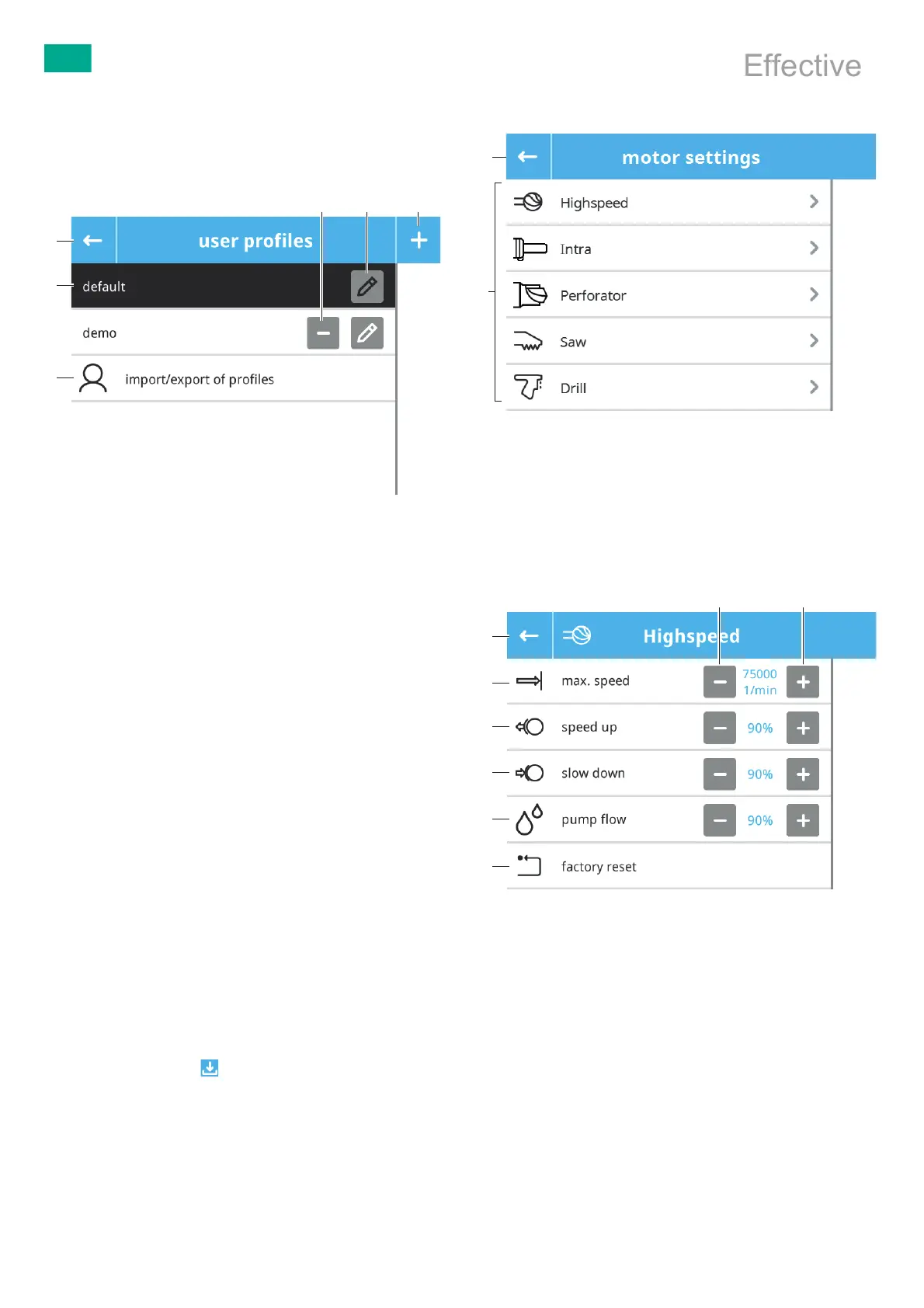
User profiles can be created and edited in the user profiles menu.
Note
When the control unit is restarted, the default profile is loaded automati-
cally.
Fig.9 User profiles
Legend
a Exit menu
b User profile button
c Import/export user profiles from/to USB stick
d Delete user profile
e Modify user profile
f Create user profile
► Exit menu: Press “Exit menu” a button.
► Select user profile: Press the user profile b button.
The active user profile is highlighted in black.
► Create user profile:
– Press button “Create user profile” f.
– Enter the name of the user profile.
The settings below can be made for every user profile:
– Motor settings
– Device settings
– Oscillation settings (only for drill tool GA844)
► Modify user profile: Press button “Modify user profile” e.
► Delete user profile: Press button “Delete user profile” d.
► Import/export user profiles from/to USB stick:
– Inset USB stick into USB port of the control unit.
– Press button “import/export of profiles” c.
– Press button “import” or “export”.
– Follow the instructions on the display.
Note
Profiles must be saved after creation or modification.
► Save Profile: Press button .
6.4.2 Motor settings
The motor settings menu displays the applied part types, see Fig.10.
Fig.10 Motor settings – Overview of applied part types
Legend
a Exit menu
b Buttons for the types of applied parts
► Exit menu: Press “Exit menu” a button.
► View/change the motor settings of a type of applied part: Press the type
of applied part b button.
The submenu for the applied part type selected opens, see Fig.11.
Fig.11 Motor settings – Selected applied part type
Legend
a Factory reset
b Flow rate of the coolant and irrigation pump
c Slow down rate of the applied part
d Speed up rate of the applied part
e Maximum speed (maximum speed/stroke rate)
f Leave menu
g Reduce value
h Increase value
► Leave menu: Press button “Leave menu” f.
► Change motor settings: Press button “Reduce value” h or “Increase
value” g.
The change is implemented immediately. The set value is displayed.
a
b
Document No.: IFU - Version: 3.0 - Document ID: SOP-AIC-5001568 Date/Time Printed/Viewed: 2022-04-13 15:59 (CET)
Effective



 To Next Page