The AEV ProCal SNAP is an electronic recalibration module designed for Jeep JL Wrangler and Gladiator vehicles. Its primary function is to recalibrate the vehicle's speedometer to accurately reflect changes made to tire sizes, axle gear ratios, and transfer case gear ratios. This device allows users to input numerical values for these adjustments by plugging into the OBDII diagnostic port and utilizing the vehicle's stereo's audio equalizer controls.
Function Description:
The AEV ProCal SNAP enables users to:
- Recalibrate Tire Size: Adjust the speedometer to compensate for non-factory tire sizes. Users are instructed to physically measure the tire diameter in inches (to the nearest 10th inch) from the ground to the top of the front tire with the vehicle level and on the ground. The measured value is then entered using the stereo's equalizer settings.
- Adjust Axle Ratio: Modify the vehicle's settings to match replacement axle gear ratios. This function should only be used if the gears have been physically changed. For 4xe owners, the ProCal SNAP specifically supports a 4.50 ratio, and users are advised not to program values over 4.50. This is a workaround for inherent conditions in the transmission control systems.
- Adjust Transfer Case Ratio: Recalibrate settings for aftermarket or different transfer case gear ratios. Similar to axle ratio, this should only be modified if the transfer case has been replaced.
- Set TPMS (Tire Pressure Monitoring System) Threshold: Adjust the pressure at which the TPMS indication light turns off. The light will turn on when one tire is 75% of this set value. The adjustable range for TPMS is 28-50 psi.
- Clear DTC (Diagnostic Trouble Code) Codes: Remove diagnostic trouble codes from the vehicle's system.
- Restore Factory Settings: Revert the vehicle's programming back to its original factory settings.
Usage Features:
The ProCal SNAP operates through a straightforward process involving the vehicle's ignition, OBDII port, and stereo equalizer.
Pairing Process:
- Ignition to RUN: Press the engine start/stop button two times without pressing the brake pedal to put the vehicle into the "RUN" position.
- Insert ProCal SNAP: Plug the ProCal SNAP module into the OBDII port, typically located under the dashboard.
- Wait for Lights: Observe for a blinking green light on the ProCal SNAP and a blinking BRAKE light on the instrument cluster display.
- Initiate Pairing: With a foot on the brake pedal, press and hold the CRUISE ON/OFF button for 3 seconds.
- Confirmation: The vehicle's horn will sound quickly three times, indicating successful pairing. Once paired, the ProCal SNAP is permanently locked to that specific vehicle.
Setting Equalizer Values:
- The stereo source must be set to AM/FM.
- Values are always entered in the order: Bass, Mid, Treble.
- The equalizer settings correspond to the numerical values for the desired recalibration. For example, for 34.2" tires, Bass = 3, Mid = 4, Treble = 2.
- UCONNECT 4 and 4C stereos display EQ vertically, while UCONNECT 3 stereos display EQ horizontally with Bass at the bottom. The order of input (Bass, Mid, Treble) remains critical regardless of display orientation.
Programming Recalibrations:
- Ignition and Insertion: Follow steps 1 and 2 of the pairing process (ignition to RUN, insert ProCal SNAP).
- Wait for Solid Green: Wait for a solid green light on the ProCal SNAP, indicating it is paired and ready.
- Set EQ Values: Adjust the stereo's equalizer settings to the desired numerical values for the specific function (tire size, axle ratio, transfer case, or TPMS).
- Execute Programming Combination: Press and hold the specified combination of the brake pedal and cruise control buttons (SET+, RES, SET-, or CANC) for 3 seconds.
- Confirmation: Programming is complete when the horn sounds twice.
- Unplug and Store: Unplug the ProCal SNAP module and store it in the vehicle.
Additional Functions (Clear DTC Codes / Restore Factory Settings):
- Follow programming steps 1 and 2.
- Press/pull the specified combinations (brake pedal + pull high beam + RES for clearing DTC codes; brake pedal + pull high beam + CRUISE ON/OFF for restoring factory settings) and hold for 3 seconds.
Viewing Current Settings:
- Insert the ProCal SNAP into the OBDII port.
- Turn the radio off.
- Use the Instrument Cluster Display Control Buttons to navigate to AUDIO.
- The Instrument Cluster Display will cycle through showing the current settings for Tire Diameter, Axle Ratio, and 4Low Ratio.
Important Notes:
- The ProCal SNAP does not record changes in the vehicle's history with FCA/Jeep.
- Warranty or recall re-programming may erase ProCal SNAP settings, requiring re-adjustment.
- During programming, if the BRAKE INDICATOR flashes, immediately release the BRAKE PEDAL to avoid errors and warning lights.
- For 4xe models, programming an axle ratio higher than 4.50 is not recommended due to transmission control system conditions.
- A 'check engine light' (Malfunction Indicator Lamp - MIL) may appear after programming in 4xe models but should clear over time or by using the "Clear Codes" function.
Diagnostic Codes (LED Indicators on ProCal SNAP):
- Blinking Green: ProCal SNAP ready to pair.
- Solid Green: ProCal SNAP paired and ready.
- Slow Pulsing Orange: Waiting for vehicle ignition to be turned to RUN.
- Slow Pulsing Blue: Inserted into incorrect vehicle.
- Fast Pulsing Orange: No connection; check harness installation.
- Fast Pulsing Blue: Programming error. Turn off the radio, navigate to AUDIO on the Instrument Cluster Display, record the error message, and contact AEV support.
Maintenance Features:
- Troubleshooting Support: AEV provides customer support via phone and email for issues such as no light on the ProCal SNAP, programming errors (fast pulsing blue light), or questions regarding aftermarket stereos.
- Error Resolution: In case of a fast pulsing blue light (programming error), users are instructed to turn off the radio, navigate to AUDIO on the Instrument Cluster Display, record the error message, and contact AEV support with the information shown.
Technical Specifications (Implicit):
- Compatibility: Jeep JL Wrangler and Gladiator.
- Interface: OBDII diagnostic port.
- Input Method: Vehicle's stereo audio equalizer.
- Output/Feedback: Vehicle's horn, ProCal SNAP LED indicators, Instrument Cluster Display.
- Supported Axle Ratio (4xe): Up to 4.50.
- TPMS Range: 28-50 psi.

 Need help?
 General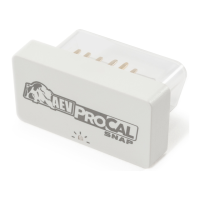

 To Next Page