SMART-SHIFT INSTALLATION
HONDA ODYSSEY 20082010
After calibration (see Section 3), verify that the
vehicle is in Park. The shift cable should t into the
OEM cable connector that is already mounted on
the Smart Shift Nose Cone. Once in place, secure the
cable to the connector by sliding the retaining clip
over the OEM cable and sliding the lock over the
retaining clip.
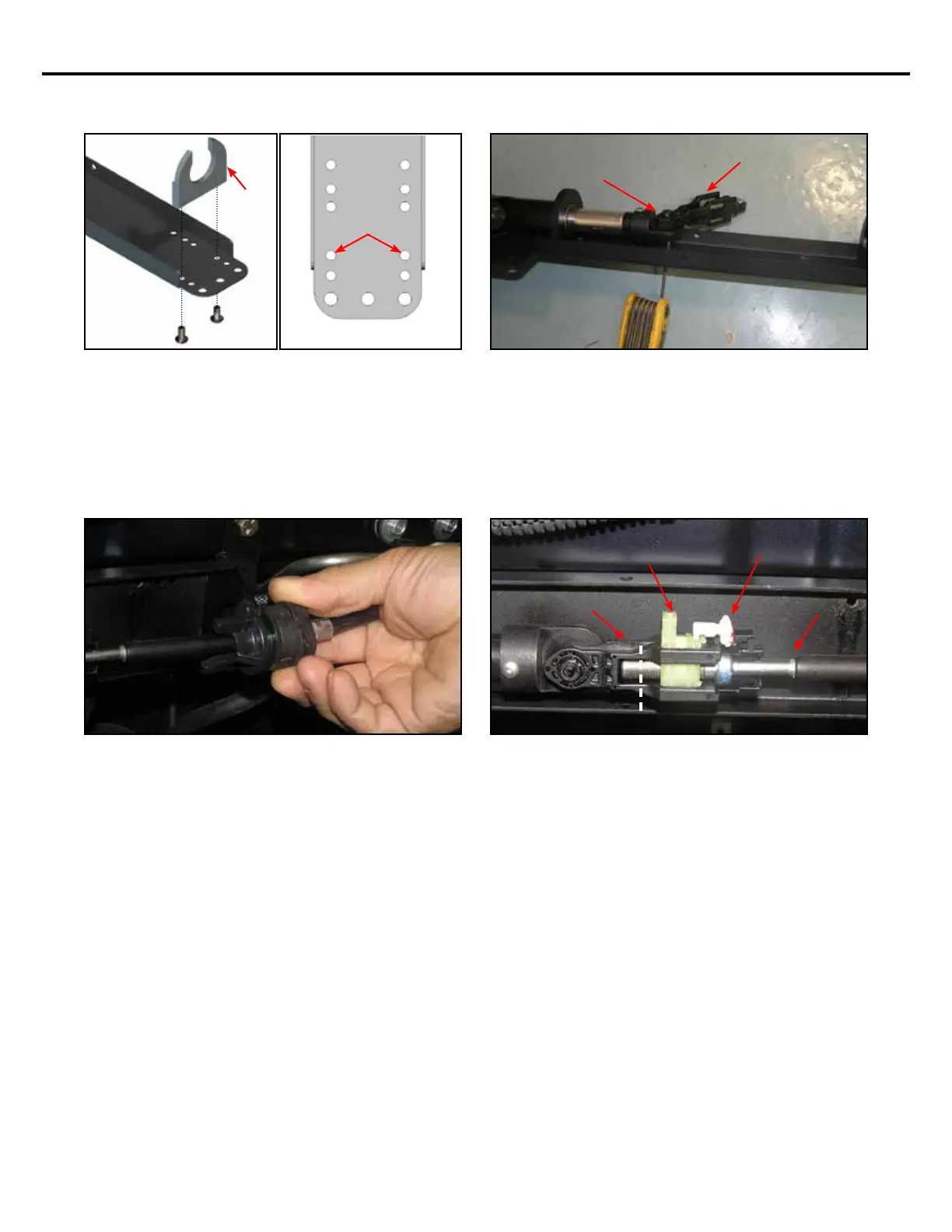
Attach the Cable Bracket (included in KIT-SS-ASSY-
04T) to the end of the Smart Shift bracket in the
location shown in the gures above. The at side of
the bracket should be facing away from the actuator.
Secure this bracket using the (2) provided #10-32 x
3/8” button head screws and a small amount of Blue
Loctite®.
2008-2010 HONDA
ODYSSEY
CABLE
BRACKET
Insert the Smart-Shift pin (included in KIT-SS-ASSY-
04T) through the OEM shift cable connector. Using
the provided #6-32 x 3/8” button head screw, attach
the pin to the actuator Nose Cone as shown using a
small amount of Blue Loctite®.
OEM shift cable connector
Secure the shift cable to the Smart Shift by sliding
the end of the OEM cable onto the Cable Bracket and
rotating.
OEM Shift Cable
Retaining Clip
Retaining Clip Lock
OEM Shift Cable Con-
nector
Smart Shift pin
6


 To Next Page