15
in.k600™
Setting the time
Enter Programming mode by
holding Prog. key pressed
down for 3 sec. The display will
show the current time setting.
Setting the hour:
Use (+) or (-) key to change hour
setting (AM/PM).
Setting the minutes:
Press Prog. key a second time.
Use (+) or (-) key to change
hour setting.
Setting filter cycle start time
To program the filter cycle, you
must enter these parameters:
the start time, duration and
frequency. During a filter
cycle, pumps run for one min-
ute to purge the plumbing,
then Pump 1 runs for the
programmed number of hours.
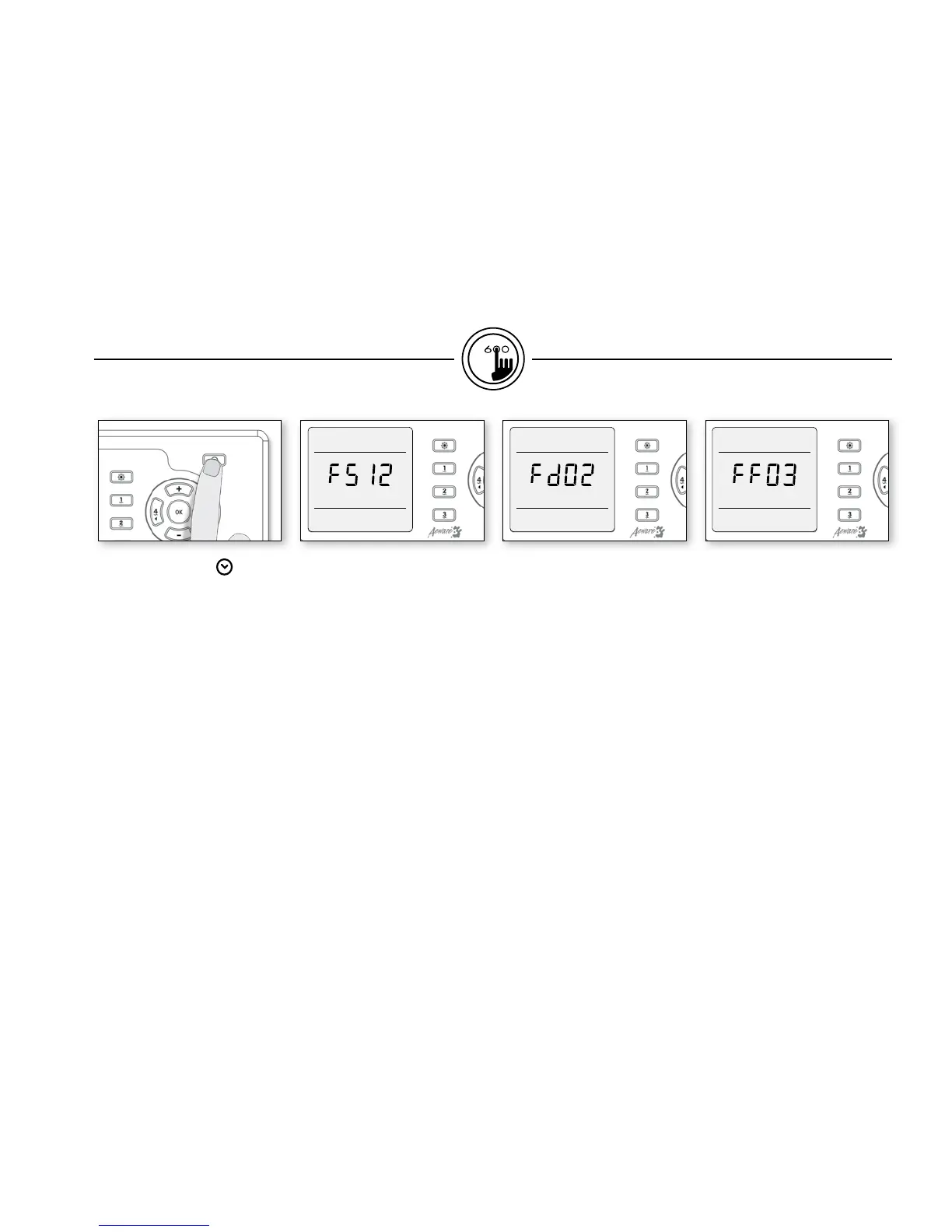
Press Prog. key a third time.
The display will show FSxx,
with "xx" representing the
starting hour.
Use (+) or (-) key to change
setting (0:00 h - 23:00h).
Setting filter cycle duration
Press Prog. key a fourth time.
The display will show Fdxx,
with "xx" representing the
duration in hours.
Use (+) or (-) key to change
setting.
Filter cycle frequency
Press Prog. key a fifth time.
The display will show FFxx, with
"xx" representing the number of
filter cycles per day (up to 4).
Use (+) or (-) key to change
setting.
functions


 To Next Page