8
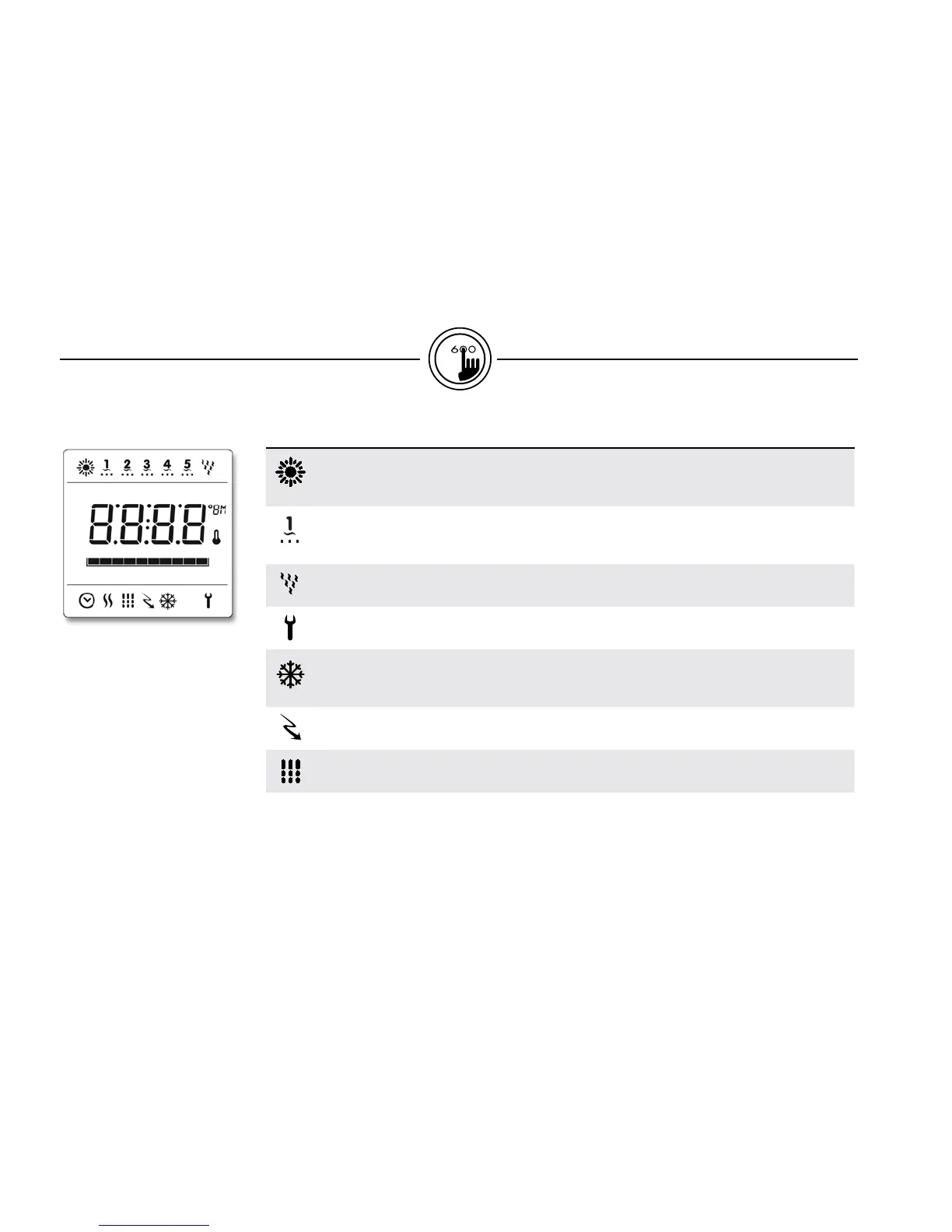
in.k600™icon description
Icon Description
Light icon
The "Light" icon lights up when the light is on. The icon's number of rays is proportional to
the light's intensity.
Pumps icons
The "Pump" indicator numbers light up and their icons become fast animated when pumps
are in high speed, slower animated icons when pumps are in low speed.
Blower icon
The "Blower" indicator icon become animated when blower is on.
Service icon
A problem has been detected. Do not enter the water! Spa service is required.
Smart winter mode icon
The "SWM" icon automatically turns on when freeze protection is active.
It flashes while system purges the spa plumbing.
Economy mode icon
The "Economy" icon lights up when filter cycle is on
Filter Cycle icon
The "Filter Cycle" icon lights up when filter cycle is on. It flashes when filtering is suspended.


 To Next Page