14 15
RUNNING A TREATMENT CYCLE
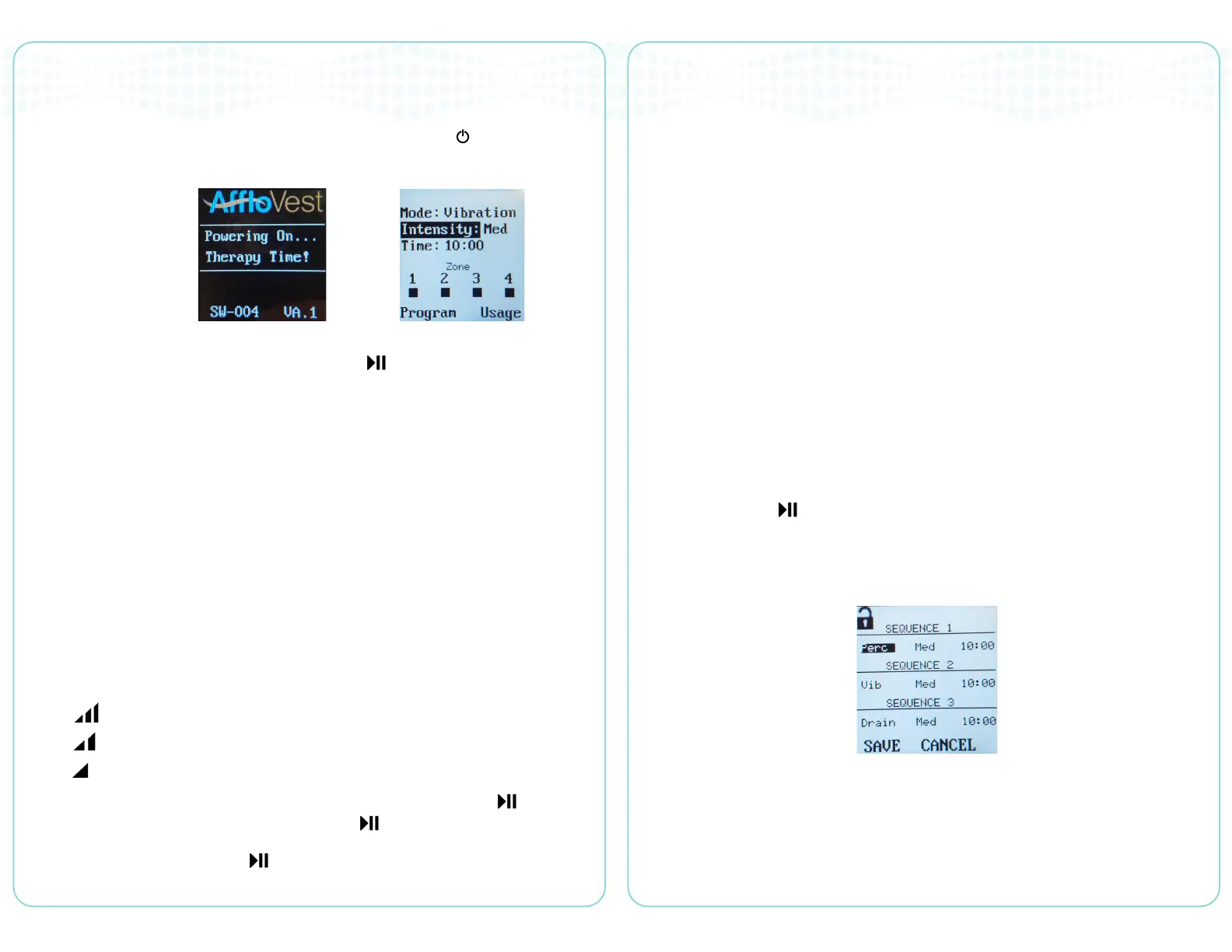
When the AffloVest is properly setup, press and hold the Standby ( ) button on
the controller. After a brief start-up period, the controller will navigate to the main
treatment menu.
Treatment may be started at any time by hitting the button (Play/Pause) from
the main treatment menu. Pressing the following buttons will update the treatment
whether the vest is running or not.
• “P” - Percussion mode, all motors operate in a pulsed fashion.
• “V” - Vibration mode, all motors operate continuously.
• “D” - Drainage mode, motors operate in a pre-programmed sequential fashion.
• “GO” - Automatically starts the GO mode, the system will perform the following
treatments sequentially (by default):
» Percussion mode, 10 minutes duration at Medium intensity (followed by a 10
second pause)
» Vibration mode, 10 minutes duration at Medium intensity (followed by a 10
second pause)
» Drainage mode, 10 minutes duration at Medium intensity
The AffloVest will start in the Medium intensity mode by default. Pressing the following
buttons will update the treatment whether the vest is running or not:
• - HIGH intensity
• - MEDIUM intensity
• - LOW Intensity
While treatment is running, the AffloVest may be paused by pressing the button
(Play/Pause). This shall suspend treatment until the
button is pressed again.
While paused, press and hold the
button to reset the treatment time to the
previous setting.
INDICATORS
The Main Menu for the AffloVest contains the following indicators to provide the user
with useful information:
• Zone Indicator - Displays which motor zones are currently active
during treatment.
• Low Battery Indicator - When the battery is low, a battery icon will flash alerting
the user. The controller will also beep to alert the user to charge the battery.
The Battery for the AffloVest contains the following indicators to provide the user with
useful information:
• Fuel Gauge - Displays the battery level when the button is pressed.
MENU NAVIGATION
Press the “UP” and “DOWN” buttons to navigate through menus on the controller.
To change the value, press the “RIGHT” and “LEFT” buttons while the value is
highlighted.
To navigate to the Program Menu or Usage Menu, navigate to the desired menu
selection. Press the button to navigate to that menu.
PROGRAM MENU
Navigating to the Program Menu allows the user to modify the default GO
treatment settings.
Modify the settings as desired within the following allowable ranges:
• Treatment Type: Percussion, Vibration, Drainage
• Treatment Time: 5 - 15 Minutes
• Treatment Intensity: Low, Medium, High
Figure 1. Welcome Screen Figure 2. Main Treatment Menu
Figure 3. Program Menu


 To Next Page