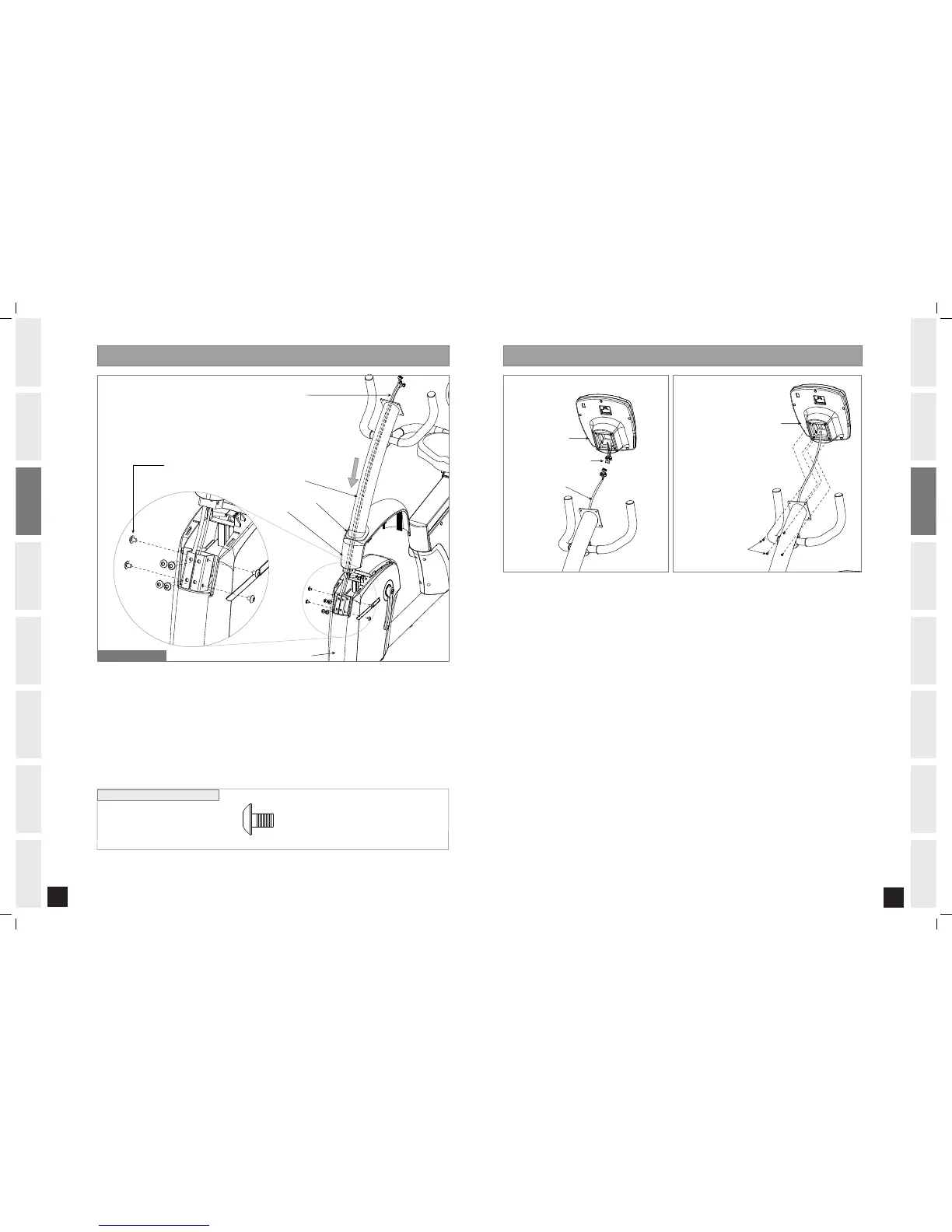
HARDWARE BAG FOR STEP 4 CONTENTS :
Open HARDWARE BAG FOR STEP 4.
Slide TOP CAP GROMMET and TOP CAP onto the bottom of the CONSOLE MAST.
Carefully pull the CONSOLE WIRE through the CONSOLE MAST using the twist tie located inside the
CONSOLE MAST.
Attach the CONSOLE MAST to the MAIN FRAME using 8 BOLTS (E).
Slide TOP CAP GROMMET and TOP CAP down CONSOLE MAST and carefully snap TOP CAP into the
MAIN FRAME.
A.
B.
C.
D.
E.
Note: There is no hardware bag for this step. All hardware is pre-attached.
Attach the CONSOLE MAST WIRES to the CONSOLE WIRES.
Carefully tuck the CONSOLE MAST WIRES into the CONSOLE MAST before attaching CONSOLE.
Attach the CONSOLE to the CONSOLE MAST using the 4 PRE-ATTACHED SCREWS (screws will have to be
removed from the console first).
NOTE: Be Careful Not to Pinch Wires!
A.
B.
C.


 To Next Page