-Dati tecnici e caratteristiche soggetti a cambiamenti senza preavviso -Technische Daten und Eigenschaften mit Änderungen ohne Anzeige
-All specifi cation subject to change without notice - Données techniques et caracteristiques suiettes à des changements sans avis
35
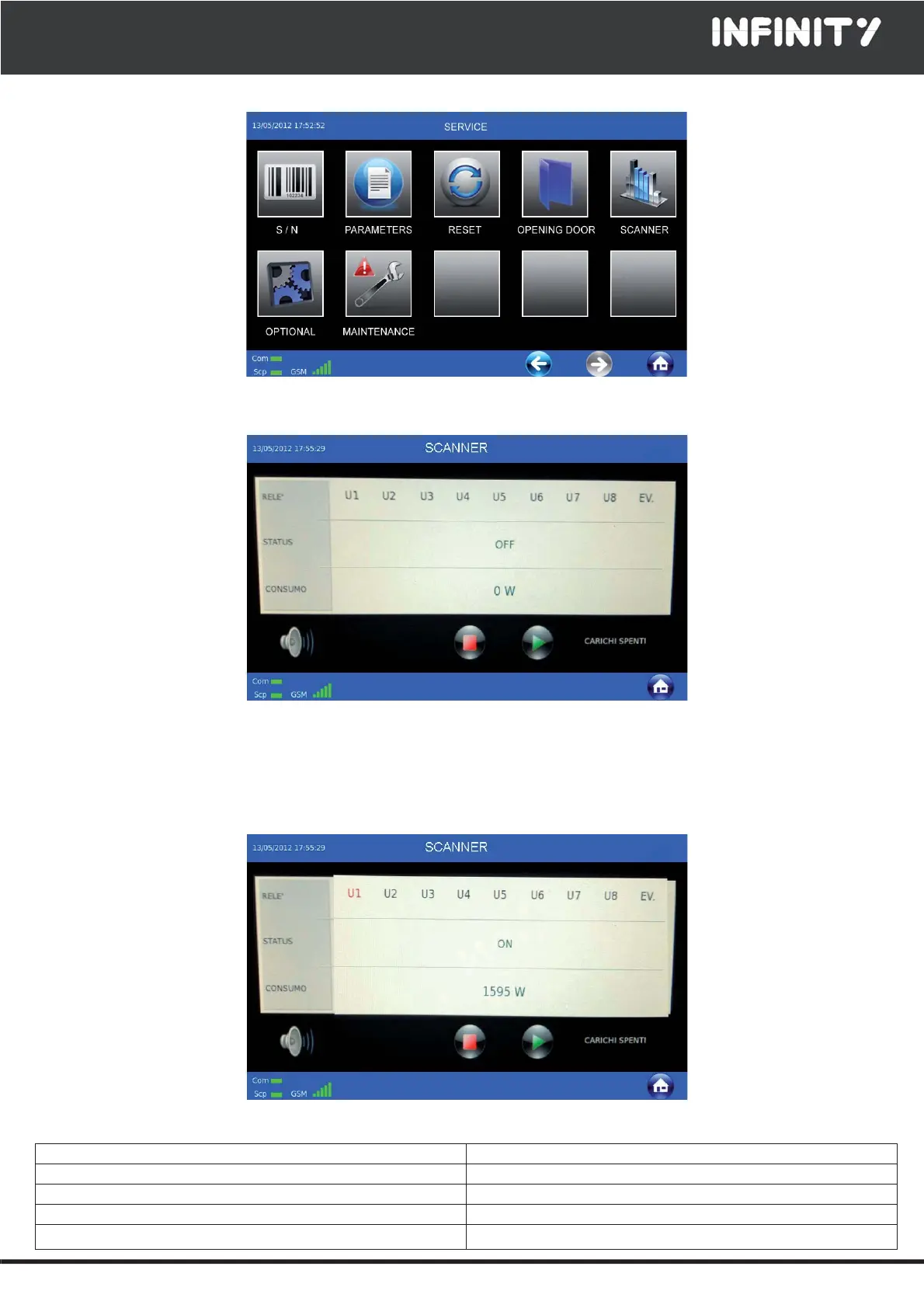
You will then gain access to the SERVICE functions.
Press "SCANNER"
This function is used to check that the components are enabled and properly connected.
To run the test on the single components, press "PLAY" and wait for the related "Ux" value to change to a red color, which
indicates "ON" status, and for the consumption in W for the tested component to appear.
Then, press the "PLAY" key again to move to the next component test.
After you have tested all the outputs, press the "HOME" icon.
The output acronym/component pairing are:
U1 Compressor U6 Heated probe (optional)
U2 Heating (optional) U7 Hot Gas
U3 Door frame heater U8 Internal lighting (optional)
U4 Pump-Down EV Evaporator fans
U5 Sterilizer (optional)


 To Next Page