support@agasio.com Page | 47 713-893-4514
17. E-mail and FTP Settings
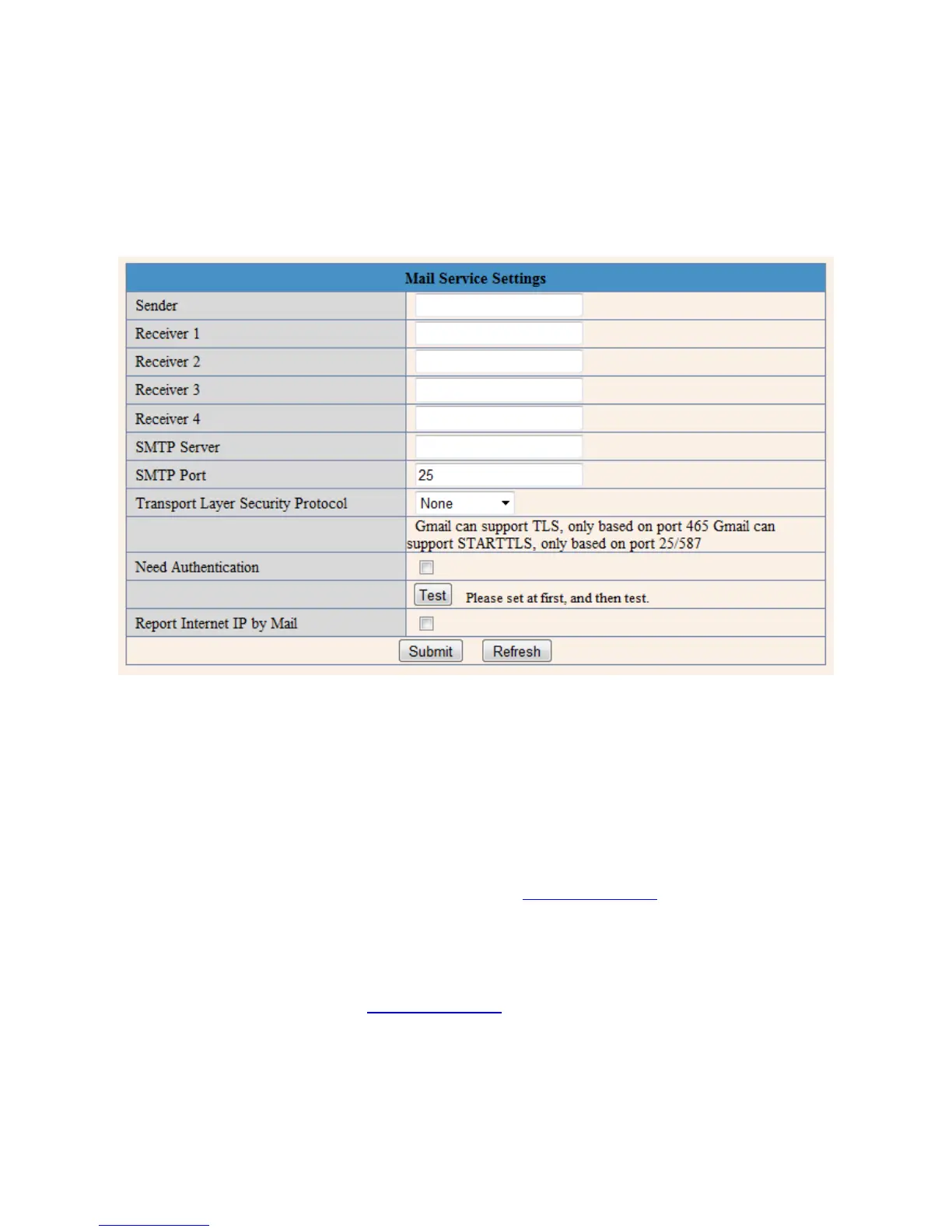
Figure 17.1 – The Mail Service Settings Page
Seen in Figure 17.1 is the Alarm E-mail Notification Settings. Configuring this page will allow you to
receive e-mail alerts when motion is detected to your e-mail, you will also receive pictures of the motion
detection to your e-mail address if you choose to do so.
The fields listed are detailed as follows.
Sender – This should be your e-mail address, for example, Agasio@gmail.com.
Receiver 1 – 4 – These fields are for the e-mail addresses you would like notifications sent to. Put your
own e-mail address as well as any additional e-mail addresses in these fields.
SMTP Server – The SMTP server is going to be the last part of your e-mail address with the word “mail”
in the front. For example, our e-mail, Agasio@gmail.com, the SMTP server will be “mail.gmail.com.”
SMTP Port – Usually the SMTP port is 25, however for certain e-mail providers the SMTP port differs.
Some other ports are 465 and 587. Check with your e-mail provider if you are unsure of your SMTP port.


 To Next Page