INSTRUMENTS
04.9
11-04
RoGator 418
Selecting COM VIEWER allows the user to exam-
ine the incoming data stream and is intended for
use only as a diagnostic tool. The COM viewer can
read three communication port buffers; the user
should select the one which is connected to the
engine.
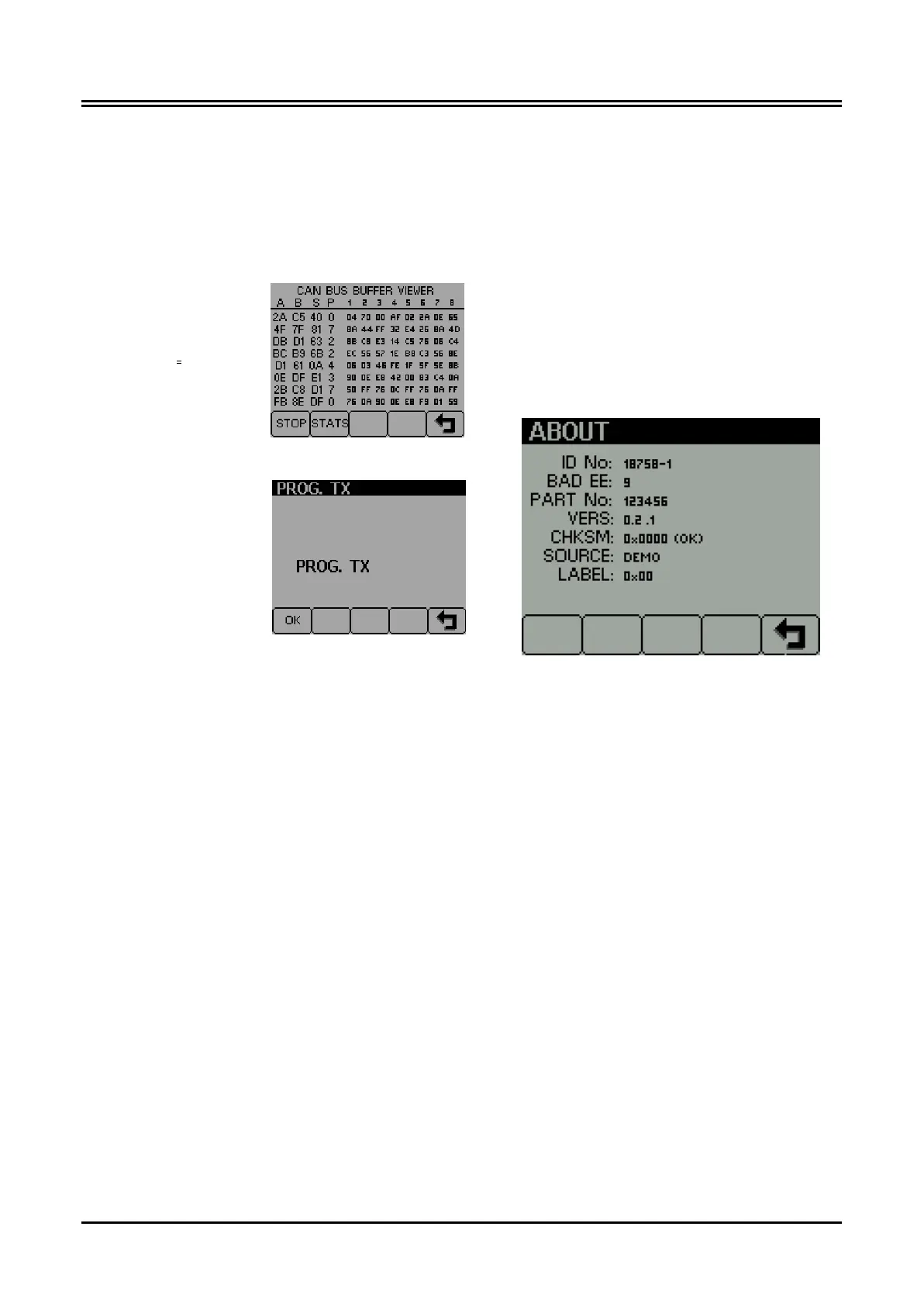
The CAN viewer screen
allows the user to view
the most recent mes-
sages in the CAN bus
receive buffer.
The PROG TX screen
allows the user to trans-
mit the GEM application
program, which is stored
in Flash memory, onto
the CAN bus. Any other
GEM displays on the bus
will be updated with the
application program from
the transmitting GEM.
Press the ‘OK’ key to initiate programming.
Note: It is strongly recommended that all other
CAN equipment is disconnected from the bus dur-
ing this process.
The ABOUT screen shows the following informa-
tion about the GEM:
ID NO: Unique identifying number of the dis-
play
BAD EE: Number of writes on the EEPROM
PART No: Software part number
VERS: Software version number
CHKSM: Flash memory checksum
SOURCE: Display the source of received data
LABEL: Allocated Label on the bus. Each unit
on the same bus should have a dif-
ferent label.











 To Next Page