2. Start using
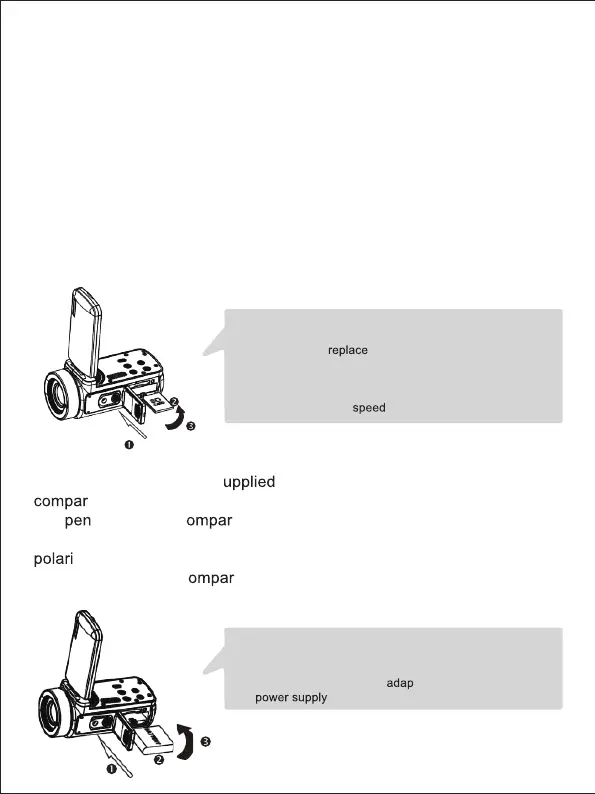
2.1 Inserting the memory card
The camcorder supports SD memory card up to 128 GB. It is necessary
to insert a memory card before using it to store more photos or videos.
When the battery is low or replaced, the media files stored on the
memory card would not be lost.
Please follow the instructions below to insert it properly:
1. Open the battery compartment by sliding its locking button.
2. As shown below, insert the memory card into the dedicated slot with
the side of the metallic contact facing up and then push it in until
hearing a click indicating that it has been well installed.
3. Close the battery compartment cover until you hear a click again
indicating that it is securely closed.
Warning!
Please format the memory card before using the camcorder.
Do not remove or
the memory card when recording,
otherwise you could damage it or lose the files stored on it!
Some memory cards may also cause the camcorder crash or
malfunction.It is recommended to use a memory card with
C10 or higher transfer
as storage medium.
Warning!
Please install the battery correctly, otherwise you may not be
able to turn on the camcorder or damage it.
Use a standard charger with
ter to connect it to an outlet
with
of 100V-240V / 50-60HZ.
2.2 Installing the lithium battery
Install the lithium battery s
with the camcorder in the battery
tment following the instructions below:
1. O
the battery c tment by sliding its locking button.
2. As shown below, insert the battery into the dedicated slot in the correct
ty direction.
3. Close the battery c
tment cover until you hear a click again
indicating that it is securely closed.
3



 To Next Page