2.8 Photo mode
In
to mode, you can take ctures and store them in the internal
memory of the camcorder or on the memory card.
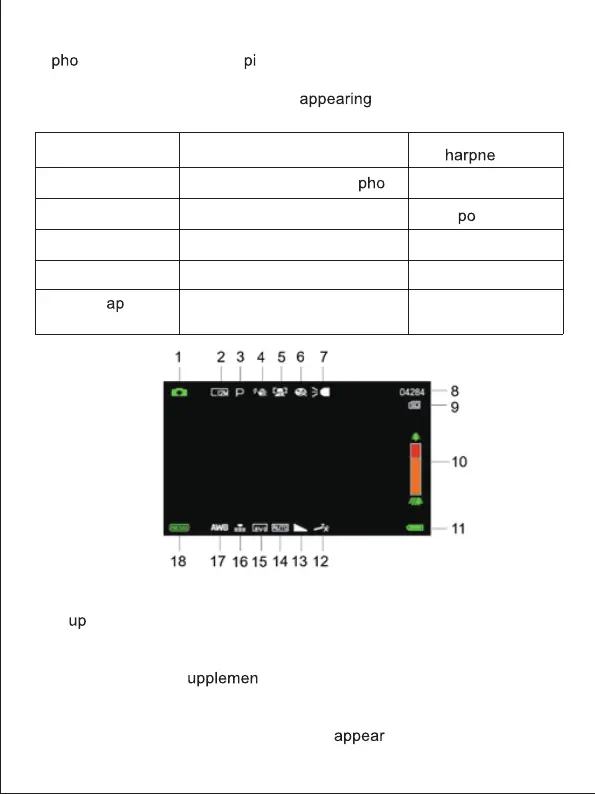
Here is the signification of each icon
on the screen in video
mode:
2.9 Zoom
The camcorder has a digital zoom function allowing you to enlarge your
shot
to 18 times. Slide the Zoom button to the right (T) to zoom in, then
slide it to the left (W) to zoom out.
2.10 Using the LED s
tary lighting
In low light conditions, it is better to use the LED light built into the front of
the camcorder above the lens. Press the LED button (or Power button) to
turn on the LED lighting, an icon will then
on the screen to indicate
that it is well on.
1.Photo mode 7. Indicator light
18. Setting
configuration
13.S
ss
14. ISO
15. Ex
sure
16. Photoquality
17. White balance
8. Remaining number of
tos
9. Memory card indicator
10. Zoom
11. Battery charge
12. Photo shooting effect
2. Photo resolution
3. Scene
4.Anti-shake
5. Face detection
6.Smile c
ture
6



 To Next Page