-3-
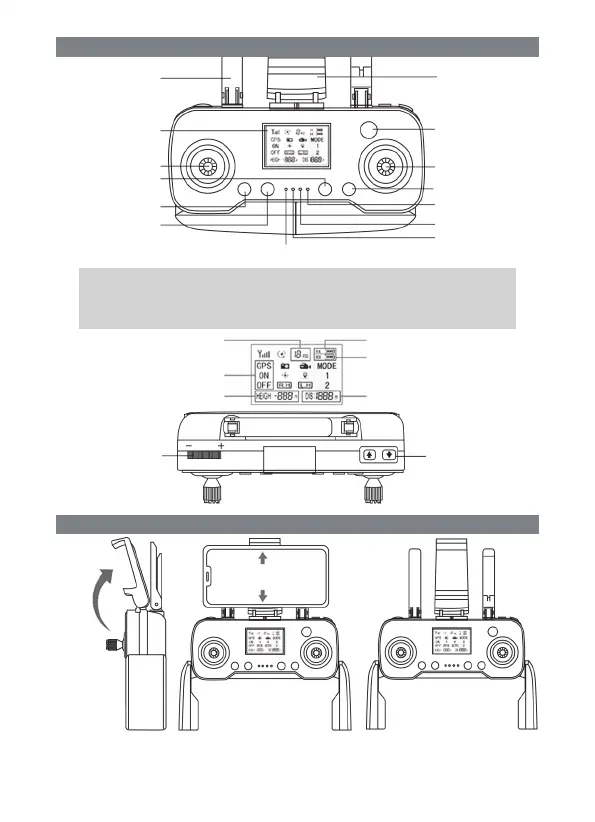
Remote control function key and name Description:
Instructions for remote control handle/mobile phone rack:
Remote control optional:
With LCD,
Without LCD
Note:
Note: Please follow the geomagnetic calibration steps for geomagnetic calibration and gyroscope calibration steps in outdoor
operation before taking off. Otherwise, it will cause the missing flight. (It is GPS mode after power on by default. We do not
need to press GPS button. The flight back light is constant ON without any flicker after searching 12 GPS signals and correct
calibration. It can de-block and take off.) The remote controller displays that GPS ON is startup status while GPS OFF is
shutdown status. (Note: It has return mode when default mode 1 is GPS mode. Mode 2 is optical flow mode with no low voltage
return, one key return and a series of GPS function. Please pay attention to the flight distance and height when using it.)
Note: For mobile phone control,
please refer to the supplied
camera manual mobile phone rack
FIG. 1 FIG. 2 FIG. 3
Lift the mobile phone rack in the middle of the remote controller upward (FIG.1), and stretch upward to
place the mobile phone (FIG. 2).
Remote control handle: Pull the bottom handle of the remote control down from the middle position and
rotate it into place(FIG. 3).
Geomagnetic indicator
Aerial Mobile phone rack
Power switch
Right control lever
One key return
Power indicator
GPS indicator
Charging indicator
Liquid crystal display
Left joystick
Geomagnetic calibration
GPS switch
Number of satellites
Velocity conversion
Remote control Electric quantity
Gimbal Camera
adjustment
Drone Electric quantity
Flying distance
Gyroscope calibration
reset
GPS switch
Flying height


 To Next Page