-4-
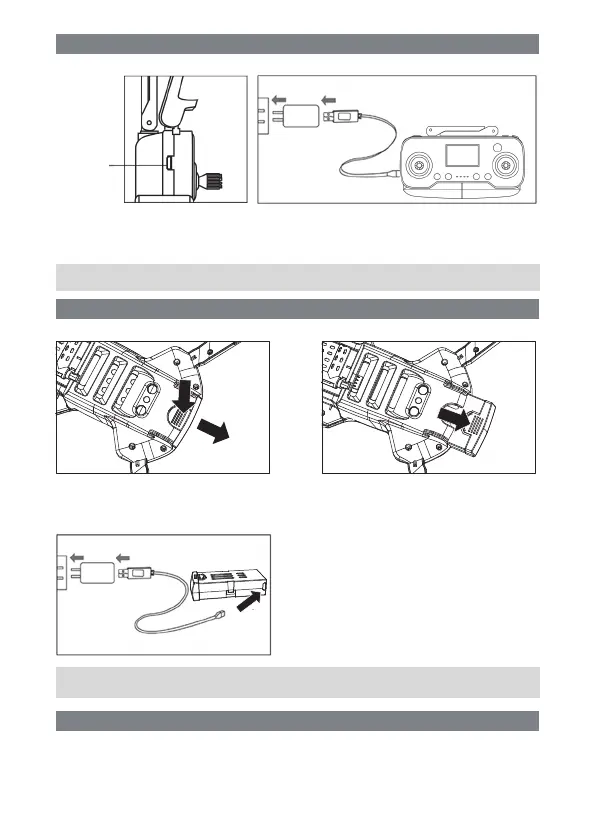
Instructions for charging controller:
Instructions for charging drone lithium battery:
Pre-flight environmental requirements:
Charging
socket
Insert the charging plug of the charging wire into the charging socket of the remote controller, and then
connect the USB charger plug to the computer or mobile phone charger for charging. When charging,
the charging indicator lights up, and the indicator lights out after full charging. (Charging time is about 60
minutes)
Take out the UAV battery:Press on as shown in Figure 1,pull back and remove the battery upward.
Battery charging steps:
Note: If the charge indicator does not change during charging, this indicates that the battery is fully
charged and does not need to be recharged
Note: If the battery is plugged into the charger and the Android headlight on the battery is not on, no
recharging is required
Plug the USB Android head into the battery and plug
the USB charger Connect the computer or mobile
phone charger to charge. When charging, the Android
headlight on the battery lights up, and when fully
charged, the red light goes out.
(Charging time is about 180 minutes)
Please choose an open indoor or outdoor environment without rain and snow and wind force less than
Level 4 to fly. Please stay away from people, trees, electric wires, tall buildings, airports and signal
transmission towers when flying.


 To Next Page