EasyManua.ls Logo

Ahuja CPA-760 - User Manual

Ahuja CPA-760
4 pages
Print Icon
To Next Page IconTo Next Page
Loading...
-10
6
2 2
+10
6
8
4
0
4
8
LOW IMPEDANCE MIC INPUTS
-10
6
2 2
+10
6
8
4
0
4
8
TAPE
MIC-1
MIC-1
MIC-2
BASS
OUTPUT LEVEL
MASTER
ON -13 -8 -3 0 +3
TREBLE
MIC-2
MIC-3/AUX
MIC-3
MIC
MIC-4/TAPE
MIC-4
PLAY
FF
EJECT
CPA-760
AC/12VDC
AUTO STOP CASSETTE
POWER
6
10
8
0
2
4
6
10
8
0
2
4
6
10
8
0
2
4
6
10
8
0
2
4
6
10
8
0
2
4
CPA-760
PA CASSETTE PLAYER
OPERATION MANUALOPERATION MANUAL
70W RMS / 100W Max.
Please read this manual thoroughly before making connections and turning on the power. Following the instructions in this
manual will enable you to obtain optimum performance from your new AHUJA PA Cassette Player.
Please retain this manual for future reference.
®
SPECIFICATIONS
GENERAL
PLAYER SECTION
Power Supply : AC - 220 -240V 50/60 Hz*
Track System : 2 Track Monaural
: DC - 1 2 -14 V Car Battery
Tape Speed : 4.75 cm / sec.
Power Consumption : AC - 140VA at rated output
FF Time : 190 sec. approx. (C-60)
: DC - 5 A / 12V
Wow & Flutter : 0.35% Nominal
Semiconductors : 17 Transistors
Tape Speed Accuracy : Within +2% -1%
: 11 Diodes
: 2 Zener Diodes
AMPLIFIER SECTION
: 6 LEDs 1 IC
Power Output : 100W RMS (max)
Protections : AC Fuse(2 Amp, 250V)
: 75W RMS at 10% THD
: DC Fuse(10 Amp)
: 70W RMS at 5% THD (Rated)
Indicators : Pilot LED
Input Channels : 4 × Mic 0.6mV (Lo-Z) / 4.7k
: 5 LED Array for output level
: 1 × Aux 100mV / 470k
Dimensions : W385 × H130 × D310 mm
Frequency Response : 50Hz -15,000Hz ±3dB
Net Weight : 9.6 kg
S/N Ratio : >55dB
Tone Control: : Bass:-10dB +7dB at 100 Hz
: Treble: -10dB +7dB at 10 kHz
* This unit is connected to 240V tap when leaving the factory.
Output Taps for speaker : 4, 8, 16 & 100 V
matching
Owing to continuous product upgradation,design & specifications
are subject to change without notice.
Line Output : 1V / 3.5 k
Specifications claimed are subject to permissible production
tolerances.
FEATURES
n Imported Tape Deck Mechanism with Auto Stop used.
n Provision for automatic changeover from AC to Battery Operation ensuring continuity of program.
n 100V line for long distance speaker connections.
n Separate active BASS and TREBLE controls for shaping tonal quality of music & speech as desired.
n LINE OUT for connecting additional booster amplifier.
n Four low impedance Microphone inputs and one Aux. Input. The Aux input is for connecting Mixer, CD Player, etc.
All manuals and user guides at all-guides.com
Question and Answer IconNeed help?

Do you have a question about the Ahuja CPA-760 and is the answer not in the manual?

Summary

Product Features

Technical Specifications

Front & Rear Panel Controls

Speaker Connections

Details on connecting speakers to the amplifier, covering low impedance and 100V line options.

Cassette and Operation Procedures

AC Mains Operation

Instructions for powering the unit using AC mains supply and setting initial controls.

Operating Procedure

Step-by-step guide for using the cassette player and amplifier controls for optimal sound.

Precautions, Maintenance & Trouble Checks

Precautions

Important safety and usage guidelines to prevent damage or poor performance.

Maintenance

Essential maintenance steps for ensuring long-term, trouble-free service of the unit.

Trouble Checks

Common problems and their solutions for the cassette player and amplifier sections.

Overview

The AHUJA CPA-760 is a PA Cassette Player designed for public address applications, offering a maximum output of 100W RMS (70W RMS at 5% THD). It integrates a cassette player with an amplifier, providing a versatile solution for audio playback and voice amplification.

Function Description:

The device features an imported tape deck mechanism with an auto-stop function, ensuring reliable cassette playback. It is equipped with an automatic changeover system that switches between AC and battery operation, guaranteeing uninterrupted program delivery. For speaker connections, it offers a 100V line output suitable for long-distance speaker connections, minimizing power loss over extended cable runs. Additionally, it provides low impedance speaker taps for 4, 8, and 16 ohms, catering to various speaker configurations.

The CPA-760 includes separate active BASS and TREBLE controls, allowing users to precisely shape the tonal quality of music and speech according to their preferences. A LINE OUT jack is provided for connecting an additional booster amplifier, enabling expansion of the sound system for higher power output. The unit has four low impedance microphone inputs and one auxiliary input. The auxiliary input is designed for connecting external audio sources such as mixers, CD players, or tuners.

Important Technical Specifications:

Player Section:

  • Track System: 2 Track Monaural
  • Tape Speed: 4.75 cm/sec.
  • FF Time: Approximately 190 seconds (C-60 cassette)
  • Wow & Flutter: 0.35% Nominal
  • Tape Speed Accuracy: Within +2% -1%

Amplifier Section:

  • Power Output: 100W RMS (max), 75W RMS at 10% THD, 70W RMS at 5% THD (Rated)
  • Input Channels:
    • 4 x Mic: 0.6mV (Lo-Z) / 4.7kΩ
    • 1 x Aux: 100mV / 470kΩ
  • Frequency Response: 50Hz - 15,000Hz ±3dB
  • S/N Ratio: >55dB
  • Tone Control:
    • Bass: -10dB +7dB at 100 Hz
    • Treble: -10dB +7dB at 10 kHz
  • Output Taps for speaker matching: 4, 8, 16Ω & 100V
  • Line Output: 1V / 3.5kΩ

General:

  • Power Supply: AC 220-240V 50/60 Hz* (unit connected to 240V tap from factory), DC 12-14V Car Battery
  • Power Consumption: AC - 140VA at rated output, DC - 5A / 12V
  • Semiconductors: 17 Transistors, 11 Diodes, 2 Zener Diodes, 6 LEDs, 1 IC
  • Protections: AC Fuse (2 Amp, 250V), DC Fuse (10 Amp)
  • Indicators: Pilot LED, 5 LED Array for output level
  • Dimensions: W385 x H130 x D310 mm
  • Net Weight: 9.6 kg

Usage Features:

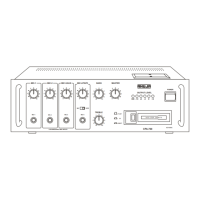
Front Panel Controls:

  • MIC-1 to MIC-4 Input Jack Sockets: For connecting low impedance microphones.
  • TREBLE Control: Adjusts high frequency signals.
  • MIC-4 / TAPE Selector Switch: Toggles between MIC-4 input and tape playback.
  • FF / EJECT Lever: Used for fast winding tape (partially pushed) and ejecting cassettes (fully pushed).
  • CASSETTE SLOT: For loading cassettes.
  • POWER Switch: Turns the unit ON/OFF.
  • LED ARRAY: Indicates output level.
  • POWER LED: Illuminates when the unit is ON.
  • MASTER Control: Overall volume adjustment.
  • BASS Control: Adjusts low frequency signals.
  • MIC-1 to MIC-4/TAPE Volume Controls: Individual volume adjustments for each input.

Rear Panel Controls:

  • AC Mains Fuse (2Amp 250V): Overcurrent protection for AC operation.
  • AC Mains Cable with plug: For connecting to AC power.
  • BATTERY Terminal Strip: For connecting a 12V car battery.
  • SPEAKER Terminal Strip: For connecting speakers or driver units.
  • EARTH Terminal: Ground connection.
  • LINE Output Jack Socket: For connecting additional booster amplifiers.
  • AUX Input Jack Socket: For connecting auxiliary audio sources.
  • ABS Legs: For supporting the unit on its back during handling.

Operating Procedure:

  1. Cassette Insertion: Hold the cassette with the exposed tape area facing right and the full reel towards you. Insert the cassette firmly into the slot until it snaps into position. To retrieve, push the FF/EJECT lever fully. The auto-stop system automatically stops the cassette at the end of playback.
  2. AC Mains Operation: Set all volume controls to '0' and power switch to OFF. Connect speakers and inputs. Plug in the AC power cord and switch to POWER. The pilot LED should glow.
  3. Volume and Tone Adjustment:
    • Set all mic volume controls to '0', raise MASTER volume to 7 or 8.
    • Set BASS and TREBLE controls to '0' (Flat).
    • Slowly raise MIC-1 volume to desired level, avoiding howling/feedback. Repeat for other MIC inputs.
    • For a fourth microphone, use MIC-4 jack and set MIC/TAPE selector to MIC.
    • For Aux input, use the RCA jack on the rear panel and adjust MIC-3/AUX control.
    • Use MASTER control for overall volume.
    • For tape playback, set MIC/TAPE switch to TAPE.
    • Adjust BASS (boosts/cuts low frequencies) and TREBLE (boosts/cuts high frequencies) controls as desired.

Speaker Connections:

  • Low Impedance: Use 4, 8, or 16 ohm taps for speakers within 50 meters. Ensure total speaker impedance equals or exceeds the specified impedance on the terminal strip. Use 23/36 or thicker cable.
  • 100V Line: For speakers or driver units beyond 50 meters, use the 100V line output with line matching transformers for each speaker to prevent excessive power loss.

Maintenance Features:

Precautions:

  • Avoid using in high ambient temperatures.
  • Tighten loose tape before insertion to prevent entanglement with the pinch roller.
  • Ensure speaker impedance matches or exceeds the selected impedance on the output terminal strip to prevent insufficient output or component overheating.
  • C-120 cassettes are not recommended due to their thinness.

Maintenance for Trouble-Free Service:

  • Regularly clean the Head, Capstan, and Pinch Roller, as dirt or magnetic material can cause loss of high frequencies, reduced output, and unstable tape speed (increased Wow and Flutter).
  • To clean, remove the plastic cover by unscrewing. Clean the head and pinch roller with a cotton bud dipped in methylated spirit/alcohol.
  • Keep magnets and metallic objects away from the head. Magnetized heads can cause noise and loss of high frequencies. Demagnetize the head and metallic parts after approximately 50 hours of use. Consult your dealer for demagnetization.

Trouble Checks:

  • Pilot LED not glowing: Check AC mains plug, car battery connections (ensure correct polarity), and fuses (AC 2Amp 250V, DC 10Amp).
  • Hum and noise: Check microphone quality/cables and ensure AC mains cable is not running close to input cables.
  • Poor sound quality (Microphone): Ensure proper impedance matching (use LOW IMPEDANCE microphones or set impedance switch to LOW).
  • Unit getting hot: Ensure proper ventilation and check for speaker mismatch causing overloading.
  • Auto stop activates immediately: Check if tape is fully wound on the right reel or if cassette spools are jammed.
  • Tape moving but no output: Check if tape volume control is at minimum or if MIC/TAPE selector switch is at MIC position.

Ahuja CPA-760 Specifications

General IconGeneral
BrandAhuja
ModelCPA-760
CategoryCassette Player
LanguageEnglish

Related product manuals