16
Press!!/"!to!select!Photo/Music/Movie/Text!icon.!
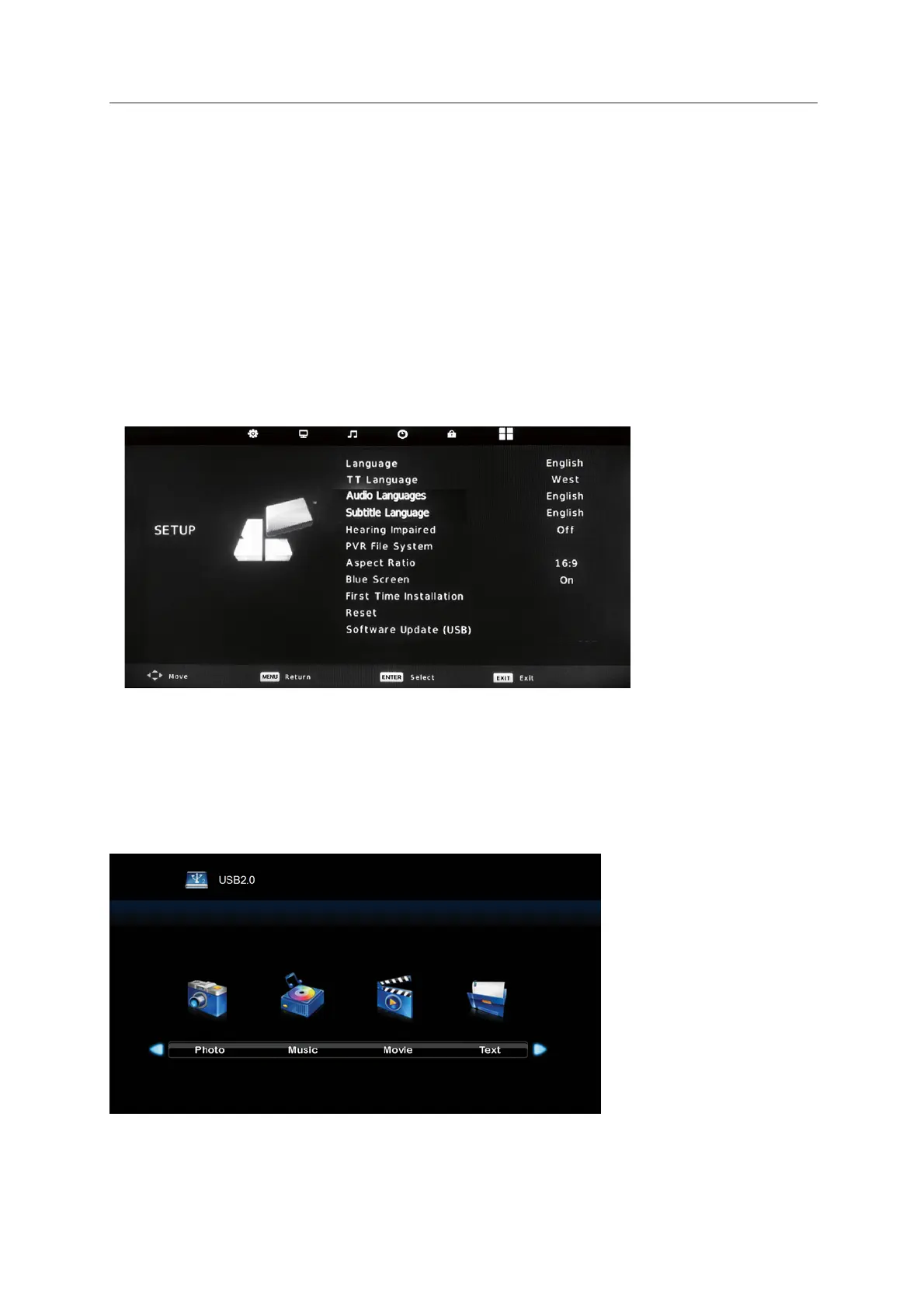
! Press!MENU!to!display!the!main!menu!,!then!press!/"!to!select!!SETUP.
! !Language:!Set!the!OSD!display!language.! !
! !Language:!PressTT button
▼ / ▲ / ◄ / ►
to select TT language.
Setup menu
Multimedia!
The!color!of!the!icon!will indicate!whether!your!TV!has!detected!a!USB!memory!or!not:
!
Gray:
!
No
!
!Blue:!Yes
system
“Off”
! Press!to!select !the!items !
! !Press!to!set!!Hearing!Impaired!to!“On”!or! !
! PVR!File!System: Set!the!recording!file! !
! First!Time!Installation:Press “" “or “ENTER” to enter relevant options including OSD Language
! Reset: Recall the default setting.
! Software!Update(USB): To upgrade the software.
and Country.
(Only for DTV mode).
(Only for DTV mode).
(Only for DTV mode).
“ENTER”
!
!!Audio!Languages/Subtitle !Language:!!!!!!!!!!!!!!!!
Hearing Impaired:


 To Next Page