ATTENTION
Be sure to configure the settings according to the
connected devices. Otherwise, the station may not
operate properly.
NOTE
While in the settings menu, no operations such as calls or
notifications can be performed.
The station will enter standby mode (the display will turn
off) after about one minute of no operation. If this occurs,
any unfinished setting changes will be lost.
(*): The setting values should be the same as those of other
monitor station.
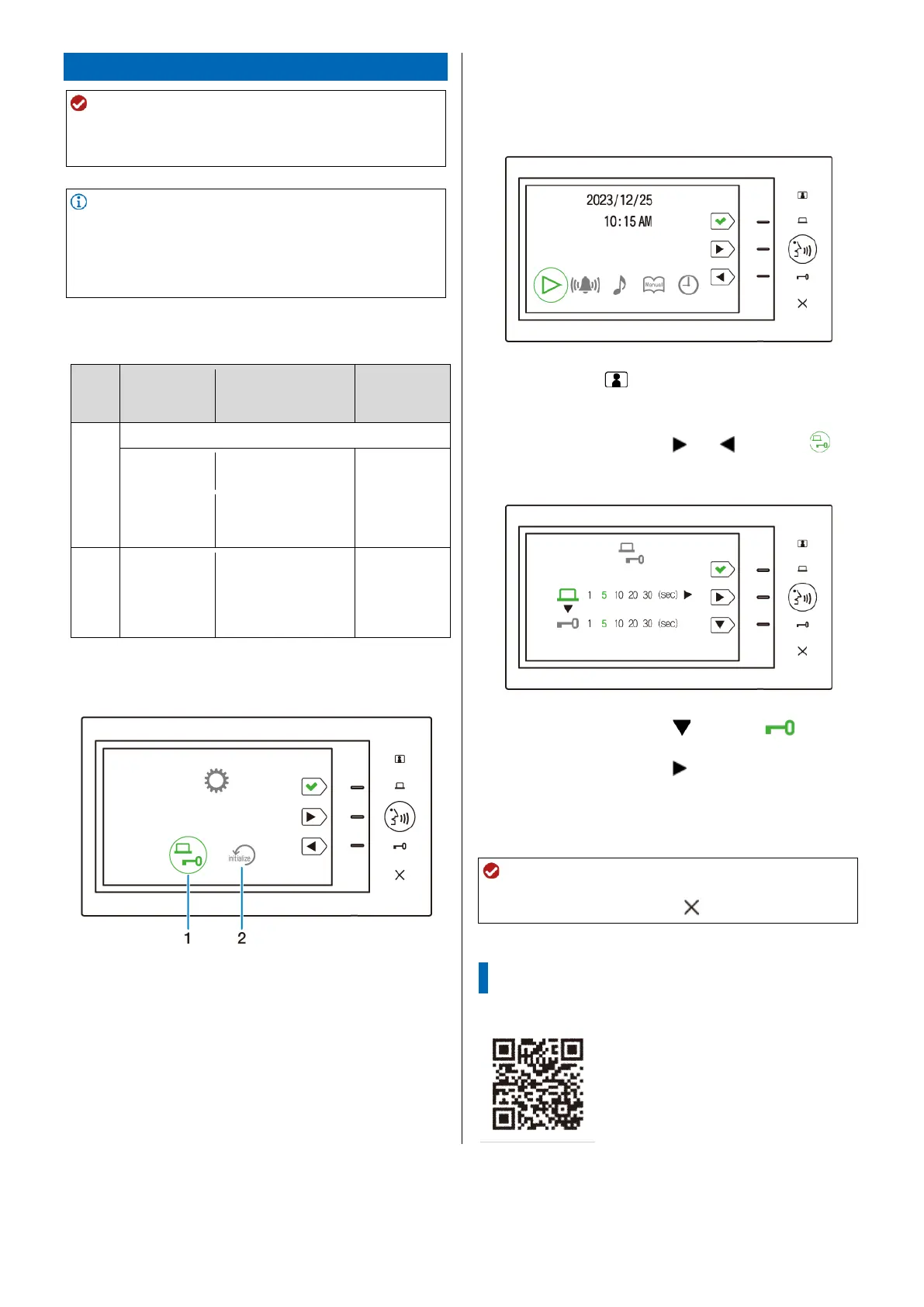
Installer setup menu screen
Setting procedure (e.g., setting the
door release duration)
1 Tap one of the function buttons in standby mode.
The menu screen will be shown.
2 Tap and hold for 5 seconds or more.
The installer setup menu screen will be shown.
3 Tap the function button ( ) or ( ) to select ,
then tap the function button (✔).
The contact output time screen will be shown.
4 Tap the function button ( ) to select .
5 Tap the function button ( ) to adjust the door
release duration.
6 Tap the function button (✔) to apply changes.
ATTENTION
Be sure to tap the function button (✔) to apply changes.
Changes will not be applied if is pressed.



 To Previous Page