
 Need help?
Do you have a question about the AIPTEK Pocket Pocket DV and is the answer not in the manual?
Guide to installing the software for the Digital Video Camera Manager.
Instructions for connecting the camera hardware using USB cables.
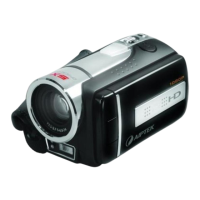
Overview of the Pocket DV's features and capabilities.
Information on powering the camera using AA batteries or USB cable.
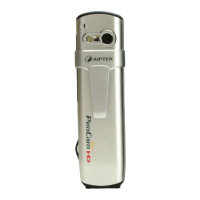
Diagrams and labels identifying the various buttons and components of the camera.
Step-by-step guide on how to power the camera on and off.
Explanation of icons and indicators shown on the camera's LCD screen.
Details on image size, quality (H/L), and maximum photos for still images.
Information about the QVGA video recording format for AVI movies.
Instructions on positioning the viewfinder for optimal viewing.
Guidance on setting focal length for different shooting scenarios.
Steps to capture single still pictures using the camera.
How to record and stop video clips in AVI Movie mode.
Instructions for setting up and using the 10-second self-timer for photos.
Procedure to delete the most recently taken picture or AVI movie.
Steps to delete all stored pictures and AVI movies from the camera.
Explanation of the counter display and its limitations beyond 999 pictures.
Information on low battery warnings, standby time, and data backup.
How to start and stop voice recording using the Audio button.
Guide to launching the software from the Start menu and Programs.
How to switch between Live View and DSC modes on the camera.
Overview of the DSC mode interface and its capabilities.
How to use the right-click shortcut menu for file management.
Steps to upload images from the camera to the PC's work area.
How to preview images and set up a slide show with adjustable timers.
Process of combining JPG or BMP images into an AVI video file.
Instructions to play AVI video files using the default media player.
How to play WAV audio files using the default media player.
Method for deleting JPG, BMP, AVI, or audio files from the computer.
Steps to move pictures from the work area to the album for organization.
Mention of using external software like PhotoExpress for photo editing.
Options for deleting files, selecting all items, and creating new album folders.
How to send selected images to an email recipient.
Using the preview window to view live camera feed.
Adjusting frame rate and recording time for video clips.
How to use the Snapshot button to capture images to the work area.
Changing picture size and video quality settings, with QVGA as standard.
Accessing advanced settings related to the video source.
Steps to access and start the TWAIN Manager application.
Actions for transferring files, saving AVI/WAV, and capturing pictures via TWAIN.
 General
| Display Type | LCD |
|---|---|
| Max Video Resolution | 640 x 480 |
| Sensor Type | CMOS |
| Lens | Fixed Focus |
| Supported Flash Memory | SD Card |
| Storage | SD Card |
| Connectivity | USB |








 To Next Page