Manual V1.00_2009_V5
12.0 Log book
12.1 Select flight
Go to a flight using Key1
and Key2 select with Key3 .
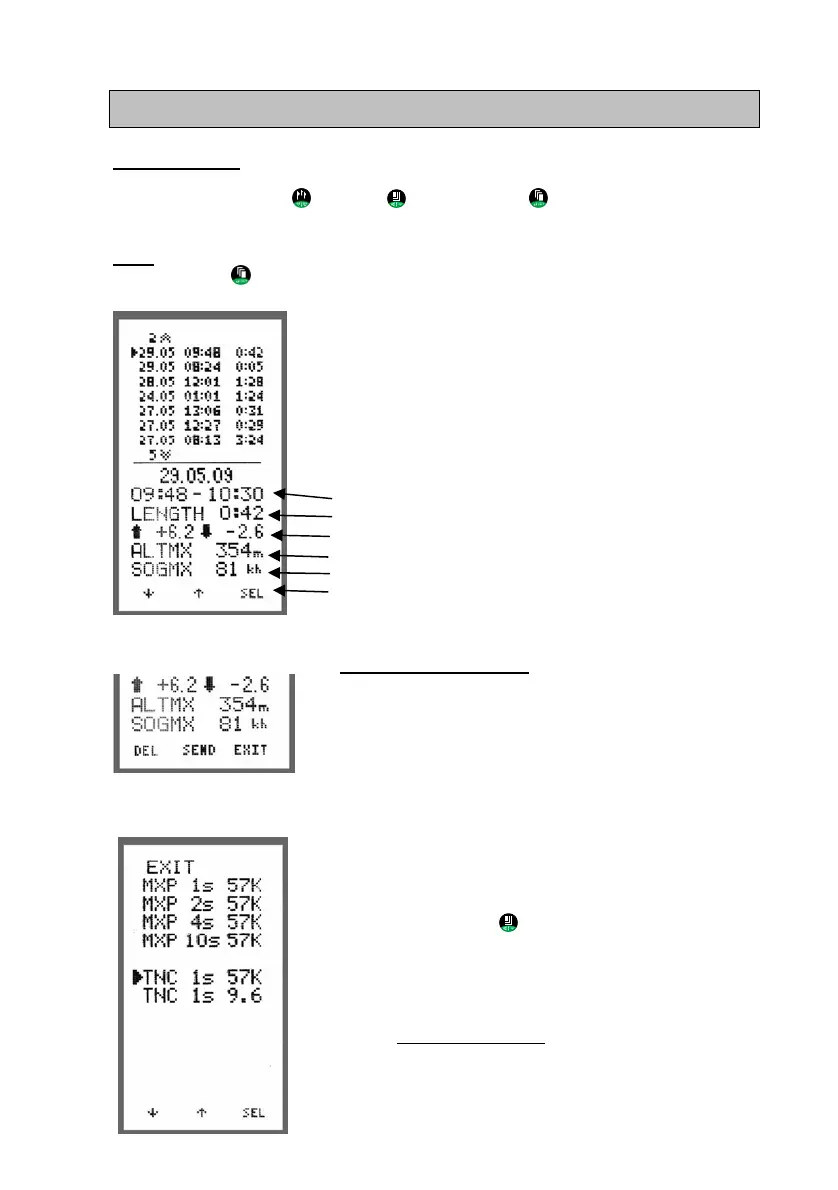
In the lower half of the display the key data of the flight are displayed.
EXIT:
Return to the main menu by moving the cursor to the top or the bottom of the list, or
by holding Key3
for a few seconds.
Upon ent
ry into the FLIGHTS menu the latest 7 flights are
listed, with date, start time and duration. The instrument
stores up to 128 flights.
In the lower half of the screen the following data is visible
for the indicated flight:
Date
Start time and Land time
Duration
max. climb/ max. Sink
max. altitude
max. speed SOG
12.2 Delete or send flight
Once a flight is selected the follow
ing options become
available at the bottom of the screen: „DEL SEND
EXIT“
DEL > Deletes the flight
The flight is deleted from the log book, but can still
be found and restored under ALL FLIGHTS (as
long as it hasn’t been replaced by new flights in
the 18h circular memory)-
SEND > to PC via:
XC-TrainerEasy+ > USB connection
XC-TrainerEasy > via Speedboard USB
Click on Key2
to view the Protocol Menu. Use
this menu to select transfer speed as well as the
upload protocol used by the PC software.
Two protocols are available:
MXP > for the free program „MAX Punkte“
TNC > Aircotec Software TN-Complete
Details from page 33
EXIT > Back to main menu
Page 28


 To Next Page