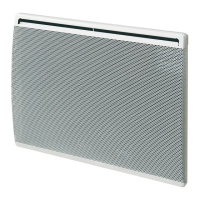
This document describes the AIRELEC Tactic Pro and Basic Pro electric convection heaters, providing installation, usage, and maintenance instructions across multiple languages.
Function Description:
The AIRELEC Tactic Pro and Basic Pro are decentralized electric heating appliances designed for fixed installation. They offer various operating modes to maintain desired room temperatures and optimize energy consumption.
Operating Modes:
The control unit features four distinct operating modes:
- COMFORT: Maintains the room at the desired comfort temperature. The display shows the setpoint temperature (e.g., 19°C).
- ECONOMY (EC): Maintains the room at an economic temperature, typically 3°C below the comfort setpoint. This mode is recommended for short periods of absence (more than 2 hours) to maximize savings.
- FROST PROTECTION (HG): Maintains the room temperature at approximately 7°C, preventing freezing. This mode is suitable for long periods of absence (more than 24 hours) to achieve maximum energy savings without the risk of frost damage.
- HEATING OFF (--): Switches off the heating function of the device. The device retains its settings in memory while in standby.
- PROGRAMMING (PROG): Allows the device to operate automatically via a central programming unit or an individual programmer. The display shows the current mode along with "Prog".
Key Features:
- Setpoint Temperature Setting: Users can adjust the desired temperature in 1°C increments using the '+' and '-' buttons.
- Economy Temperature Adjustment: The economy temperature can be modified from its default 3°C reduction by pressing the MODE button for 3 seconds until the economy setpoint flashes, then using the '+' and '-' buttons.
- Open Window Detection: This function automatically cuts off heating if a sudden temperature drop is detected (e.g., an open window or door). The display shows "FO" when disabled and "F1" when activated. If the device switches off due to detection, "FE" flashes on the display.
- Keypad Locking: The control unit keypad can be locked to prevent accidental changes. This is done by simultaneously pressing the '+' and '-' buttons for about 3 seconds. A flashing display indicates the keypad is locked. If any button is pressed while locked, "FF" is displayed, indicating the request cannot be processed.
- Preset Programming (P1, P2, P3, FP): The device supports predefined programs for automatic operation.
- P1: Comfort temperature from 6:00 to 8:00 in the morning and 17:00 to 23:00 in the evening.
- P2: Comfort temperature from 6:00 to 8:00 in the morning, 11:30 to 13:30 at midday, and 17:00 to 23:00 in the evening.
- P3: Comfort temperature from 8:00 to 23:00.
- FP: Allows the device to operate in pilot wire mode.
- Clock and Day Setting: Essential for using preset programs. The device allows setting the day, hour, and minutes. In case of a power outage exceeding 30 minutes, the thermostat loses its time setting and displays "Hr" flashing, prompting a reset.
- Display Harmonization: In rare cases of discrepancy between the device's display and an external thermometer, the display can be harmonized by entering the thermometer's reading. This is possible only when the device is set between 17°C and 23°C, with all doors and windows closed.
Important Technical Specifications:
The document provides a table of technical specifications for both Tactic Pro and Basic Pro models, categorized by wattage:
| Model Series |
Power (W) |
Intensity (A) |
Height (mm) |
Width (mm) |
Device Thickness + Wall Fixing (mm) |
| A693871 / A693861 |
500W |
2.3 |
440 |
340 |
102 |
| A693872 / A693862 |
750W |
3.3 |
440 |
340 |
102 |
| A693873 / A693863 |
1000W |
4.3 |
440 |
420 |
102 |
| A683875 / A693865 |
1500W |
6.5 |
440 |
580 |
102 |
| A693877 / A693867 |
2000W |
8.7 |
440 |
740 |
102 |
| A693878 / A693868 |
2500W |
10.9 |
440 |
900 |
102 |
Power Thermal Characteristics:
- Nominal thermal power (Pnom): Ranges from 0.50 kW (500W model) to 2.50 kW (2500W model).
- Minimum thermal power (Pmin): N.A. for all models.
- Maximum continuous thermal power (Pmax,c): Matches Pnom for all models.
Auxiliary Electricity Consumption:
- At nominal thermal power (elmax): 0.00 kW for all models.
- At minimum thermal power (elmin): 0.00 kW for all models.
- In standby mode (elSB): 0.0008 kW for all models.
Temperature Control Type:
- Electronic room temperature control: Yes
- Electronic room temperature control and weekly programmer: Yes
- Room temperature control with open window detector: Yes
Usage Features:
- Installation: The power cable exit through the wall should be within the device's surface to remain invisible after installation. A minimum clearance of 150 mm from the bottom of the device to the floor is required. The backplate serves as a marking template for fixing points.
- Electrical Connection: Installation must comply with local standards (e.g., NFC 15-100 for France). If installed in France, the cable should be cut 5cm from the plug and connected to the wall box. Ensure correct tightening of wires.
- Switching On/Off: The device is switched on by moving the side switch to position "1" and off to " ".
- Control Unit Interaction: The display shows the setpoint temperature or operating mode. A heating indicator light and a programming indicator light are present. The screen automatically turns off after about ten seconds and can be reactivated by pressing any button.
- Pilot Wire Mode (6 Orders): If the installation is managed by an energy manager (e.g., EDF Tempo contract), the device can receive 6 orders (Comfort, Economy, Comfort-1, Comfort-2, Frost Protection, Heating Off). Comfort-1 reduces temperature by 1°C, and Comfort-2 by 2°C, relative to the Comfort setpoint. Changes commanded by the manager or programmer take about 15 seconds to take effect.
Maintenance Features:
- Regular Dusting: To maintain performance, regularly dust the inside of the device by vacuuming the air inlets and outlets.
- Cleaning: Use universal cleaning products based on surfactants (soap, etc.) and a microfiber cloth. For simple dusting, a soft cloth is sufficient.
- Safety Precautions: All interventions on the appliance must be carried out with the power off and by qualified and approved personnel.
- Avoid Abrasive Products: Never use abrasive products or acetone-based products, as they may damage the device's coating.
- Initial Heating Odor: An odor may be emitted during the first heating, which will disappear after a few minutes of operation.
- Power Outage: The device is designed to be connected to a 230V~ 50Hz electrical supply. In case of a power outage longer than 30 minutes, the clock and day settings must be reset.
- Troubleshooting Guide: A detailed troubleshooting section is provided to help diagnose common issues such as the device not heating, heating continuously, or not following programming orders. It suggests checks like switch position, setpoint value, circuit breaker status, and room conditions. For all other cases, contact a qualified person.
- Identification Label: The identification label, located at the bottom right (control side) of the device, provides the full reference, manufacturing index, wattage, conformity certificates, address, and manufacturer number.

 Need help?
 General

 To Next Page