INP UT
/
VOLU ME
AUX BAL
USB
OPT COAX
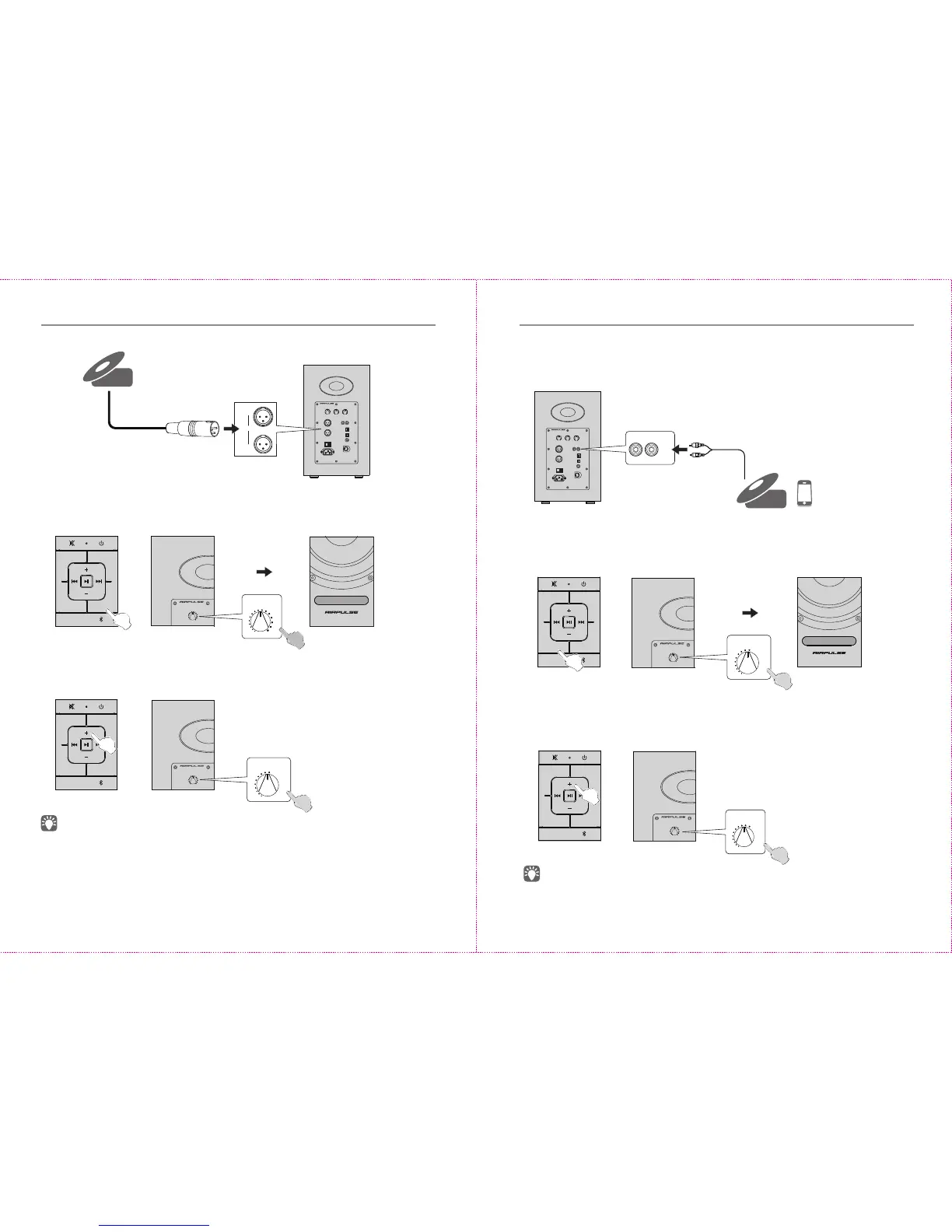
AUX Input Mode
O
I
A300
ACTIVE SP EAK ER S YST EM
Audio decoder/PC/music player, etc
CD player
R
L
AUX
2. Press the “AUX” buon on the remote control or press the “VOLUME / INPUT”
buon on the rear panel of the acve speaker to select AUX input mode, LED
indicator on the acve speaker will display “AUX”.
Or
AUX
Balanced Input Mode
O
I
A300
ACTIVE SP EAK ER S YST EM
CD player/decoder.
CD player
* XLR type interface is widely used in professional audio equipments, XLR interface of
A300 can be connected to playing devices with balanced output port.
* Balanced connecon can effecvely cancel external noise, support long-distance
line transmission, and reduce noise picked up during transmission.
* There is no XLR cable aached in the package, and the users need to buy it on their
own.
1. Connect to audio source devices with balanced output using XLR cable
2. Press the “BAL” buon on the remote control or press the “VOLUME / INPUT”
buon on the rear panel of the acve speaker to select BAL input mode, LED
indicator on the acve speaker will display “BAL”.
Or
Or
BAL
11
12
AUX BAL
USB
OPT COAX
AUX BAL
USB
OPT COAX
AUX BAL
USB
OPT COAX
3. Play music on the connected device, press the “+/-” buon on the remote
control or press the “VOLUME / INPUT” buon on the rear panel of the acve
speaker to adjust volume to a desired level.
3. Play music on the connected device, press the “+/-” buon on the remote control
or press the “VOLUME / INPUT” buon on the rear panel of the acve speaker to
adjust volume to a desired level.
IN PUT
/
VOL UME
BALA NCED IN
L
R
INP UT
/
VOLU ME
IN PUT
/
VOL UME
INP UT
/
VOLU ME
IN PUT
/
VOL UME
INP UT
/
VOLU ME
IN PUT
/
VOL UME
Or
When connecng to audio source devices with 3.5mm headphone jack, user can use
the adapter plug for transferring output.
English English
1. Insert RCA audio cable into AUX input port on the rear panel of the acve speaker
(pay aenon to L/R connector matching); then connect RCA audio cable to audio
source devices with RCA output port (CD player/audio decoder/PC/music player/
mobile phone).


 To Next Page