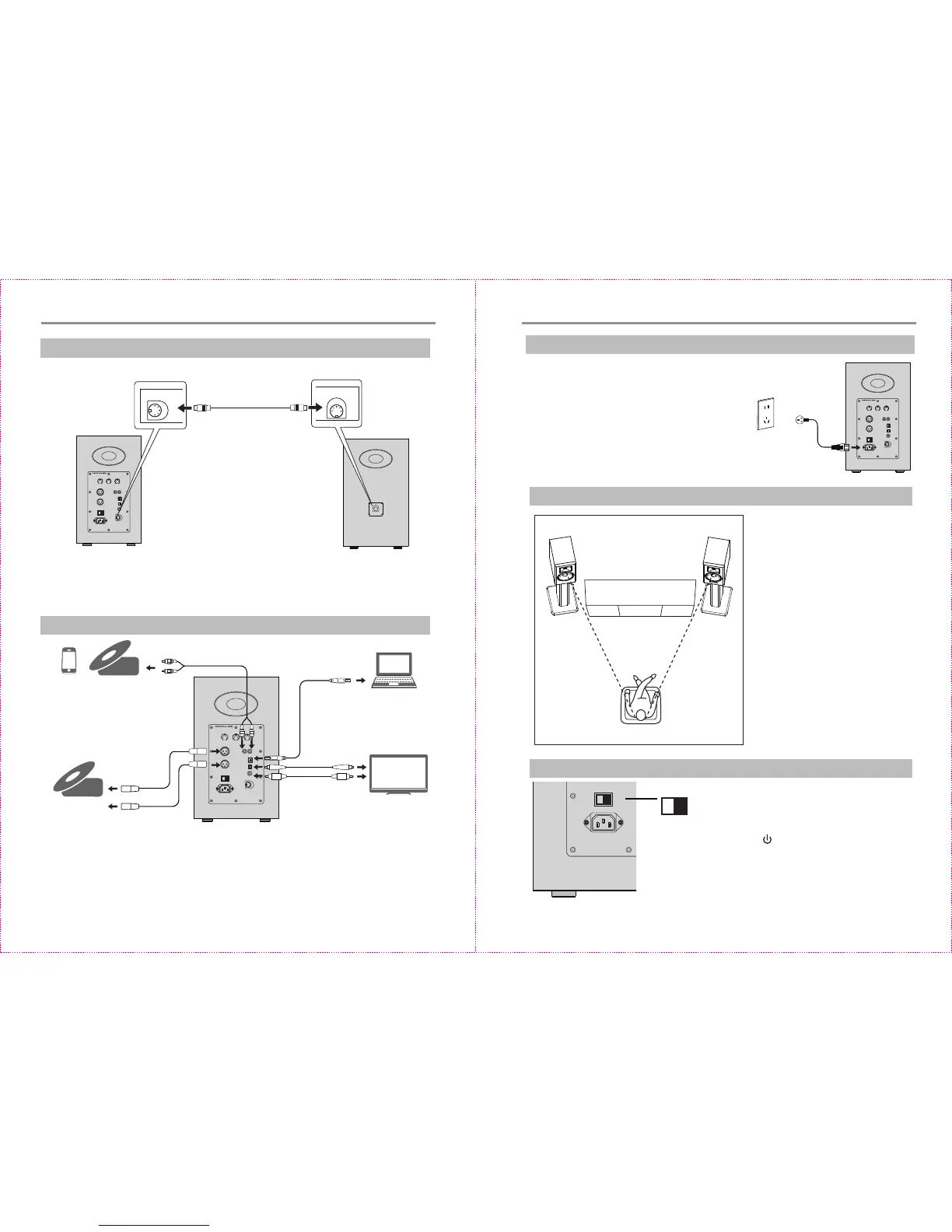
Preparaons
O
I
A300
ACTIVE S PE AKE R S YSTE M
RCA audio cable
CD player/music player/PC
PC or Mac
USB cable
Fiber opc input
audio cable
TV/CD player
/ Blu-ray player
CD player
/ decoder
XLR cable
O
I
A300
ACTIVE SP EAK ER S YST EM
Use the speaker connecng
cable included for connecon
CD player
CD player
1.Connect speakers
2. Connect to playback devices
3.Connect to power source
O
I
A300
ACTIVE SP EAK ER S YST EM
Connect the power cable included to power
input port on the rear panel, and then insert
power plug into wall outlet.
Preparaons
4.Speaker placement
* Place the passive and acve speaker
on a solid, leveled and steady surface.
For the opmum sound posioning
and layering, using the special stands
of A300 is recommended.
* For the opmum stereo sound effect,
the listener can slightly adjust speaker
angel.
* For the most accurate sound and
balance, the listener should be in the
axis of equilateral triangle formed by
the acve and passive speakers.
* High frequency has a much higher
direcvity, and for more accurate
sound effect the speaker's tweeter
should be at ear level of the listener.
Passive speaker Acve speaker
5.Turn on main power
* Aer all cables are connected securely, press
power switch on the rear panel to turn on
main power;
* Press the “ ” on the remote control to turn
off power source or switch to standby state;
* LED indicator will be lit to show current audio
mode, please select the correct audio source
with the corresponding connecon.
O
Power
9 10
Coaxial cable
O
I


 To Next Page