Chapter 3: Configuration and Commissioning
54 ModuLaser Modular Aspirating Smoke Detector Installation Manual
Access level 3 user operation and
configuration
This access level is restricted and is reserved for authorized users trained to
configure the detection system. The default access code for this level is 3333.
In addition to those tasks described in Access level 2 user operation and
configuration on page 41, this level lets you:
• Configure the date and time.
• Configure the device settings (inputs, outputs, etc.)
• Configure the detection settings (alarm levels, delays, flow, etc.)
• Configure the communications settings (network setup, etc.)
The Main menu
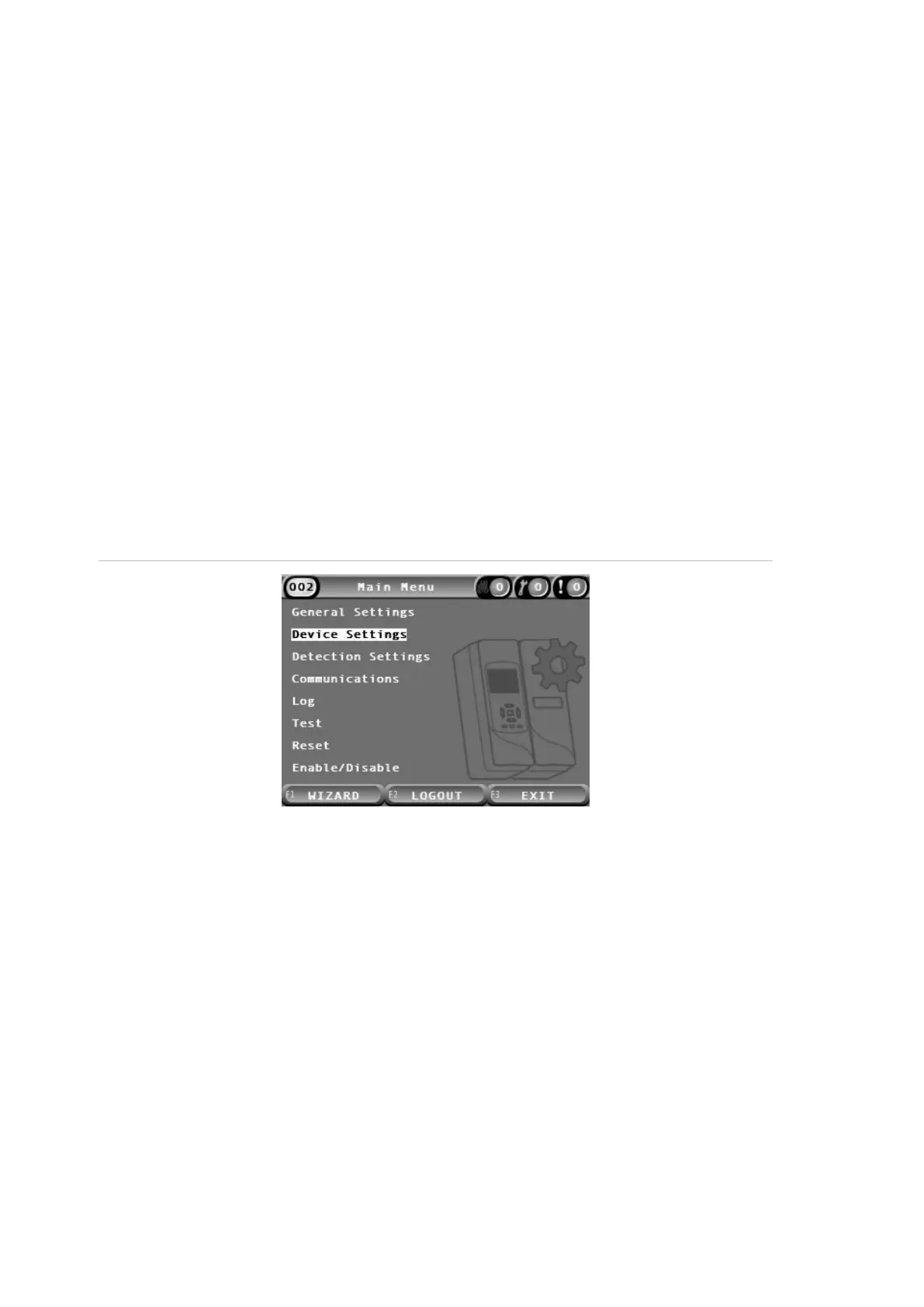
The Main menu for this access level is shown below.
Figure 24: Access level 3 Main menu
General Settings menu
Use the General Settings menu to set the date and time.
For more information on the other options in this menu, see Access level 2 user
operation and configuration on page 41.
Changing the date and time
Use the Date and Time menu to change the date and time. When the date and
time are changed, the internal clock for all devices in the network is set to the
new values. Set these values correctly as they are used to record events in the
event log.
Note: If the module loses power for more than 10 minutes, the last known date
and time are used the next time the module starts up.


 To Next Page