- 11 -
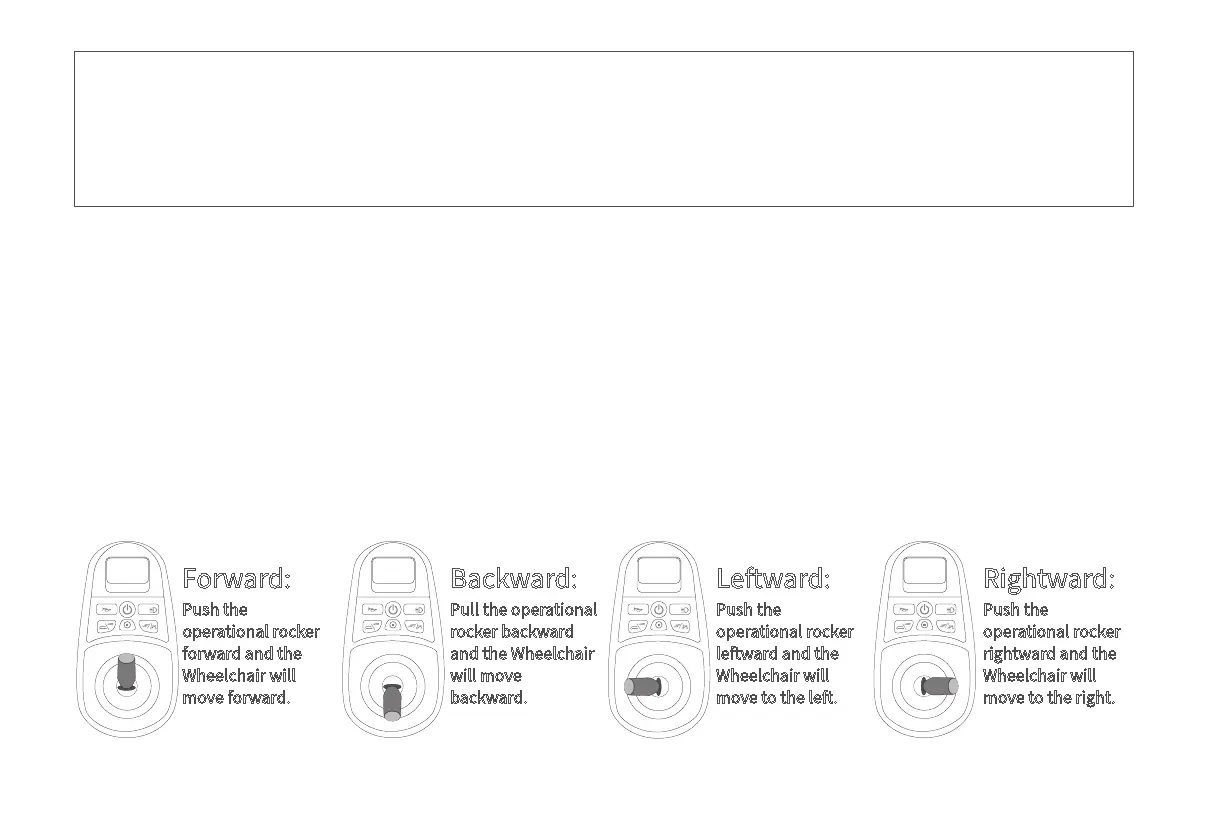
The controller controls H3TS+ to go forward, backward, and turn left and right, and to accelerate, decelerate and
brake. After turn on the switch button, push the rod forward vertically and H3TS+ moves forward. More forward, the
faster the speed. Release the rod to slow down and when fully released, the rod is reset and H3TS+ stops and is in
the braking state. Pull the rod backward, H3TS+ moves backwards, more backward, the faster the speed to backward.
Release the rod to slow down and when fully released, the rod is reset and H3TS+ stops and is in the braking state.
Similarly, turn the rod to left or right, H3TS+ will turn left or right. Pushing more left or right, the faster the speed
towards left or right. Release the rod to slow down and when fully released, the rod is reset and H3TS+ stops and is in
the braking state.
How to use the controller
Forward:
Push the
operational rocker
forward and the
Wheelchair will
move forward.
Backward:
Pull the operational
rocker backward
and the Wheelchair
will move
backward.
Leftward:
Push the
operational rocker
leftward and the
Wheelchair will
move to the left.
Rightward:
Push the
operational rocker
rightward and the
Wheelchair will
move to the right.
• O state: The power switch on the battery box is on, the power button on the controller is o, and the LED
display is o.
• Standby state: Press the power button, the LED display is always on and no operation is performed.
• Riding status: Press the start button, the LED display is always on, and the joystick is used to put the
wheelchair in motion.



 To Next Page