EasyManua.ls Logo

Aiwa AI6006-BLK - User Manual

Aiwa AI6006-BLK
20 pages
Print Icon
To Next Page IconTo Next Page
Loading...
User Manual
Item: AI6006
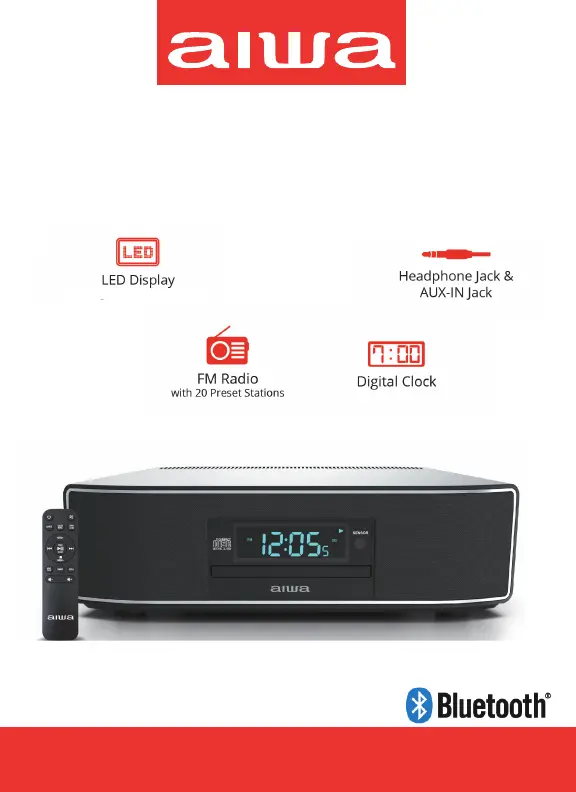
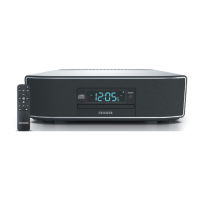
Exos Home Speaker
2 x 15W RMS
with high/mid/low dimmer control
-
-
-BLK

Questions and Answers

  • S
    Sara HuntAug 15, 2025
    What to do if there is no sound on Bluetooth mode on Aiwa AI6006-BLK?
    • J
      Jacob DavisAug 15, 2025
      If there is no sound in Bluetooth mode, the speakers may not be connected to your Bluetooth device. Please refer to the “Bluetooth Operations” section to connect the speakers. Also, make sure the device is within the Bluetooth operating range (30 feet). Finally, check that the volume on your Bluetooth device is not set too low and increase it if necessary.
  • F
    fgarzaAug 18, 2025
    What to do if my Aiwa Speakers device does not respond or power on?
    • T
      Thomas HopkinsAug 18, 2025
      If your Aiwa Speakers device does not respond, ensure it is properly connected to a functioning AC outlet. If it's already connected, try a different AC outlet to rule out a power issue.
  • E
    Erika HuntAug 21, 2025
    Why is the sound distorted on my Aiwa AI6006-BLK Speakers?
    • A
      Andrea HicksAug 21, 2025
      Sound distortion can occur if the volume level is too high; try decreasing it. If that doesn't work, the sound source itself might be distorted. If you are using an external sound source, like an older iPod, try reducing its output volume.
  • K
    Kelly BrownAug 25, 2025
    Why is my Aiwa Speakers CD player skipping?
    • A
      Anthony BanksAug 25, 2025
      If the CD skips while playing, the disc may be dirty or scratched. Try wiping the CD with a clean cloth or using another disc.
  • L
    Lori DavisAug 27, 2025
    What to do if Aiwa AI6006-BLK Speakers CD player will not play?
    • T
      Tina BaxterAug 27, 2025
      If the CD player won't play, first ensure the device is in CD mode by pressing the Source button. Also, make sure the CD is inserted correctly with the label side facing outward. If you are using a self-compiled CD, the media may not be compatible; try using better quality blank media and test again.
  • M
    Michael RosarioAug 30, 2025
    What to do if my Aiwa AI6006-BLK device is ON but there is low or no volume?
    • S
      smcconnellAug 30, 2025
      If your device is on but the volume is low or absent, use the Volume buttons on your remote to raise the volume.
  • V
    vruizSep 2, 2025
    Why is there intermittent sound from my Aiwa AI6006-BLK Speakers CD Player?
    • K
      Kathryn AndersonSep 2, 2025
      Intermittent sound from the CD player may be due to a dirty or defective disc; try cleaning or replacing it. Another cause might be a dirty pickup lens; use a CD-lens cleaning cloth to clean it. Excessive shock or vibration could also be the problem; relocate the player away from such disturbances.
  • P
    Philip OrtizSep 5, 2025
    Why is there noise or sound distorted on FM broadcast on my Aiwa AI6006-BLK Speakers?
    • J
      Johnathan VaughnSep 5, 2025
      If you experience noise or distorted sound on FM broadcast, the station may not be tuned properly. Try repositioning the device and tuning the FM broadcast station again.
  • K
    Katherine ChandlerSep 8, 2025
    Why is there no sound on FM on my Aiwa Speakers?
    • D
      Devon SmithSep 9, 2025
      If there is no sound on FM, make sure the device is in Radio mode. Press the Source button to select FM.
  • E
    Eric RogersSep 12, 2025
    Why do my Aiwa AI6006-BLK Speakers get warm after extended play at high volume?
    • D
      Dominic GlassSep 12, 2025
      The Aiwa Speakers getting warm after extended play at high volume is normal. To address this, turn the device off for a while or lower the volume.

Summary

SAFETY PRECAUTIONS

SAFETY PRECAUTIONS CONT.

ON PROTECTION AGAINST LASER ENERGY EXPOSURE

Safety guidelines for operating the laser CD player to prevent eye damage and radiation exposure.

ON PLACEMENT

Recommendations for optimal and safe placement of the device to ensure proper ventilation and performance.

ON CONDENSATION

Information on preventing and addressing condensation issues that may affect device operation.

WHATS INCLUDED

YOUR REMOTE

Inserting Batteries

Step-by-step instructions for correctly installing batteries into the remote control.

YOUR SPEAKER

Front View

Diagram and labels for the speaker's front panel features.

Rear View

Diagram and labels for the speaker's rear panel ports and connections.

POWERING

AC POWER OPERATION

Detailed instructions for connecting the speaker to AC power and initial power-up.

SETTING THE TIME

USING YOUR REMOTE

CD FUNCTION

USING THE SPEAKER TO PLAY CDS

Guide to loading, playing, pausing, and navigating audio tracks on a CD.

CD FUNCTION CONT.

SETTING UP PROGRAMS

How to create and manage programmed playback lists for CDs.

BLUETOOTH FUNCTION

Using Your Remote Control On Bluetooth Mode

How to control Bluetooth audio playback using the remote control.

AUX IN FUNCTION

TV;OPTICAL AUDIO FUNCTION

FM RADIO FUNCTION

Using Your Remote Control On FM Radio Mode

Remote control operations specifically for FM radio mode.

SETTING YOUR RADIO PRESETS

Steps to save and store favorite FM radio stations for quick access.

RECALL A PRESET STATION

Method to retrieve and play saved FM radio presets.

CONNECT YOUR HEADPHONES

Read this Important Information before Using Your Headphones

Critical advice regarding safe volume levels and hearing protection during headphone use.

TROUBLESHOOTING GUIDE

CARE AND MAINTENANCE

FCC STATEMENT

SPECIFICATIONS

WARRANTY

What Is Not Covered By Warranty

Details specific conditions, damages, or uses that are excluded from warranty protection.

To Obtain Warranty Service and Troubleshooting Information

Procedures and contact details for accessing warranty service and technical support.

Aiwa AI6006-BLK Specifications

General IconGeneral
BrandAiwa
ModelAI6006-BLK
Speaker TypePortable Bluetooth Speaker
ColorBlack
Battery LifeUp to 10 hours
Water ResistanceIPX5
ConnectivityBluetooth

Related product manuals