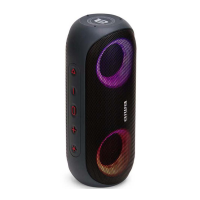
Need help?
Do you have a question about the Aiwa ASP-0750 and is the answer not in the manual?
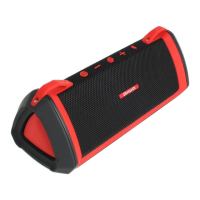
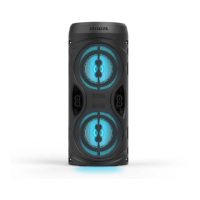
Details about the front and back views of the wireless speaker and its components.
List of items included with the Boom Box Wireless Speaker.
Instructions on how to switch the wireless speaker on and off using the ON/OFF switch.
Steps to connect the wireless speaker to your mobile device via Bluetooth.
Information on how the wireless speaker automatically reconnects to the last paired device.
Guide on how to charge the speaker using the provided Micro USB cable and adapter.
Detailed specifications of the Boom Box Wireless Speaker, including driver size and battery.
Answers to common questions regarding pairing and charging issues.
Important safety precautions for using the lithium battery and the product.
The Aiwa Boom Box Wireless Speaker, model ASP-0750, is a portable audio device designed for wireless music playback. This manual provides comprehensive instructions for its operation, pairing, charging, and general maintenance, ensuring users can maximize their experience with the product.
The primary function of the Aiwa Boom Box Wireless Speaker is to provide high-quality audio playback wirelessly from compatible mobile devices. It utilizes Bluetooth technology to establish a connection with smartphones, tablets, and other Bluetooth-enabled devices, allowing users to stream music without the need for physical cables. The speaker is designed for ease of use, offering straightforward power control and a simple pairing process. Its portable nature makes it suitable for various environments, from indoor listening to outdoor gatherings.
Power On/Off: To power on the speaker, users simply slide the ON/OFF switch to the "ON" position. Conversely, to power off the device, the switch should be moved to the "OFF" position. This intuitive control ensures quick and easy activation and deactivation of the speaker.
Wireless Pairing: The speaker is designed for seamless wireless connectivity. To pair it with a mobile device, users should first ensure that the speaker and their mobile device are within 10 meters of each other. After powering on the wireless speaker, the Bluetooth function on the mobile device needs to be activated. Users then select "Aiwa ASP-0750" from the list of available Bluetooth devices. A distinct beep sound will confirm successful pairing, indicating that the speaker is ready for audio playback.
Automatic Reconnection: A convenient feature of the Aiwa Boom Box Wireless Speaker is its ability to automatically reconnect with the last successfully paired device. Once the speaker is powered on, it will attempt to establish a connection with the device it was most recently paired with, eliminating the need to repeat the pairing process every time. This enhances user convenience and speeds up the process of starting music playback.
Charging: The speaker is equipped with a rechargeable lithium-ion battery. To charge the device, users should use the provided Micro USB cable. One end of the cable (Micro USB plug) connects to the Micro USB charging port on the speaker, while the other end (USB plug) connects to a USB port on a computer or a wall adapter. During charging, an LED indicator light will turn red, signifying that the battery is being replenished. Once the battery is fully charged, the red light will turn off. For safety and optimal performance, it is crucial to use an appropriate 5V input charger/adapter for charging.
Portability: The design of the Boom Box Wireless Speaker emphasizes portability, making it easy to carry and use in various locations. Its compact form factor and wireless capabilities contribute to a versatile listening experience, whether at home, in the office, or during outdoor activities.
Charging Best Practices: To ensure the longevity and safety of the lithium battery, it is recommended to charge the product at ambient temperatures between 10°C (50°F) and 40°C (104°F). Users should only use certified and appropriate chargers/adapters for charging. It is important to avoid exposing the product to direct heat, fires, or other high-temperature locations, as this can cause the battery to overheat, explode, or ignite. Storing the device in direct sunlight or inside cars in hot weather should also be avoided.
Troubleshooting Pairing Issues: If the wireless speaker fails to pair with a device, several steps can be taken. Users should first ensure that the speaker is in pairing or reconnection mode and that the Bluetooth search function on their mobile device is activated. If the mobile device is already paired with another Bluetooth device, it should be unpaired first. Moving the device closer to the speaker can also help establish a connection.
Troubleshooting Charging Issues: In cases where the wireless speaker cannot be recharged, users should verify that the power supply is securely connected and functional if using a power outlet. If charging via a computer, it's essential to ensure that the computer is connected and the USB port is powered.
General Safety Precautions: The product is not a toy and should be kept away from young children, who must be supervised to prevent them from playing with it. To prevent damage and ensure safe operation, the speaker should not be exposed to moisture or submerged in liquids. It is also important to switch off the product after use. The manual explicitly states that the manufacturer will not be responsible for any wrong operation, such as using a voltage higher than 5V, which could lead to severe injury or loss of property. Abuse or misuse of the lithium battery pack can result in explosion, heat generation, fire, or smoke development.
By following these instructions and guidelines, users can enjoy a reliable and safe audio experience with their Aiwa Boom Box Wireless Speaker.
 General
| Brand | Aiwa |
|---|---|
| Model | ASP-0750 |
| Type | Portable Bluetooth Speaker |
| Input Voltage | 5V |
| Charging Time | 3 hours |
| Bluetooth Range | 10 meters |
| Configuration | Stereo |

 To Next Page