The Aiwa ALP40P is a multimedia projector designed for indoor, household use, offering a versatile solution for displaying content from various sources. It is a compact and portable device, making it suitable for quick setup and easy transport.
Function Description
The primary function of the ALP40P is to project images and videos onto a screen or flat surface. It supports multiple input sources, including HDMI, VGA, AV, USB, and MicroSD cards, allowing users to connect a wide range of devices such as laptops, DVD players, gaming consoles, and external storage. The projector features a built-in speaker for audio output, but also offers a 3.5mm audio output for connecting external speakers or headphones, providing flexibility in audio setup.
The projector is equipped with a lens for image projection, and controls for focus and keystone adjustment to ensure a clear and rectangular image, even when the projector is not perfectly perpendicular to the screen. It also includes a height adjustment peg for setting the vertical angle of the projected image.
For wireless audio connectivity, the ALP40P incorporates Bluetooth playback, enabling users to pair the projector with Bluetooth wireless speakers or sound bars. This feature enhances the audio experience by allowing sound to be played through external audio systems without the need for cables.
Usage Features
The ALP40P offers several features to enhance its usability and adaptability to different environments:
- Placement Flexibility: The projector can be installed in four configurations: front table, front ceiling, rear table, and rear ceiling. This allows users to choose the most suitable setup based on their room layout and screen type. For ceiling installations, a projector mount is required.
- Image Adjustment:
- Focus Adjustment: A dedicated knob allows users to sharpen the image by adjusting the lens focus, ensuring optimal clarity for different projection distances.
- Keystone Adjustment: This feature corrects distorted images (trapezoidal shape) that occur when the projector beam is projected at an angle, restoring the image to a rectangular or square shape.
- Vertical Angle Adjustment: A height adjustment peg on the bottom of the projector allows for fine-tuning the vertical angle of the image, particularly useful for table-top setups.
- Remote Control: A comprehensive remote control is included, providing convenient access to all projector functions, including power, mute, volume, source selection, menu navigation, playback controls (play/pause, stop, previous/next, fast search), and zoom.
- On-Screen Display (OSD) Menu: The projector features an intuitive OSD menu that allows users to customize various settings:
- Picture Mode: Adjusts image parameters such as contrast, brightness, color, sharpness, and tint, with preset modes (Vivid, User, Soft, Standard) and a custom option.
- Color Temperature: Offers options like Warm, Cool, and Medium to adjust the color balance of the image.
- Aspect Ratio: Allows selection between 16:9, 4:3, or Auto, to match the aspect ratio of the content being displayed.
- Noise Reduction: Helps to reduce visual noise in the image, with settings like Off, Low, Middle, High, or Default.
- Sound Mode: Provides sound presets (Music, Movie, User, Sports, Standard) and allows adjustment of treble, bass, and balance.
- Surround Sound: Enables or disables surround sound for an immersive audio experience.
- OSD Language: Supports multiple languages for the on-screen menu.
- Bluetooth Control: Allows users to turn Bluetooth on or off.
- Panel Rotate: Offers options to rotate the display image by 0, 1, 2, or 3 positions, useful for different projection orientations (e.g., ceiling mount).
- Info: Displays unit information such as model, serial number, software version, and Bluetooth version.
- Clock and Timer Functions: Includes settings for clock, off timer, on timer, sleep timer (10min to 240min), and auto sleep (4, 6, or 8 hours).
- Media Playback: The projector supports direct playback of media files (mpeg1, mpeg2, mpeg4, mp3, Jpeg) from USB devices (up to 1TB) and MicroSD cards (up to 32GB). The remote control provides full playback functionality for these media types, including navigation, fast search, pause, and resume.
- Connectivity:
- HDMI: Two HDMI inputs (HDMI1, HDMI2) for connecting high-definition devices.
- VGA/PC: A VGA input for connecting computers.
- AV: A 3.5mm AV input for connecting standard definition devices using the included 3.5mm to RCA AV cable.
- USB: A USB port for connecting USB storage devices.
- MicroSD Card: A slot for MicroSD cards.
- Audio Output: A 3.5mm audio output for external speakers or headphones.
- DC Power Port: For connecting the included AC power adapter.
Maintenance Features
To ensure the longevity and optimal performance of the ALP40P, the manual outlines several maintenance guidelines:
- Cleaning: The device should be cleaned only with a soft, slightly damp cloth. Solvents, petrol-based fluids, or harsh detergents should be avoided. For severe stains, a damp cloth with dilute detergent can be used. The lens can be cleaned with a vacuum cleaner to remove spots.
- Ventilation: It is crucial not to cover or block any ventilation openings. When placing the device on a shelf, a minimum of 5 cm (2 inches) free space should be maintained around the entire device to prevent overheating.
- Power Adaptor Care: The power adaptor should be handled with care, avoiding stepping on it, pinching it, or placing heavy items on it.
- Battery Handling: When replacing batteries in the remote control, ensure correct polarity. Only same or equivalent type batteries as recommended should be used. Batteries should not be exposed to excessive heat, fire, or direct sunshine. Mixing old and new batteries, or different types of batteries (alkaline, carbon-zinc, rechargeable), is not recommended. Batteries should not be disposed of in fire, as they may explode or leak.
- Environmental Conditions: The projector should not be used or stored in areas subject to direct sunlight, excessive heat, dust, or vibration. It is designed for moderate climates and should be avoided in extremely cold or warm environments. It should also not be used in wet or moist areas, such as bathrooms, steamy kitchens, or near swimming pools, and should not be exposed to dripping or splashing liquids.
- Troubleshooting: The manual provides a troubleshooting section to address common issues like no image, lamp turning off, image distortion, and faded brightness, offering solutions such as checking power, lens cover, cable connections, source settings, ventilation, and keystone adjustment. If problems persist, contacting customer service is advised.
- Professional Servicing: All servicing should be referred to qualified service personnel, especially if the apparatus has been damaged, liquid has been spilled, objects have fallen into it, or it has been exposed to rain/moisture, does not operate normally, or has been dropped. Unauthorized repairs or adjustments are not covered by warranty and may result in hazardous radiation exposure.

 Need help?
 General
 Weight and Dimensions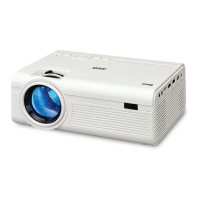

 To Next Page