EasyManua.ls Logo

Aiwa Prodigy View - User Manual

Aiwa Prodigy View
12 pages
Print Icon
To Next Page IconTo Next Page
Loading...
Quick Start Guide
Item: AI1008
Prodigy View
True Wireless Earphones
FCC ID: 2AAPK-MA-3915
Question and Answer IconNeed help?

Do you have a question about the Aiwa Prodigy View and is the answer not in the manual?

Summary

Prodigy View

Whats Included

Al1008 Earphones and Charging Case

Lists the main components: Al1008 earphones and charging case.

Silicone Eartips

Includes different sizes of silicone eartips for comfort and fit.

USB-C Cable

Details the inclusion of a USB-C cable for charging the case.

A Closer Look

Charging Case Features

Describes the charging port, LED display, and battery indicators on the charging case.

Earphone Features

Details the multi-function touch controls and LED indicators on each earphone.

Charging

Charging the Earphones and Case

Explains how to charge both the earphones and the charging case.

Understanding Charging Status

Details how to interpret the LED display and earphone battery icon indicators.

Powering On and Off

Automatic Power Management

Describes automatic power on/off when placing earphones in/out of the case.

Manual Power On;Off Note

Provides a note on how to turn on if earphones are out of the case.

Bluetooth Pairing

Initial Pairing Mode

Explains earphone behavior (LED flashing) when entering pairing mode.

Connecting to a Device

Guides users to connect via phone's Bluetooth settings to "AIWA Prodigy View".

Post-Pairing Reconnection

Describes automatic re-connection to the paired device.

Using Your Earphones

Left Earphone Controls

Details functions like Play/Pause, Track Skip, Voice Assistant, Call handling.

Right Earphone Controls

Details functions like Play/Pause, Track Skip, Voice Assistant, Call handling.

Specifications

Bluetooth Range and Charging Input

Lists Bluetooth range (33 feet) and charging input (DC5V 1A max).

Play Time Details

Specifies 6 hours of play time, noting it's at 50% volume.

Safety Precautions

General Usage Warnings

Covers water, cleaning, children, heat, repair, dropping, commercial use, ventilation.

Maintenance and Care Guidelines

Provides advice on cleaning, storage, cable handling, temperature exposure, and disposal.

FCC Statement

Compliance and Interference Conditions

States compliance with FCC Part 15 and conditions for operation.

Interference Correction Measures

Lists measures to correct harmful interference if reception issues occur.

Warranty Information

Warranty Coverage and Period

Covers defects in material/workmanship for one year under normal usage.

Exclusions and Service Procedures

Details what is not covered and how to obtain warranty service and troubleshooting.

Summary

Prodigy View

Whats Included

Al1008 Earphones and Charging Case

Lists the main components: Al1008 earphones and charging case.

Silicone Eartips

Includes different sizes of silicone eartips for comfort and fit.

USB-C Cable

Details the inclusion of a USB-C cable for charging the case.

A Closer Look

Charging Case Features

Describes the charging port, LED display, and battery indicators on the charging case.

Earphone Features

Details the multi-function touch controls and LED indicators on each earphone.

Charging

Charging the Earphones and Case

Explains how to charge both the earphones and the charging case.

Understanding Charging Status

Details how to interpret the LED display and earphone battery icon indicators.

Powering On and Off

Automatic Power Management

Describes automatic power on/off when placing earphones in/out of the case.

Manual Power On;Off Note

Provides a note on how to turn on if earphones are out of the case.

Bluetooth Pairing

Initial Pairing Mode

Explains earphone behavior (LED flashing) when entering pairing mode.

Connecting to a Device

Guides users to connect via phone's Bluetooth settings to "AIWA Prodigy View".

Post-Pairing Reconnection

Describes automatic re-connection to the paired device.

Using Your Earphones

Left Earphone Controls

Details functions like Play/Pause, Track Skip, Voice Assistant, Call handling.

Right Earphone Controls

Details functions like Play/Pause, Track Skip, Voice Assistant, Call handling.

Specifications

Bluetooth Range and Charging Input

Lists Bluetooth range (33 feet) and charging input (DC5V 1A max).

Play Time Details

Specifies 6 hours of play time, noting it's at 50% volume.

Safety Precautions

General Usage Warnings

Covers water, cleaning, children, heat, repair, dropping, commercial use, ventilation.

Maintenance and Care Guidelines

Provides advice on cleaning, storage, cable handling, temperature exposure, and disposal.

FCC Statement

Compliance and Interference Conditions

States compliance with FCC Part 15 and conditions for operation.

Interference Correction Measures

Lists measures to correct harmful interference if reception issues occur.

Warranty Information

Warranty Coverage and Period

Covers defects in material/workmanship for one year under normal usage.

Exclusions and Service Procedures

Details what is not covered and how to obtain warranty service and troubleshooting.

Overview

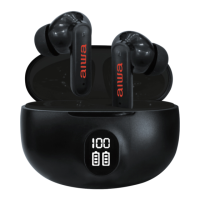
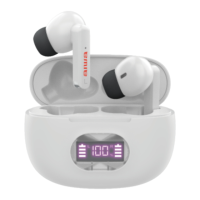
The AIWA Prodigy View True Wireless Earphones (Item: AI1008, FCC ID: 2AAPK-MA-3915) are a pair of Bluetooth-enabled true wireless earphones designed for audio playback and calls. They come with a charging case that features an LED display screen to show battery levels.

Function Description:

The AIWA Prodigy View earphones are designed for wireless audio streaming and hands-free calling. They connect to devices via Bluetooth and offer touch controls for various functions. The charging case not only protects the earphones but also charges them, extending their usage time.
Important Technical Specifications:

  • Bluetooth Range: Up to 33 feet (10 meters), allowing for a reasonable distance from the connected device.
  • Charging Input: DC5V 1A max, indicating the power requirements for charging the case.
  • Play Time: Approximately 6 hours, applicable at 50% of maximum volume. Actual play time may be lower when volume is higher.
  • Included Components:
    • AI1008 Earphones and Charging Case
    • Silicone Eartips (S, M, L sizes) for a comfortable and secure fit.
    • USB-C Cable for charging the case.

Usage Features:

  • Powering On/Off: The earphones automatically turn ON when removed from the charging case and turn OFF when placed back into the case. If the earphones are already out of the case, placing them back in and then taking them out again will turn them ON.
  • Bluetooth Pairing:
    1. Remove the earphones from the case; they will power ON and enter pairing mode. One earphone will flash red and blue, while the other will flash blue.
    2. On your phone, go to the Bluetooth settings menu and ensure Bluetooth is turned on.
    3. Connect to the device listed as "AIWA Prodigy View."
    4. Once paired, both earphone's LED indicators will slowly flash blue.
    5. After initial setup, the earphones will automatically re-connect to the paired device every time they are taken out of the charging case.
  • Charging:
    • Charging the Earphones: Place the earphones into the charging case to charge them. The earphone battery icons on the LED display screen will flash while charging and will display a solid icon once fully charged. The right earphone icon flashes when the right earphone charges, and the left earphone icon flashes when the left earphone charges.
    • Charging the Case: Connect the included USB-C cable to the charging port on the case. Insert the other end into a USB port of a computer or a suitable wall adapter. The digits on the LED display screen will flash while the case charges and will show a solid '100%' once fully charged.
  • Touch Controls (Multi-function button):
    • Left Earphone:
      • Play/Pause: Press
      • Previous Track: Triple Press
      • Voice Assistant: Double Press
      • Answer Call: Press
      • End Call: Press
      • Decline Call: Press and hold for 2 seconds
    • Right Earphone:
      • Play/Pause: Press
      • Next Track: Triple Press
      • Voice Assistant: Double Press
      • Answer Call: Press
      • End Call: Press
      • Decline Call: Press and hold for 2 seconds
  • LED Indicators: The earphones have LED indicators that show their status (e.g., pairing mode, paired). The charging case has an LED display screen that shows the battery level of the case and individual earphones.

Maintenance Features:

  • Cleaning: Use a soft cloth or paper towel to clean the earphones. Avoid harsh chemicals or detergents. Ensure the earphones are dry before charging.
  • Storage: When not in use, store the earphones in a cool, dry place.
  • Cable Handling: Connect and disconnect charging cables carefully. Avoid tugging or yanking on the cable while it's connected to the charging case.
  • Temperature Exposure: Do not expose the earphones to high temperatures or extreme cold.
  • Disposal: Recycle or dispose of the earphones properly according to local municipal laws and rules. Contact local recycling facilities or the manufacturer for more information.
  • Repair: Do not attempt to repair the product yourself. Contact a qualified service center if service is needed.

Safety Precautions:

  • Read all instructions before use.
  • Do not use near water or on wet surfaces.
  • Clean only with a clean cloth.
  • Keep out of reach of children due to small parts that can be a choking hazard. Parental supervision is advised.
  • Do not expose to excessive heat, fire, or temperatures above 100°F. Keep out of direct sunlight.
  • Do not drop, crush, or expose to excessive physical force.
  • Not intended for commercial use.
  • When charging, ensure charging cables are well ventilated and not in contact with flammable materials like bedding, linens, or synthetic fabrics.

Aiwa Prodigy View Specifications

General IconGeneral
BrandAiwa
ModelProdigy View
CategoryHeadphone
LanguageEnglish

Related product manuals