VERSION WITH CENTRAL TFT SCREEN
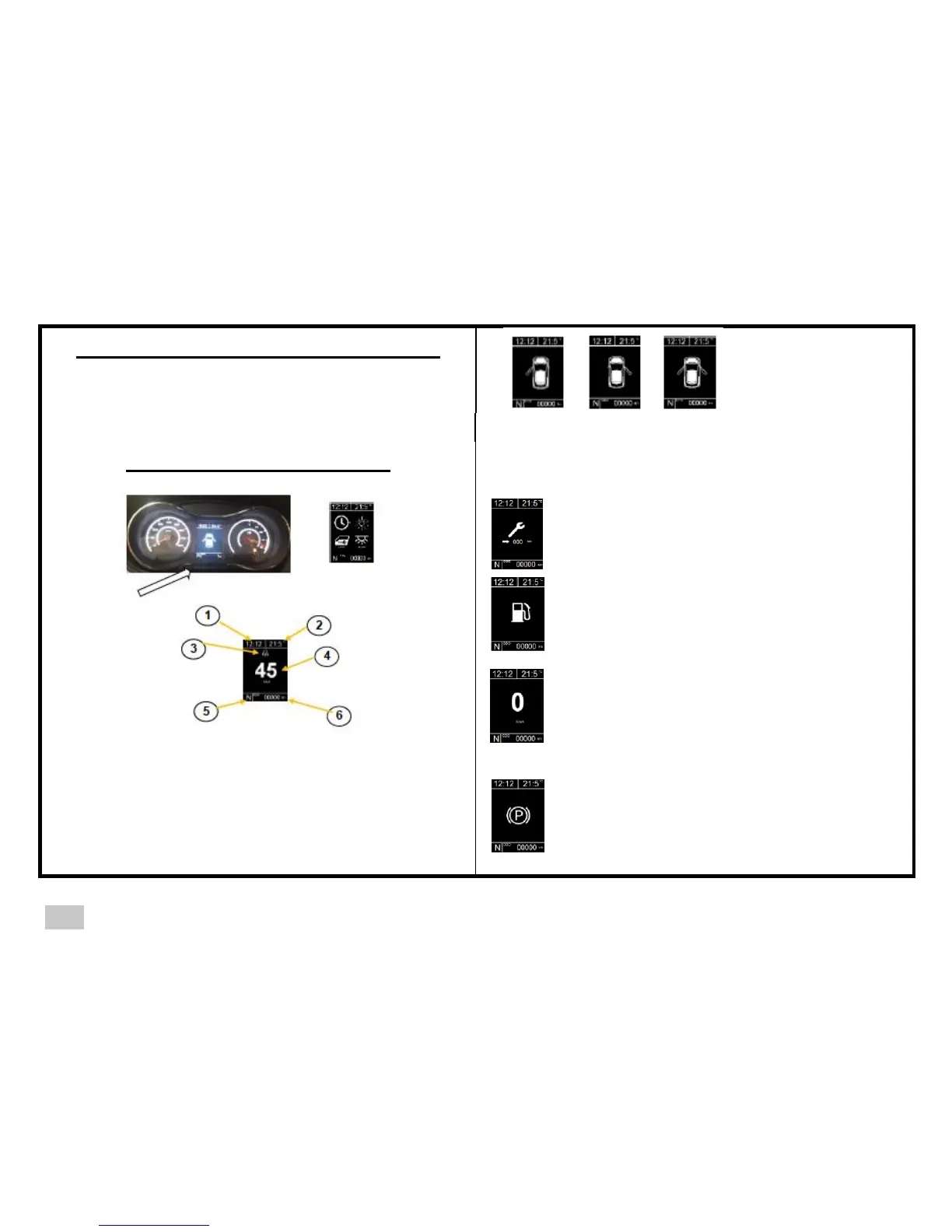
Four sub-screens can be displayed successively by pressing the
left-hand scroll button or the button on the end of the right stalk
control (except the configuration screen, which is only accessible
with the left-hand button on the panel)
1- DOORS OPEN
1-2 Symbol for right door, left door or both doors open.
When a door is open, the door open symbol is displayed for 5
minutes maximum if the ignition is OFF
2-SERVICE
When the ignition is switched on, the number of km
before the next service is displayed
3-FUEL TANK
Information on the fuel level in the tank
4-SPEED
Digital speed display
1. Time display
2. External temperature display
3. Risk of ice information zone
4. Speed information zone or symbols
5. Gear lever position
6. General odometer
5-PARKING BRAKE
Parking brake on indicator



 To Next Page