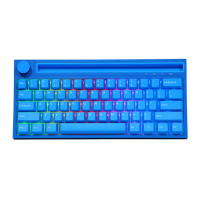
4.Description of Lighting Mode
FN+\I Light effect switching, 18 kinds of light effects cycle in tur
FN+I!, 2@, 3# can customize three sets of game lighting effects:
FN+I! : Default FPS Mode—W
FN+2@: Default LOL mode—Q /W / E/ R/ D / G/ F/ B/ V / I-Ctrl / L-Alt / Tab / space / 1-6 / Esc
FN+3#: Default 37-key office mode:A-Z26 English letters/ / ./ , /// t / J / e
FN+-: Select one group according to the lighting effect of the above three game modes, and press key to record the lighting
mode. Press the button once during recording to change one color, a total of 8 colors. Press again to turn off the light, and
then press key to save after recording
FN+t : The backlight flashes 3 times when the light brightness + (five gears) limit is indicated
FN+ : Light brightness - (five gears), the backlight is turned off at the limit
FN+<—: Dynamic light direction switching
FN+ Toggle backlight color
FN+-_: Light speed - (five gears) when the backlight flashes 3 times at the limit
FN+=+: TLight speed + (five gears) when the backlight flashes 3 times at the limit.
5. Description of Key Compound Functions
FN+FI: Multimedia Player
FN+F5: stop Playing
FN+F9: Mail
FN+F2: Volume Down
FN+F6: Previous song
FN+FIO: Browser
FN+F3: Volume Up
FN+F7: Play/Pause
FN+FII: My Computer
FN+F4: Mute
FN+F8: Next song
FN+F12: Calculator
FN+Left WIN: Lock the left window function (Win lock light, the win key light flashes to indicate lock, and the normal light effect
will be restored after unlocking)
FN+ space bar: Hold down the key for 3-5 seconds to restore default Settings
FN+X: turn off/on the backlight
FN + A: Mac
FN+S: Windows (default)
6


 To Previous Page