EasyManua.ls Logo

Akai AA-V205 - RF Terminals and European Use; RF Terminal Configuration for Video; Transformer and Connector Guidelines; European Country Operation Notes

Akai AA-V205
18 pages
Print Icon
To Next Page IconTo Next Page
To Previous Page IconTo Previous Page
Loading...
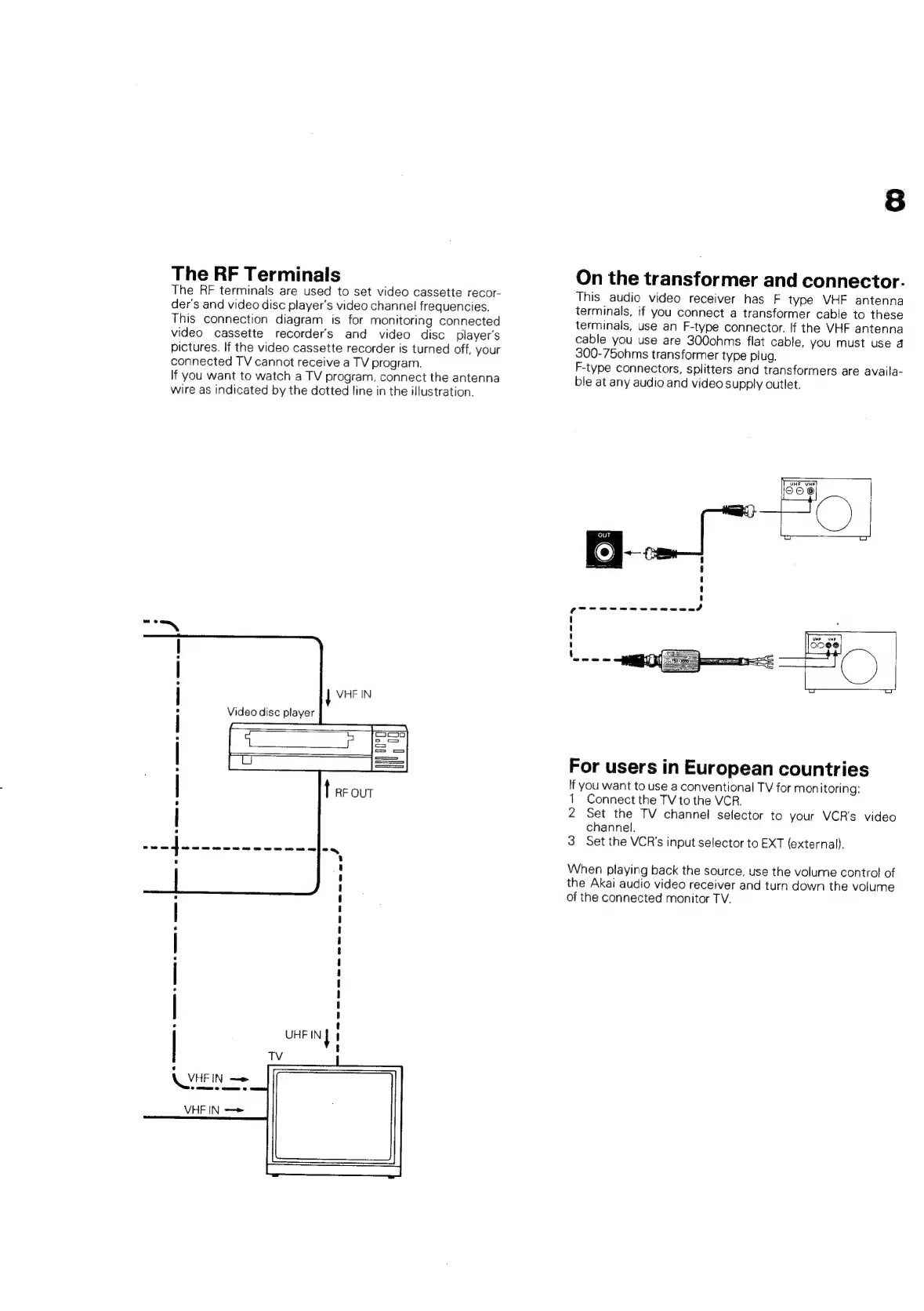
The
RF
Terminals
The
RF
terminals
are
used
to
set
video
cassette
recor-
der's
and
video
disc
player's
video
channel
frequencies.
This
connection
diagram
is
for
monitoring
connected
video
cassette
recorders
and
video
disc
player's
pictures.
If
the
video
cassette
recorder
is
turned
off,
your
connected
TV
cannot
receive
a
TV
program.
If
you
want
to
watch
a
TV
program,
connect
the
antenna
wire
as
indicated
by
the
dotted
line
in
the
illustration.
Cee
kk
ee
UHF
IN
f
4
$
TV
°c
eee
>
ere
2
eee
ee
8
On
the
transformer
and
connector.
This
audio
video
receiver
has
F
type
VHF
antenna
terminals,
if
you
connect
a
transformer
cable
to
these
terminals,
use
an
F-type
connector.
If
the
VHF
antenna
cable
you
use
are
300ohms
flat
cable,
you
must
use
4
300-75ohms
transformer
type
plug.
F-type
connectors,
splitters
and
transformers
are
availa-
ble
at
any
audio
and
video
supply
outlet.
For
users
in
European
countries
If
you
want
to
use
a
conventional
TV
for
mon
itoring:
1
Connect
the
TV
to
the
VCR.
2
Set
the
TV
channel
selector
to
your
VCR's
video
channel.
3
Set the
VCR's
input
selector
to
EXT
(external).
When
playing
back
the
source,
use
the
volume
control
of
the
Akai
audio
video
receiver
and
turn
down
the
volume
of
the
connected
monitor
TV.

Related product manuals