EasyManua.ls Logo

Akai AA-V205 - Receiver Controls and Functions; Front Panel Control Layout; Mute Protection System Explained

Akai AA-V205
18 pages
Print Icon
To Next Page IconTo Next Page
To Previous Page IconTo Previous Page
Loading...
@
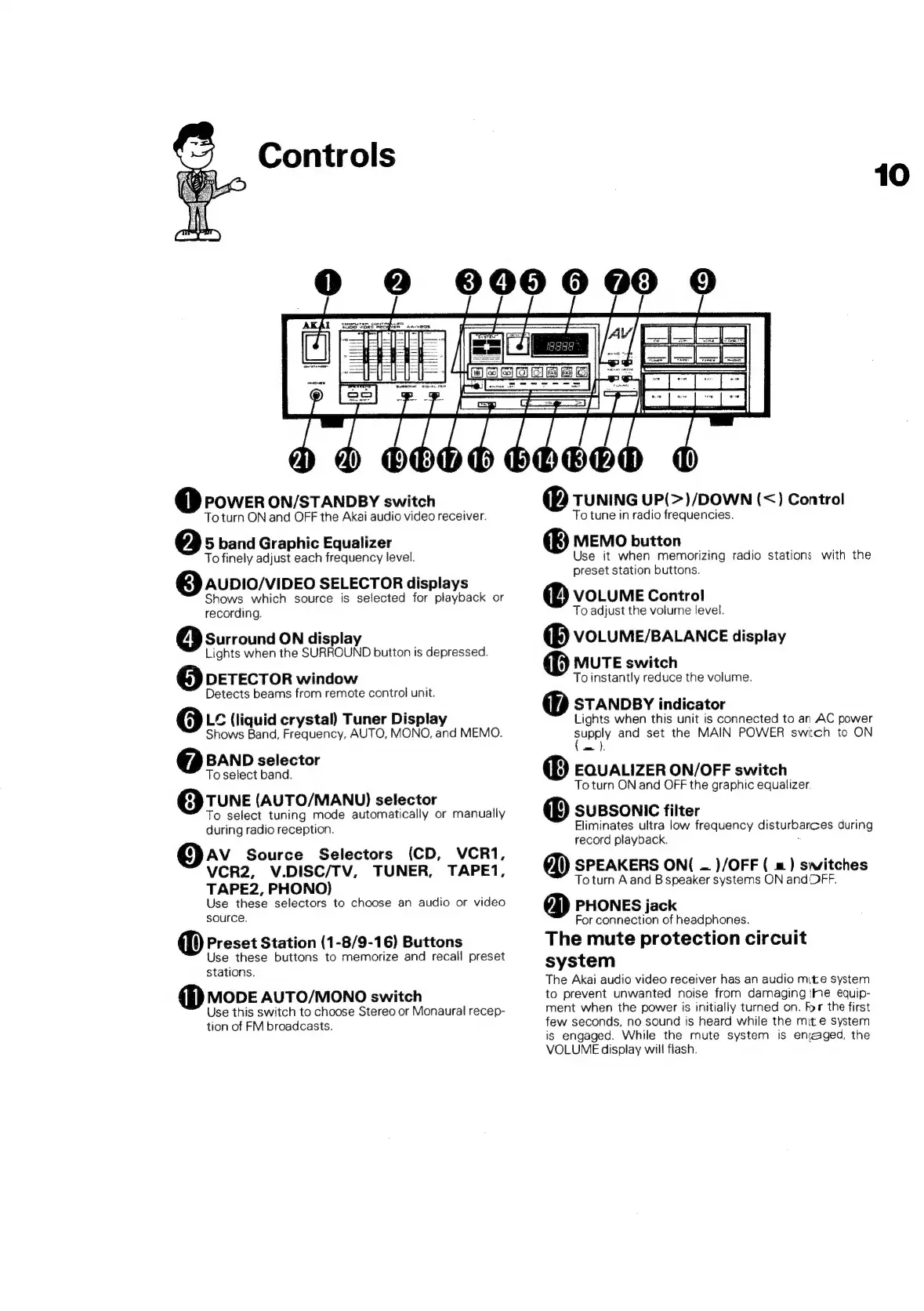
power
on/STANpBY
switch
To
turn
ON
and
OFF
the
Akai
audio
video
receiver.
@
5
band
Graphic
Equalizer
To
finely
adjust
each
frequency
level.
AUDIO/VIDEO
SELECTOR
displays
Shows
which
source
is
selected
for
playback
or
recording.
Surround
ON
display
Lights
when
the
SURROUND
button
is
depressed.
@
DETECTOR
window
Detects
beams
from
remote
control
unit.
@
L¢
(liquid
crystal)
Tuner
Display
Shows
Band,
Frequency,
AUTO,
MONO,
and
MEMO.
BAND
selector
To
select
band.
TUNE
(AUTO/MANU)
selector
To
select
tuning
mode
automatically
or
manually
during
radio
reception.
AV
Source
Selectors
(CD,
VCR1,
VCR2,
V.DISC/TV,
TUNER,
TAPE1,
TAPE2,
PHONO)
Use
these
selectors
to
choose
an
audio
or
video
source.
@
Preset
Station
(1-8/9-16)
Buttons
Use
these
buttons
to
memorize
and
recall
preset
stations.
@
Mode
AuTO/MONO
switch
Use
this
switch
to
choose
Stereo
or
Monaural
recep-
tion
of
FM
broadcasts.
@
tunine
uP(>)/DOWN
(<)
Control
To
tune
in
radio
frequencies.
MEMO
button
Use
it
when
memorizing
radio
stations
with
the
preset
station
buttons.
@
VOLUME
Control
To
adjust
the
volume
level.
@B
votume/BaLANnce
display
MUTE
switch
To
instantly
reduce
the
volume.
@
sTAnpBy
indicator
Lights
when
this
unit
is
connected
to
an
AC
power
rage
and
set
the
MAIN
POWER
switch
to
ON
@)
EQuatizer
ON/OFF
switch
To
turn
ON
and
OFF
the
graphic
equalizer.
@
sussonic
fitter
Eliminates
ultra
low
frequency
disturbances
during
record
playback.
:
SPEAKERS
ON(
—
)/OFF
(
=)
switches
To
turn
A
and
B
speaker
systems
ON
and
OFF.
@)
PHONES
jack
For
connection
of
headphones.
The
mute
protection
circuit
system
The
Akai
audio
video
receiver
has
an
audio
mite
system
to
prevent
unwanted
noise
from
damaging
the
equip-
ment
when
the
power
is
initially
turned
on.
For
the
first
few
seconds,
no
sound
is
heard
while
the
mite
system
is
engaged.
While
the
mute
system
is
enraged,
the
VOLUME
display
wiil
flash.
10