Analogue inputs connection
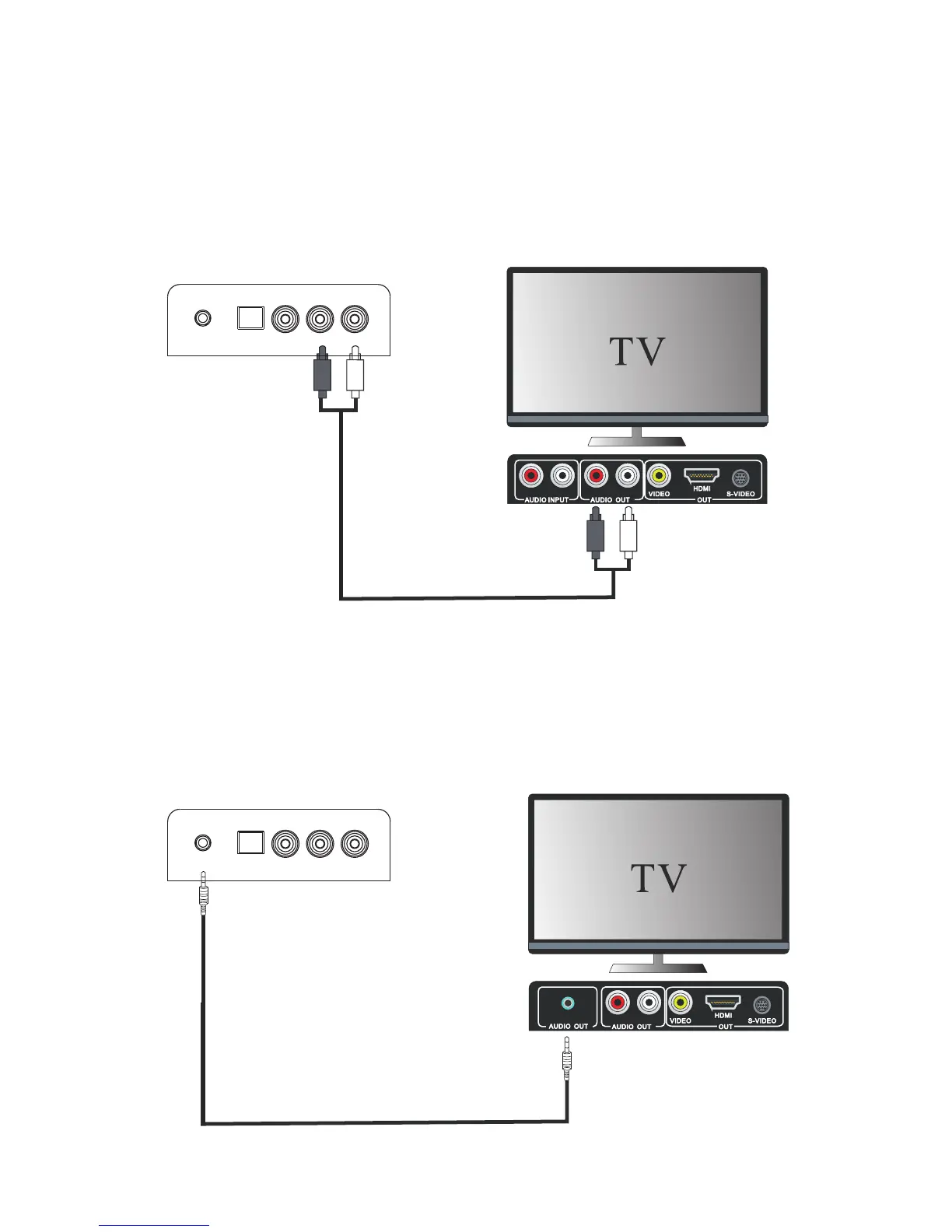
Connecting DVD player/TV outputs to analogue inputs from the sound board.
from the sound board.
sound board inputs
DVD player / TV outputs
Connecting DVD player/TV outputs to analogue inputs from the sound board.
- Use a to connect the DVD player/TV outputs line-in audio cable (Φ 3.5mm) with the AUDIO (not supplied)
input socket from the sound board-.( o r to connect an external audio device headphone socket to this
sound board inputs
DVD player / TV outputs
- Use the supplied RCA audio cable to connect the DVD player/TV outputs with the AUX(L/R) input socket
AUDIO IN socket on the unit, such as MP3 player, Ipod®, or Iphone®, etc…).
[29]
OPTICALL COAXIAL L-AUX-R
AUDIO IN
OPTICALL COAXIAL L-AUX-R
AUDIO IN


 To Next Page