EasyManua.ls Logo

Akai DYNMX - User Manual

Akai DYNMX
22 pages
Print Icon
To Next Page IconTo Next Page
Loading...
MODEL NO: A58077
POWER CHARGING: DC5V
POWER SUPPLY: LI-BATTERY 300MAH 3.7V
POWER: 3W
We declare that this product conforms to the following product
legislation in accordance with the following directive(s):
2014/30/EU Electromagnetic Compatibility Directive.
2014/35/EU Low Voltage Directive.
2011/65/EU Restriction of Hazardous Substances Directive
2014/53/EU Radio Equipment Directive.
RK Wholesale LTD Quality Assurance.
This product is guaranteed for 12 months from the date of the
original purchase.
If any defect arises due to faulty materials or workmanship, the
faulty product must be returned to the place of purchase.
Refund or replacement is at the discretion of the retailer.
The following conditions apply:
The product must be returned to the retailer with the proof of
purchase.
The product must be installed and used in accordance with the
instructions contained in this instruction guide.
This item is for domestic purposes only.
This guarantee does not cover wear and tear, damage, misuse
or consumable parts.
RK Wholesale Ltd has limited responsibility for incidental or
consequential loss or damage.
Valid in the UK and Eire only.
SAFETY INFORMATION
Important safety instructions read carefully
before use.
It is important that this instruction manual should
be retained with the appliance for future reference.
These warnings have been provided in the interest
of safety. You MUST read them carefully before
installation or use.
WARNING
Check that the voltage of the main
circuit corresponds with the rating of
the appliance before operating.
Please ensure that the appliance
is used on a stable, level, and heat
resistant surface.
DO NOT immerse cords or any part
of the appliance in water or any other
liquid.
DO NOT leave the appliance
unattended while it is operating.
Close supervision is necessary when
any appliance is used by or near
children or pets.
This appliance can be used by
children aged from 8 years and above
and persons with reduced physical,
sensory or mental capabilities or
lack of experience and knowledge
if they have been given supervision
or instruction concerning use of
the appliance in a safe way and
understand the hazards involved.
Children shall not play with the
appliance.
Cleaning and user maintenance shall
not be made by children without
supervision.
If the appliance is damaged, stop
using the appliance immediately and
seek advice from the manufacturer
or its service agent or a similarly
qualified person.
DO NOT let the cord hang over the
edge of a table or counter or let
it come into contact with any hot
surfaces.
The use of accessory attachments is
not recommended by the appliance
manufacturer, apart from those
supplied with this product. DO NOT
use an extension cord to charge this
appliance.
DO NOT use this product for anything
other than its intended use.
This appliance is for household use
only.
DO NOT carry the appliance by the
USB Cable.
DO NOT use the appliance outdoors.
DO NOT block any ventilation
openings & install in accordance with
the manufacturer’s instructions.
DO NOT install near any strong
magnets or heat sources such as
radiators, heat registers, stoves,
or other appliances (including
amplifiers) that produce heat.
Unplug the appliance from the USB
Cable during lightning storms or
when it has been unused for long
periods of time.
DO NOT block any ventilation
openings & install in accordance with
the manufacturer’s instructions.
DO NOT install near any strong
magnets or heat sources such as
radiators, heat registers, stoves,
or other appliances (including
amplifiers) that produce heat.
Unplug the appliance from the USB
Cable during lightning storms or
when it has been unused for long
periods of time.
If the appliance is not going to be
used for a period of time please
ensure that it is fully disconnected
from its power source.
If the appliance is brought directly
from a cold place to a warm one,
moisture may condense inside
the appliance which will cause
malfunction. Should this occur, leave
the appliance off for a few hours until
the moisture evaporates.
DO NOT place anything heavy on to
the appliance.
Never attempt to disassemble the
appliance. There probably would be a
risk of electric shock and/or harm by
CAUTION! To reduce the risk of
electric shock, DO NOT cover the
back of the speaker. There are NO
user-serviceable parts inside. Refer
all servicing to the manufacturer or
qualified service personnel.
WARNING! DO NOT expose the
appliance to rain or moisture to
reduce the risk of electric shock or
fire.
WARNING! DO NOT immerse the
product in water or any other liquid.
In the unlikely event the appliance
develops a fault, stop using it
immediately and seek advice from the
Customer Support Team.
DISPOSAL OF THE UNIT
Appliances bearing the symbol shown here may not be
disposed of in domestic rubbish.
You are required to dispose of old electrical and electronic
appliances like this separately.
Please visit www.recycle-more.co.uk or www.recyclenow.
co.uk for access to information
about the recycling of electrical items.
Please visit www.weeeireland.ie for access to information
about the recycling of
electrical items purchased in Ireland.
The WEEE directive, introduced in August 2006, states that all
electrical items must be recycled, rather than taken to landfill.
Please arrange to take this appliance to your local
Civic Amenity site for recycling, once it has reached
the end of its life.
TECHNICAL DATA GUARANTEE IMPORTANT INFORMATION - RETAIN FOR FUTURE USE
RECYCLING
INSTRUCTION MANUAL
MODEL: A58077
DECLARATION OF CONFORMITY

Question and Answer IconNeed help?

Do you have a question about the Akai DYNMX and is the answer not in the manual?

Summary

Features and Controls

In the Box

Lists all items included in the product packaging, such as the manual, speaker, and cables.

Speaker Controls

Details the main control button functions like play/pause, skip tracks, and volume adjustment.

Ports and Indicators

Identifies physical ports (DC, USB, TF) and the LED indicator on the speaker.

Using Your Appliance

First Use and Charging

Instructions for initial setup, removing packaging, and charging the battery for the first time.

Bluetooth Pairing

Steps to connect the speaker to a Bluetooth-enabled device, including searching and pairing.

Basic Operation

Explains how to turn the speaker on/off, audible cues, and LED status during playback.

Indicator Light Status

Using the Controls

Power and Track Controls

Instructions for turning the device on/off and skipping tracks using slide gestures.

Play, Pause, and Phone Handling

How to play/pause audio and answer/end calls using the speaker's control button.

TF Card and LED Functionality

Details the TF card slot for playback and the function of the LED indicator.

Additional Modes

TF Card Mode

How to access and use the TF card playback mode.

Radio Mode

Instructions for entering FM radio mode and changing stations.

Troubleshooting

Cleaning and Maintenance

Technical Data

Declaration of Conformity

Guarantee

Safety Information

General Precautions

Essential safety advice for voltage, placement, and initial setup before operating the appliance.

Recycling

Disposal of the Unit

Information on how to properly dispose of the electronic appliance according to environmental regulations.

Need Help?

Overview

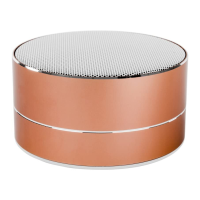
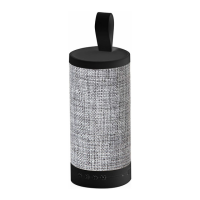
The AKAI DYNMX A58077 is an aluminium cylinder Bluetooth speaker, designed with 90 years of Japanese technology. This instruction manual provides comprehensive details on its features, usage, maintenance, and safety information. The product comes with a 3-year guarantee, indicating its durability and the manufacturer's confidence in its quality.

Function Description

The AKAI DYNMX A58077 is a versatile portable speaker that offers multiple modes of operation, including Bluetooth connectivity, TF card playback, and FM radio. It functions as a speaker for audio playback from various devices and also supports hands-free phone operation. The speaker is designed for ease of use with intuitive controls for playback, volume adjustment, and mode switching.

Important Technical Specifications

  • Model No.: A58077
  • Power Charging: DC5V
  • Power Supply: LI-BATTERY 300MAH 3.7V
  • Power Output: 3W
  • Connectivity: Bluetooth, Micro USB, TF Card, USB Input, AUX Connector
  • Battery Life: Approximately 2 hours of charging time for a full charge when the battery is low.
  • Bluetooth Pairing Name: "A58077"
  • Bluetooth Pairing Password (if required): "0000"

Usage Features

In the Box:

  • Instruction Manual
  • Speaker
  • USB Cable
  • 2-in-1 Cable/Mini Micro USB & AUX Connector

Speaker Controls:

The speaker features several controls for easy operation:

  1. Speaker Control:
    • A) PLAY/PAUSE/PHONE/FM: This button serves multiple functions for playing/pausing audio, answering/ending calls, and switching to FM radio mode.
    • B) SKIP BACK /SKIP FORWARD: These controls are used to navigate between tracks and adjust volume.
  2. DC/MICRO USB PORT: For charging the speaker.
  3. TF CARD: Slot for inserting a TF card to play stored audio tracks.
  4. USB INPUT: For connecting USB devices.
  5. LED INDICATOR: Provides visual feedback on the speaker's status (charging, pairing, connected, playing).
  6. ON/OFF: A slide switch to power the speaker on or off.

Powering On and Charging the Battery:

Before first use, fully charge the battery.

  1. Plug the micro USB end of the charging cable into the speaker's port.
  2. Connect the USB connector to a computer's USB port or a compatible AC wall adapter.
  3. A red LED will illuminate to indicate charging.
  4. The red LED will turn off when fully charged.
  5. When the battery is low, approximately 2 hours of charging time is needed for a full charge.
  6. The speaker can be used while charging, but it may take longer to fully charge.
  7. To turn the speaker on while charging or with charge, flip the ON/OFF switch to the ON position.

Using Bluetooth:

  1. Flip the ON/OFF switch to the ON position. The LED light on the Volume knob will flash blue, indicating pairing mode.
  2. Enable Bluetooth on your external device and search for "A58077".
  3. Select the speaker name to pair. If a password is required, enter "0000".
  4. Once connected, the LED light will stop flashing, indicating successful pairing.
  5. If pairing fails, restart both devices and repeat the steps.
  6. Use the media controls on the Control Panel to manage playback.

Basic Operation:

  • Turn On: Slide the ON/OFF switch to the right. The speaker will beep, and a blue LED will flash quickly.
  • Playing Music: The blue LED will blink slowly.
  • Low Battery: The speaker will beep every 20 seconds.
  • Turn Off: Slide the ON/OFF switch to the left.

Indicator Light Status:

  • Charging: Red LED ON
  • Fully Charged: LED OFF
  • Pairing Mode: Blue LED will flash quickly
  • Connected to Bluetooth Device: Blue LED ON
  • Playing: Blue LED will flash slowly

Using the Controls:

  1. ON/OFF: Turns the speaker on and off.
  2. Skip Backward/Volume Down: Slide left and hold left to decrease volume. Slide left (without holding) to skip back to the last track.
  3. Skip Forward/Volume Up: Slide right and hold right to increase volume. Slide right (without holding) to skip forward to the next track.
  4. Play/Pause: Plays or pauses audio.
  5. LED Light: Indicates charging, Bluetooth pairing readiness, and successful pairing.
  6. TF Card Input: Insert a TF card to play stored tracks.

Hands-Free Phone Operation:

  • Answer Call: Press the 'Play/Pause/Phone' key.
  • End Call: Press the 'Play/Pause/Phone' Key.

Additional Modes:

  • TF Card Mode: Press the 'Play/Pause/Phone' key to enter TF Card Mode and access an inserted TF Card.
  • Radio Mode: Press the 'Play/Pause/Phone' key to enter radio mode; press again for FM radio. To change radio stations, slide the 'Play/Pause/Phone' to the left or right.

Troubleshooting:

  • Low sound level: Adjust source volume or charge battery.
  • Sound distorted: Charge battery.
  • No sound at all: Turn on source/speaker, adjust volume, or play media from source.

Maintenance Features

Cleaning & Maintenance:

  • Clean the appliance with a soft, damp cloth. Avoid chemicals or hard abrasives.
  • Keep the unit away from wet or damp surroundings.
  • Store in a cool, dry place.

Disposal of the Unit:

  • The crossed-out wheelie bin symbol indicates that the product should not be disposed of with domestic rubbish.
  • Dispose of old electrical and electronic appliances separately in an environmentally friendly way.
  • Visit www.recycle-more.co.uk or www.recyclenow.co.uk for information on recycling electrical items in the UK.
  • Visit www.weeeireland.ie for information on recycling electrical items purchased in Ireland.
  • Arrange to take the appliance to a local Civic Amenity site for recycling at the end of its life.

Safety Information:

  • Retain the instruction manual for future reference.
  • Ensure the main circuit voltage matches the appliance rating.
  • Use the appliance on a stable, level, and heat-resistant surface.
  • DO NOT immerse cords or any part of the appliance in water or other liquids.
  • DO NOT leave the appliance unattended while operating.
  • Close supervision is necessary when used by or near children or pets.
  • Children aged 8 and above, and persons with reduced capabilities, can use the appliance with supervision and instruction.
  • Children shall not play with the appliance.
  • Cleaning and user maintenance should not be done by children without supervision.
  • If damaged, stop using immediately and seek advice from the manufacturer or qualified personnel.
  • DO NOT let the cord hang over edges or come into contact with hot surfaces.
  • DO NOT use accessory attachments not recommended by the manufacturer.
  • DO NOT use an extension cord to charge.
  • This appliance is for household use only.
  • DO NOT carry the appliance by the USB Cable.
  • DO NOT use the appliance outdoors.
  • DO NOT block ventilation openings; install according to manufacturer's instructions.
  • DO NOT install near strong magnets or heat sources (radiators, stoves, amplifiers).
  • Unplug from the USB Cable during lightning storms or long periods of disuse.
  • If unused for a period, ensure it is fully disconnected from its power source.
  • If brought from a cold to a warm place, moisture may condense; leave off for a few hours until it evaporates.
  • DO NOT place anything heavy on the appliance.
  • Never attempt to disassemble the appliance due to risk of electric shock/harm.
  • CAUTION: DO NOT cover the back of the speaker. No user-serviceable parts inside. Refer servicing to qualified personnel.
  • WARNING: DO NOT expose to rain or moisture to reduce risk of electric shock or fire.
  • WARNING: DO NOT immerse in water or any other liquid.
  • In case of fault, stop using immediately and contact Customer Support.

Akai DYNMX Specifications

General IconGeneral
BrandAkai
ModelDYNMX
CategorySpeakers
LanguageEnglish

Related product manuals