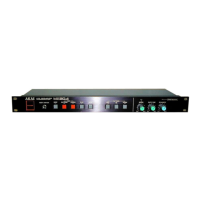
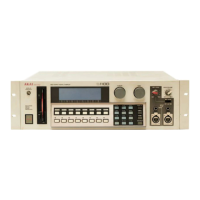
The Akai ME30P is a MIDI programmable patch bay designed to facilitate MIDI signal connections between musical instruments, effectors, mixers, and other MIDI equipment. It allows for flexible routing and storage of patch configurations, enhancing the functionality of a MIDI setup.
Function Description
The primary function of the ME30P is to act as a central hub for MIDI signal routing. It enables the patching of signals from up to four MIDI input units to a maximum of eight MIDI output units. All signals are passed through (THRU), meaning they are not processed or altered by the ME30P itself, only routed.
A key feature is its ability to store patch data in banks. It can recall 15 different types of patch configurations, which can be switched by the user. This bank switching can also be triggered by MIDI program change data received on the D channel input from connected equipment, such as a keyboard. This allows for dynamic changes to the MIDI routing during a performance or recording session.
The ME30P also includes a connection check function. When activated, it transmits MIDI pitch number 69 signals from each input, allowing users to verify the input and output connections and ensure proper signal flow.
Important Technical Specifications
- Connection Terminals:
- INPUT: 4 MIDI/IN (DIN/5P) jacks
- OUTPUT: 8 MIDI/THRU (DIN/5P) jacks
- BANK UP: 1 (Foot switch/Standard phone jack) for external bank switching.
- Functions:
- POWER: ON/OFF switch
- DISPLAY: 7-segment red LEDs with a point indicator, showing bank number (1-9, A-F) or output channel number (1-8). A red dot indicates the selected input channel connected to the assigned output channel.
- BANK (Bank Selection): Switches between memory banks (1-9, A-F).
- OUTPUT CH (Output Channel Assignment): Switches for assigning outputs (1-8).
- INPUT CHANNEL (Input Channel Selection): Switches for selecting inputs (A-D).
- CHECK (Check Mode Switch): ON/OFF.
- Memory Bank: 15 programmable banks.
- Power Requirements:
- 120 V, 60 Hz for USA and Canada
- 220 V, 50 Hz for Europe (except UK)
- 240 V, 50 Hz for UK and Australia
- Front Panel: EIA-1U rack mount type.
- Maximum External Dimensions: 482.6 (W) x 45.7 (H) x 120 (D) mm.
- Weight: 1.9 kg.
Usage Features
- Rack Mountable: The ME30P is designed as an EIA-1U rack mount type, allowing for integration into professional studio or live setups.
- Bank Switching: Users can manually switch between the 15 memory banks using the front panel BANK switch or an optional foot switch connected to the BANK UP jack. This provides quick access to different patch configurations.
- Program Change Control: The bank number can be switched by MIDI program change data (numbers 1-15) received on the D channel input, enabling external control over patch changes from a keyboard or other MIDI controller.
- Intuitive Display: The LED display shows the current bank number or output channel, and a red dot indicates the active input channel for the selected output, simplifying configuration and monitoring.
- Connection Check Mode: This mode allows users to verify their MIDI connections by transmitting a specific MIDI pitch signal (number 69) through the selected input. This helps in troubleshooting and ensuring all devices are correctly connected and receiving signals.
- Patch Data Management: The manual provides a "ME30P Program Sheet" for users to document their patch configurations for each bank, aiding in organization and recall.
- Reset Function: To clear all memory banks, users can hold the BANK switch depressed while turning on the POWER switch. This is useful for starting fresh or resetting configurations.
- Individual Patch Editing: Users can modify specific patch data within a bank without clearing all memory. This involves selecting the bank, assigning outputs, and then selecting the input channel.
Maintenance Features
- Power Safety: Users are advised to use only the specified AC power source and to avoid exposing the device to water or moisture to prevent electric shock and fire hazards.
- Ventilation: Ensure the ME30P is well-ventilated and kept away from direct sunlight and heat sources to prevent damage to internal circuits and the external surface.
- Cleaning: Avoid using denatured alcohol, paint thinner, or spray-type insecticides for cleaning, as these can damage the finish or pose a fire risk. The manual advises referring to Section 2 for cleaning directions, though specific details are not provided in the excerpt.
- Professional Servicing: In case of malfunction, users are strongly advised not to open the cabinet or attempt repairs themselves. Servicing should be referred to qualified service personnel to prevent electric shock and ensure proper functioning.
- Secure Installation: When rack-mounting, ensure the ME30P is securely attached using screws to prevent damage or instability.
- Cable Management: Use exclusive MIDI cords (DIN/5P plug) for input and output connections and ensure all plugs are securely inserted into their jacks.
- Pre-Connection Check: Before connecting equipment, ensure that the power for all devices is OFF and that all plugs are securely inserted.
- Check Mode Cancellation: After using the connection check mode, it is crucial to press the CHECK switch again to cancel it. Failure to do so can prevent input signals from being received and disrupt normal operation.
- Bank Switching Signal: When a bank is switched, the ME30P produces a "123 ALL NOTE OFF" signal. If connected equipment does not receive this signal, it may continue to produce sound when the bank is switched during sound reproduction, which is an important consideration for live performance or recording.

 Need help?
 General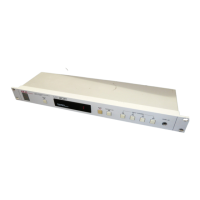

 To Next Page