4
INTRODUCTION
This Quickstart Manual is intended to give you a brief overview of the functionality and features of the
MPK61/MPK88. In this manual you will find instructions on how to connect the MPK61/MPK88 and how to
use its basic features. For detailed information, we recommend reading the Operator’s Manual included on
the software CD. Enjoy!
HOOKUP DIAGRAM
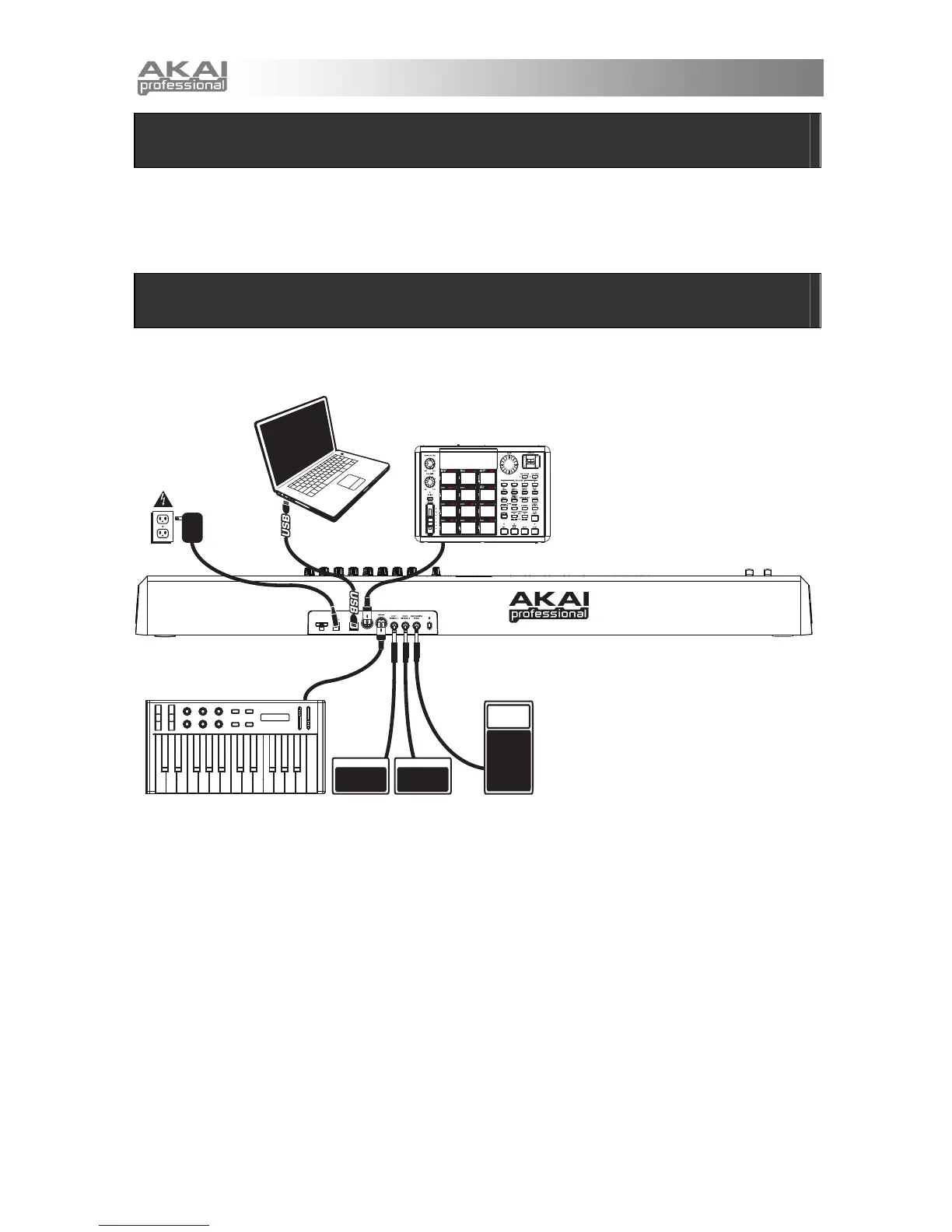
Please refer to the following scenario for connecting the MPK61/MPK88.
COMPUTER
EXTERNAL SOUND MODULE
POWER
(optional, not included)
ADAPTER
EXTERNAL MIDI DEVICE FOOTSWITCHES EXPRESSION PEDAL
1. Connect a USB cable from your computer to the MPK61/MPK88. The unit will be powered
through the USB connection. Alternatively, if you do not wish to use a computer in your setup or
if you wish to power the MPK61/MPK88 externally, please plug in a 6V-1A DC power adapter.
2. If you would like to use an external sound module, connect a 5-pin MIDI cable from the MIDI OUT
of the MPK61/MPK88 to the MIDI IN of the external device.
3. If you would like to use another MIDI controller in your setup, connect a 5-pin MIDI cable from the
MIDI OUT of the controller to the MIDI IN of the MPK61/MPK88.



 To Next Page